
ALE
Reasons for Distributing Business Functions
In a modern company, the flows of logistics and information between the various organizational units are likely to be sizable and complex. One reason for this is the adoption of new management concepts like "lean production".
Many previously centralized responsibilities are now being assigned to the organizational units that are directly linked to the relevant information or to the production.
The assignment of business management functions like inventory management, central purchasing or financial accounting to the various organizational units is not the same in every company.
There is a tendency in some areas towards an increasing independence between business units within a company. This lends itself to the idea of modeling intra-company relationships along the same lines as customer-vendor relationships.
Market requirements have led to many changes in business processes. These have increased the demands on process flows in areas such as purchasing, sales and distribution, production and accounting.
The increasing integration of business processes means that they can no longer be modeled in terms of a single company only. Relationships with customers and vendors must also be considered.
Distributing these various tasks away from the center means that a high level of communication is demanded from integration functions. Fast access to information held in other areas is required (for example, the sales department may require information on the stocks of finished products in the individual plants).
Distributed Responsibilities in a Company.
Users of modern business data processing systems require:
a high degree of integration between business application systems to ensure effective modeling of business processes
decoupled application systems that can be implemented decentrally and independently of any particular technology.
The design, construction and operation of complex, enterprise-wide, distributed application systems remains one of the greatest challenges in data processing. The conventional solutions available today do not provide a totally satisfactory answer to the diverse needs of today's users.
Further standardization of business processes accompanied by ever tighter integration within a central system no longer represents a practicable approach to the problem.
The following are some of the most commonly encountered difficulties:
• technical bottlenecks,
• upgrade problems,
• the effect of time zones on international corporations,
• excessively long response times in large centralized systems.
For these reasons a number of R/2 customers operate several systems in parallel (arranged, for example, on a geographical basis). Whilst the three-tier client-server architecture of the R/3 System means that the significance of these technical restrictions is somewhat reduced, they are still present.
Whilst the idea of using distributed databases to implement distributed application systems sounds tempting, this is rarely a practical approach these days. The reasons for this include high communications overhead, uneconomic data processing operations and inadequate security mechanisms.
ALE - The Objectives
ALE (Application Link Enabling) supports the construction and operation of distributed applications. ALE handles the exchange of business data messages across loosely coupled SAP applications, ensuring that data is consistent. Applications are integrated by using synchronous and asynchronous communication, rather than by means of a central database.
ALE comprises three layers:
1. applications
2. distribution
3. communication
In order to meet the requirements of today's customers and to be open for future developments, ALE must meet the following challenges:
Communication between different software releases
Continued data exchange after a release upgrade without special maintenance.
Independence of the technical format of a message from its contents
Extensions that can be made easily, even by customers
Applications that are decoupled from the communication
Communications interfaces that allow connections to third-party applications
Support for R/3-R/2 scenarios
ALE - The Concept
The basic principle behind ALE is the guarantee of a distributed, yet fully integrated, R/3 System installation. Each application is self-sufficient and exists in the distributed environment with its own set of data.
Distributed databases are rarely a good solution today to the problem of data transport for the following reasons:
The R/3 System contains consistency checks that could not be performed in an individual database. Replicating tables in distributed databases would render these consistency checks useless.
Mirrored tables require two-phase commits. These result in a heavy loss of performance.
The distribution is controlled at the level of tables for distributed databases, and at the level of the applications in the case of ALE distribution.
Long distance access to distributed data can be difficult even today (because of error rates, a high level of network activity and long response times).
The use of self-sufficient systems implies a certain measure of data redundancy. Therefore data has to be both distributed and synchronized across the entire system. Communication is performed asynchronously.
For certain functions that require read-only access to information, direct requests have to be made between the remote systems, using synchronous RFC, or, if this is not available, CPI-C programs. The function modules and CPI-C programs are written as required for each application.
Summary
There are both technical and business-related benefits to be realized from the distribution of applications in an integrated network.
State-of-the-art communication technology and the client/server architecture have made the distribution of standard software technically possible.
Distributed databases do not represent a good solution for the distribution of control data, master data and transaction data.
Asynchronous exchange of data with a measure of data redundancy is the best solution utilizing today's technology.
The goal of ALE is to enable data exchange between R/3-R/3, R/2- R/3 and R/3-non-SAP systems.
Control data, master data and transaction data is transmitted.
ALE also supports release upgrades and customer modifications.
ALE allows a wide range of customer-specific field choices in the communication.
IDocs (Intermediate Documents) are used for the asynchronous communication.
Allowance is made for distribution in the various applications of the R/3 System.
The application initiates the distribution of the data.
ALE and EDI complement each other.
OUT BOUND PROCESING
In the output processing one of the function modules of the application creates an IDoc, the so-called master IDoc. This IDoc is sent to the ALE layer where the following processing steps are applied:
• receiver determination, if this has not already been done by the application
• data selection
• segment filtering
• field conversion
• version change
The resulting IDocs (it is possible that several IDocs could be created in the receiver determination) are referred to as communication IDocs and are stored in the database. The dispatch control then decides which of these IDocs should be sent immediately. These are passed to the communications layer and are sent either using the transactional Remote Function Call (RFC) or via file interfaces (e.g. for EDI).
If an error occurs in the ALE layer, the IDoc containing the error is stored and a workflow is created. The ALE administrator can use this workflow to process the error.
OUT BOUND PROCESING STEP BY STEP
Receiver Determination
An IDoc is similar to a normal letter in that it has a sender and a receiver. If the receiver has not been explicitly identified by the application, then the ALE layer uses the customer distribution model to help determine the receivers for the message.
The ALE layer can find out from the model whether any distributed systems should receive the message and, if so, then how many. The result may be that one, several or no receivers at all are found.
For each of the distributed systems that have been ascertained to be receiver systems, the data that is specified by the filter objects in the customer distribution model is selected from the master IDoc. This data is then used to fill an IDoc, and the appropriate system is entered as receiver.
Segment Filtering
Individual segments can be deleted from the IDoc before dispatch by selecting Functions for the IDoc processing ® Settings for filtering in ALE Customizing. The appropriate setting depends on the sending and receiving logical R/3 System.
Field Conversion
Receiver-specific field conversions are defined under Functions for the IDoc processing ® Conversions in ALE Customizing.
General rules can be specified for field conversions; these are important for converting data fields to exchange information between R/2 and R/3 Systems. For example, the field "plant" can be converted from a 2 character field to a 4 character field.
The conversion is done using general EIS conversion tools (Executive Information System).
IDoc Version Change
SAP ensures that ALE functions between different R/3 System releases. By changing the IDoc format you can convert message types of different R/3 releases. SAP Development use the following rules when converting existing message types:
• Fields may be appended to a segment type;
• Segments can be added;
ALE Customizing keeps a record of which version of each message type is in use for each receiver. The correct version of the communication IDoc is created in the ALE output.
Dispatch Control
Controlling the time of dispatch:
The IDocs can either be sent immediately or in the background processing. This setting is made in the partner profile.
If the IDoc is to be dispatched in batch, a job has to be scheduled. You can chose the execution frequency. (e.g. daily, weekly).
Controlling the amount of data sent:
• IDocs can be dispatched in packets. To define a packet size appropriate for a specific partner, select Communication ® Manual maintenance of partner profile ® Maintain partner profile in ALE Customizing.
Mass Processing of Idocs
Mass processing refers to bundles of IDoc packets, which are dispatched and processed by the receiving R/3 System. Only one RFC call is needed to transfer several IDocs. Performance is considerably better when transferring optimal packet sizes.
To define a mass processing parameter, select Communication ® Manual maintenance of partner profile ® Maintain partner profile. For a message type the parameters packet size and output mode can be defined.
If the output mode is set to "Collect IDocs", outbound IDocs of the same message type and receiver are sent in a scheduled background job or in the BALE transaction in appropriately sized IDoc packets. The IDocs can be dispatched in batch or in the BALE transaction code.
Some distribution scenarios cannot support mass processing of inbound IDoc packets. This is especially true if the application sending the IDocs uses the ABAP/4 command CALL TRANSACTION USING. In this case the outbound parameter PACKETSIZE must be set to "1".
To get a list of function modules that can be mass processed, select Enhancements ® Inbound ® specify inbound module in ALE Customizing. INPUTTYP is "0".
INBOUND PROCESING
After an IDoc has been successfully transmitted to another system, inbound processing is carried out in the receiver system, involving the following steps in the ALE layer:
• segment filtering
• field conversion
• data transfer to the application
There are three different ways of processing an inbound IDoc:
• A function module can be called directly (standard setting),
• A workflow can be started
• A work item can be started
INBOUND PROCESING STEP BY STEP
Segment Filtering
Segment filtering functions the same way in inbound processing as in outbound processing.
Field Conversion
Specific field conversions are defined in ALE Customizing.
The conversion itself is performed using general conversion tools from the EIS area (Executive Information System).
Generalized rules can be defined. The ALE implementation guide describes how the conversion rules can be specified.
One set of rules is created for each IDoc segment and rules are defined for each segment field.
The rules for converting data fields from an R/2-specific format to an R/3 format can be defined in this way. An example of this R/2 - R/3 conversion is the conversion of the plant field from a 2 character field to a 4 character field.
Input Control
When the IDocs have been written to the database, they can be imported by the receiver application.
IDocs can be passed to the application either immediately on arrival or can follow in batch.
You can post an inbound IDoc in three ways:
1. by calling a function module directly:
- A function is called that imports the IDoc directly. An error workflow will be started only if an error occurs.
2. by starting a SAP Business Workflow. A workflow is the sequence of steps to post an IDoc.
- Workflows for ALE are not supplied in Release 3.0.
3. by starting a work item
- A single step performs the IDoc posting.
The standard inbound processing setting is that ALE calls a function module directly. For information about SAP Business Workflow alternatives refer to the online help for ALE programming.
You can specify the people to be notified for handling IDoc processing errors for each message type in SAP Business Workflow.
Repeated Attempts to Pass the Idoc to the Aplication
If the IDoc could not be passed to the application successfully (status: 51 - error on handover to application), then repeated attempts may be made with the RBDMANIN report.
This functionality can be accessed through the menu: Logistics ® Central functions ® Distribution and then Period. work ® IDoc, ALE input
Selections can be made according to specific errors. Therefore this report could be scheduled as a periodic job that collects IDocs that could not be passed to the applications because of a locking problem.
Error Handling in ALE Ibound Processing
The following is a description of how an error that occurs during ALE processing is handled:
• The processing of the IDoc causing the error is terminated.
• An event is triggered.
• This event starts an error workitem:
- The employees responsible will find a workitem in their workflow inboxes.
- An error message is displayed when the workitem is processed.
- The error is corrected in another window and the IDoc can then be resubmitted for processing.
- If the error cannot be corrected, the IDoc can be marked for deletion.
Once the IDoc has been successfully imported, an event is triggered that terminates the error workitem. The workitem then disappears from the inbox.
Objects and Standard Tasks
Message Type Standard Task ID of Standard Task
BLAOCH 7975 BLAOCH_Error
BLAORD 7974 BLAORD_Error
BLAREL 7979 BLAREL_Error
COAMAS Keine
COELEM Keine
COPAGN 8062 COPAGN_Error
COPCPA 500002 COPCPA_Error
COSMAS 8103 COSMAS_Error
CREMAS 7959 CREMAS_Error
DEBMAS 8039 DEBMAS_Error
EKSEKS 8058 EKSEKS_Error
FIDCMT 8104 FIDCMT_Error
FIROLL 8113 FIROLL_Error
GLMAST 7950 GLMAST_Error
GLROLL 7999 GLROLL_Error
INVCON 7932 INVCON_Error
INVOIC 8057 INVOIC_MM_Er
MATMAS 7947 MATMAS_Error
ORDCHG 8115 ORDCHG_Error
ORDERS 8046 ORDERS_Error
ORDRSP 8075 ORDRSP_Error
SDPACK Keine
SDPICK 8031 SDPICK_Error
SISCSO 8059 SISCSO_Error
SISDEL 8060 SISDEL_Error
SISINV 8061 SISINV_Error
SOPGEN 8063 SOPGEN_Error
WMBBIN 8047 WMBBIN_Error
WMCATO 7968 WMCATO_Error
WMCUST 8049 WMCUST_Error
WMINFO 8032 WMINFO_Error
WMINVE 7970 WMINVE_Error
WMMBXY 8009 WMMBXY_Error
WMSUMO 8036 WMSUMO_Error
WMTOCO 7972 WMTOCO_Error
WMTORD 8013 WMTORD_Error
WMTREQ 8077 WMTREQ_Error
COSFET COSFET_Error
CREFET CREFET_Error
DEBFET DEBFET_Error
GLFETC GLFETC_Error
MATFET MATFET_Error
EDI Message Types
Message Type Standard Task Functional Area
DELINS 8000 DELINS_Error
EDLNOT 8065 EDLNOT_error
INVOIC 8056 INVOIC_FI_Er
REMADV 7949 REMADV_Error
ALE QUICK START
This documentation describes how to configure a distribution in your R/3 Systems using Application Link Enabling (ALE). You will learn how to create a message flow between two clients and how to distribute materials. You will get familiar with the basic steps of the ALE configuration.
To set up and perform the distribution, proceed as follows:
1. Setting Up Clients
2. Defining A Unique Client ID
3. Defining Technical Communications Parameters
4. Modeling the Distribution
5. Generating Partner Profiles in the Sending System
6. Distributing the Customer Model
7. Generating Partner Profiles in the Receiving System
8. Creating Material Master Data
9. Sending Material Master Data
10.Checking Communication .
1. Setting Up Clients :
You must first set up two clients to enable communication. The two clients may be located on the same physical R/3 System or on separate systems.
You can either use existing clients or you can create new clients by making copies of existing ones (for example, a copy of client 000 or a client of the International Demo System (IDES)). To create new clients, you use the Copy source client function. You will find this function in the Customizing (Tools ® Business Engineering ® Customizing) under Basic functions ® Set up clients. Here you will also find additional information on setting up the clients.
Example: Clients 100 and 200 are available. Both are copies of client 000.
2. Defining A Unique Client ID :
To avoid any confusion, it is necessary for participating systems in a distributed environment to have an unique ID. The name of the "logical System" is used as the unique ID. This name is assigned explicitly to one client on an R/3 System.
When you have set up two clients for the exercise, you must tell them which logical systems exist in the distributed environment and what the description of their own client is. You will find the functions you require in the Customizing for ALE under Basic configuration ® Set up logical system.
Example : Client 100 is described as logical system LOGSYS0100.
Client 200 is described as logical system LOGSYS0200.
To maintain the logical systems in the distributed environment, choose Maintain logical systems, and
Execute the function and enter a logical system (LOG. SYSTEM) and a short text for each of your clients.
Save your entries.
When using two clients in different systems, make sure that you maintain identical entries in both systems. When using two clients in one physical R/3 System, you have to make the settings only once, since the entries are client-independent.
Log. System Short text
LOGSYS0100 System A, client 100
LOGSYS0200 System B, client 200
Allocate the corresponding logical systems to both clients using the
Allocate logical system to the client function:
Execute the function in each of the two clients.
In the view, double-click on the corresponding client.
In the Logical system field, enter the logical system name to be assigned to the indivdual client.
Save your entry.
In client Logical system
100 LOGSYS0100
200 LOGSYS0200
3.Defining Technical Communications Parameters
For the two logical systems to be able to communicate with one another, each must know how to reach the other technically. This information is found in the RFC destination.
On each of the two clients, you must maintain the RFC destination for the other logical system. You will find the function you require in the Customizing for ALE under the item Communication ® Define RFC destination.
Execute the function.
Choose Create.
Define the RFC destination:
- For the name of the destination, use the name of the logical system which is to refer to the destination (use UPPERCASE letters).
In client 100 you maintain the RFC destination LOGSYS0200.
In client 200 you maintain the RFC destination LOGSYS0100.
- As Connection type, choose 3.
- Enter a description of the RFC destination.
'RFC destination for the logical system LOGSYS0200' as a description of destination LOGSYS0200.
- As logon parameters, enter the logon language (for example, E), the logon client (for example, 200 for LOGSYS0200) and the logon user (user ID with target system password).
- Choose Enter.
- Enter the target machine and the system number:
The target machine indicates which receiving system application server is to handle communication. You can enter the specifications as UNIX host name, as host name in DNS format, as IP address or as SAP router name.
If you use SAP Logon, you can retrieve the information via Server selection ® Servers. Choose the corresponding SAP System ID and then OK. The system displays a list of all available application servers.
The system number indicates the service used (TCP service, SAP system number). When using SAP Logon, you can get the system number by selecting the system on the inital screen and then choosing EDIT.
- Save your entries.
- After saving the RFC destination, you can use Test connection to test the connection, and attempt a remote logon via Remote Login. If you succeed, the system displays a new window of the other system. Choose System ® Status... to check that you are in the correct client.
Define RFC Destination :
In this section, you define the technical parameters for the RFC destinations.
The Remote Function Call is controlled via the parameters of the RFC destination.
The RFC destinations must be maintained in order to create an RFC port.
The name of the RFC destination should correspond to the name of the logical system in question.
The following types of RFC destinations are maintainable:
• R/2 links
• R/3 links
• internal links
• logical destinations
• CMC link
• SNA/CPI-C connections
• TCP/IP links
• links of the ABAP/4 drivers
Example :
1. Enter the following parameters for an R/3 link:
- name for RFC destination: S11BSP001
- link type: 3 (for R/3 link)
- target machine: bspserver01
- system number: 11
- user in target machine: CPIC
- password, language and target client.
Standard settings
In the standard system, no RFC destinations are maintained.
Activities
1. Click on one the categories (for example, R/3 links) and choose Edit -> Create;
2. Enter the required parameters dependent on the type.
3. For an R/3 link, that is, for example, the name of the RFC destination, the name of the partner machine, logon parameter (see example).
For an R/2 connection select the option 'Password unlocked' in the log-on parameters. To test an R/2 connection you cannot use the transaction connection test, you have to use Report ACPICT1 which sets up a test connection to client 0 of the host destination. Select the check boxes for the parameters ABAP and CONVERT.
Processing RFCs with errors
If errors occur in a Remote Function Call, these are processed in the standard in the single error processing. A background job is scheduled for each RFC that resulted in an error, and this background job keeps restarting the RFC until the RFC has been processed successfully. In the case that the connection to the recipient system has been broken, this can mean that a very large of background jobs gets created that will represent a considerable additional load on the sending system.
You should always use the collective error processing in productive operation so as to improve the system performance. This will not automatically re-submit the RFC immediately, but a periodically scheduled background job will collect together all the RFCs that failed and will re-start them as a packet. This helps to reduce the number of background jobs created. This can be done both for R/3 connections and for TCP/IP connections.
To set up the collective error processing proceed as follows:
• Change the RFC destination
• Select the Destination -> TRFC options function from the menu.
• Enter the value 'X' into the 'Suppress backgr. job in case of comms. error' field.
Perform the error handling as follows:
• Start the 'Transactional RFC' monitor (menu: Logistics -> Central functions -> Distribution -> Monitoring -> Transactional RFC)
• Select the Edit -> Select.FM execute function.
For the error handling you should schedule a periodic background job that regularly does this.
Train the error handling for errors in the Remote Function Call before the prodictive start.
Further notes
The 'SAP*' user may not be used on the target machine for Remote Function Calls.
Notes on the transport
The maintenance of the RFC destination is not a part of the automatic transport and correction system. Therefore the setting has to be made manually on all systems.
Saturday, October 18, 2008
SAP ABAP ALE IDOC'S
IDoc Interface / Electronic Data Interchange
Purpose
The IDoc Interface is used to exchange business data between two different systems.
The IDoc interface consists of the definition of a data structure and the processing logic for this data structure.
The data structure is the IDoc. The systems involved must both recognize the data format used to exchange the data. IDocs allow exception handling to be defined within the R/3 System via SAP Business Workflow, without the data having to be available as an SAP application document.
You require the IDoc Interface in the following scenarios:
• Electronic Data Interchange (EDI)
• Application Link Enabling (ALE)
• Connection of any other business application systems (for example, PC applications, external workflow tools) via IDoc.
Features
For functions performed, all those from the initial node of the IDoc interface are displayed: From the R/3 initial screen choose Tools Business Communication IDoc IDoc Basis ().
Processing IDocs
This section describes the possible paths in inbound and outbound processing and the status processing. It is intended for administrators and also the end users.
Configuring ports
The technical linkage to the external system and the operating system level is described here. Port configuration is the basic prerequisite for data exchange with the external system. This section is intended for administrators.
Defining partner
A further prerequisite for data exchange is the partner profiles: Here, it is determined who can exchange which messages via which port with the R/3 System. This section is intended for administrators.
Processing tests
The IDoc interface provides tools for testing IDoc processing. Tests should be carried out both when new messages are used and for new definitions of IDoc types. This section is intended for administrators.
Monitoring
Both passive (processing display) and active monitoring (sending of warnings and advice) is documented. The section is intended for administrators and also the end users of the application.
Archiving IDocs
The archiving possibilities of IDocs are described here . This section is intended for administrators.
Structure, documentation and definition of IDoc types
The possibilities for customer enhancement of IDoc types are described here. This section is intended for R/3 developers and administrators.
General Configuration
IDoc administration: User parameter
This section describes those parameters from the IDoc administration that are regularly changed for configuration when the system is running. It is naturally intended for administrators.
Additional settings
You still have additional possibilities to configure the working environment of your IDoc interface, although in general this is not necessary. These possibilities are listed here. This section is intended for administrators.
Processing IDocs
Use
The business data is saved in IDoc format in the IDoc interface and is forwarded as IDocs. If an error occurs, exception handling is triggered via workflow tasks. The agents who are responsible for these tasks and have the relevant authorizations are defined in the IDoc interface.
Features
The IDoc interface supports three types of data flow with the external system:
• Outbound processing
IDocs are transferred to a receiving system from your SAP System.
• Inbound processing
IDocs are transferred to your SAP System from an upstream system.
• Status processing
The receiving system confirms the processing status of outbound IDocs to your SAP System.
Control records and data records are sent for IDoc inbound processing and IDoc outbound processing. Status records are sent in the status confirmation data flow (exception: status confirmation via the specific IDoc type SYSTAT01).
Exception handling functions are implemented when errors occur.
Role Resolution in Exception Handling
This section describes how the agents responsible for a work item are determined in the IDoc interface.
Communication with Older Releases
Additional customizing settings may be required.
Outbound Processing under Message Control (MC)
Use
Messages, for example purchase orders, can be found and processed via the Message Control module (MC) in SD and MM. In the case of IDoc processing, that means that the application data is written to IDocs.
Prerequisites
Setting up IDoc processing always requires you to define your partner. In particular for MC, you must assign the application and the MC output type uniquely to an IDoc type in partner profiles. You do this with the additional outbound parameters under MC.
Activities
• The Message Control module "finds" one or more messages by selecting those that match the relevant business process from a set of predefined messages. The messages are defined in the application in so-called condition tables. The messages found are "proposed" by the MC: That can be several per document. In many applications you can view and modify ("process") messages before you release the data, post the document and send the messages as IDocs.
In the specified case (message processing through IDoc dispatch) the system additionally checks messages found to determine whether the message partner was processed as a partner in the IDoc interface. The message is only proposed if this is the case, and can then be further processed. Many applications provide determination analysis, which helps you to trace message determination and locate possible errors.
• The Message Control module can process the messages immediately (after the application document has been updated). You can also process the messages found manually or in the background at a predefined time. Since you can also define the time at which IDocs are to be generated by the IDoc interface, you should combine these two times. These combinations are described in the following section: Procedure
An order for the vendor VEND is to be created in Purchasing. This order is to be sent via an EDI subsystem after being written as an IDoc of type ORDERS01. In order to do this, define the output type "NEU" (new) for VEND in purchasing master data and assign the Message Control dispatch time "4" (immediately with application update) and the transmission medium "EDI".
Choose the output mode "Transfer IDoc immediately" and "Start subsystem immediately" for VEND in the partner profiles of the IDoc interface and assign the logical message ORDERS to the combination "Application: Purchasing orders", "Output type: NEU" (new). IDoc type ORDERS01 is assigned to this logical message.
Outbound Processing under Message Control: Procedure
Message determination: Call the master data from the application and create the message as a message- or condition record, that is to say, you define the conditions under which the message is found and proposed, as well as the message properties. For example, you can enter the purchasing organization and the business partner as the conditions and the output medium (in this case 6 for EDI), dispatch time and language in which the message is to be sent as the output properties.
Message processing through IDoc dispatch: The messages are sent by the Message Control module as defined in the condition record, especially with regard to the selected dispatch time. You must also define a dispatch time ("output mode") in the partner profiles of the IDoc interface: standard combinations of the two times are shown in the table below. The Message Control parameters from the partner profiles must also match the corresponding fields in the output type. These parameters include:
Application
Partner
Partner function
Output type
Dispatch time combinations for the Message Control module and IDoc interface and the EDI equivalents
MC: Dispatch time IDoc interface: Output mode EDI equivalent
4 (= immediately) Send IDoc immediately
Start subsystem Real time
1 (= send with next selection run) Send IDoc immediately
Start subsystem Fast batch
1 Collect IDocs
Start subsystem Batch
1 Collect IDocs Do not
start subsystem Batch
If you specify that the subsystem (= follow-on system) is not to be started in the partner profiles, the receiving system determines the dispatch time in accordance with the time plan set in the system, that is to say you do not have any control over when the IDoc arrives at the target system.
Outbound Processing under Message Control: Technical Implementation
For a detailed description of the Message Control module, please refer to the documentation under CA Message Control .
• Message determination: The conditions, under which a message is to be found, are stored in the condition tables . These tables are read in an access sequence . The condition tables also contain the key fields for the application, that is to say, the fields which the application uses to access the condition records (for example the "purchasing organization" and "vendor" application fields in Purchasing). The condition tables are assigned to an output type (for example "NEU" (new) for a purchase order from Purchasing). The output types are combined in Procedures , which are assigned to the application (key, for example purchase order).
This organizational structure allows message determination to run in a structured manner and under complex conditions. The output types and tables and the access sequences and procedures are already defined in Customizing for the relevant application.
The output type is sometimes also referred to as the condition type.
• Message processing through IDoc dispatch: the central selection program of the Message Control module, RSNAST00, locates and triggers the form routine EDI_PROCESSING in the program RSNASTED in table TNAPR for the selected output type. EDI_PROCESSING reads the partner profiles and uses the process code to determine the function module which is to generate the IDoc. The process code also determines the type of further processing, for example whether the IDocs are to be processed by the ALE service.
The function modules for generating the IDocs are usually called IDOC_OUTPUT_, where represents the relevant message type. Depending on the output mode, the generated IDocs are either collected or forwarded for immediate dispatch. If the IDocs are collected, the report RSEOUT00 must be scheduled in order to forward the IDocs for dispatch.
Direct Outbound Processing: Procedure
Choose the relevant send transaction in the application and enter the parameters
accordingly. Make sure that the specified communication parameters (such as the target system) are also maintained as a port in the partner profiles of the IDoc interface. In ALE scenarios a "tRFC" port type should be entered and the partner should be an "LS" type (for "logical system").
Direct Outbound Processing: Implementation for ALE :
The way in which the IDoc is generated depends on the respective application. The following is an example of an ALE scenario in which a function module is responsible for generating the IDocs.
The function module is called in the application transaction. The function module generates a so-called master IDoc, which is transferred to the administration module MASTER_IDOC_DISTRIBUTE, which checks the control record and then calls the function module COMMUNICATION_IDOC_CREATE. This module "filters" the master IDoc (that is to say removes any data which is not required for communication).
This "filtered" IDoc is referred to as the communication IDoc and is forwarded for further processing to the function module EDI_OUTPUT_NEW by MASTER_IDOC_DISTRIBUTE.
Inbound Processing
Use
In inbound processing, IDocs are transferred to the interface and stored in the R/3 System. The document data is generated in a second step, also in the course of a workflow.
Features
The upstream system transfers an IDoc to the IDoc interface via the R/3 System port. For this reason, you do not have to specify a port in the inbound partner profiles; the IDoc interface only has to "recognize" the upstream system as a port. A port definition, which provides a unique ID for the upstream system, must be available for the port. The technical parameters of this port definition can (and usually are) overwritten by the upstream system.
The IDoc is "accepted", that is, saved in the database, if the upstream system is recognized. If your partner is defined with the corresponding message in your partner profiles, the IDoc is then processed further. This is done independently in a second step. This ensures that the external system can receive the data quickly and reliably (automatically).
The following paths are available for further processing:
• The direct path via a function module which transfers the IDoc data to the corresponding application document.
• The indirect path via SAP Business Workflow (single- or multistep task). When an IDoc is received, a work item is created as an instance of the corresponding task. The work item appears in the integrated inbox of the selected agent. For further information on SAP Business Workflow see Basis Business Management SAP Business Workflow.
IDoc type TXTRAW02 is processed via the single-step task TS30000008: A mail is sent to the SAPoffice user (or the organizational unit) that is entered as the recipient in segment E1TXTAD. If this segment is missing, the permitted agent is determined from the partner profiles as the recipient. The mail contains the text from the IDoc data records. You can also send mail attributes such as priority or "executability".
The indirect path in Release 2.1/2.2 is implemented via process technology. This technology is no longer supported.
Activities
Inbound processing: Procedure
Inbound processing: Implementation .
Inbound Processing: Procedure
Purpose
Therefore, you must always configure inbound processing when you want to implement new business processes where data will be received by IDoc. An example is EDI inbound processing of standard orders.
Prerequisites
You must only activate the event-receiver linkage for the IDoc interface once, because an event is always triggered when an IDoc is received (exception: port type "tRFC"). This takes place in Customizing, activity Activate event-receiver linkage for IDoc inbound processing.
Process flow
The inbound IDoc is linked to the required processing type via the process code in the partner profiles. You can decide whether a workflow or a function module is triggered when an IDoc is received.
The process codes supplied with the standard system are already assigned to workflows or function modules. You can display this assignment: from the initial screen of the IDoc interface (transaction WEDI), choose Control Process code inbound. This is also the initial screen for new assignments when you want to define new IDoc types or processing types. For more information, see define new IDoc types
A vendor receives a purchase order for a material via an IDoc of type ORDERS01. The vendor has assigned the function module IDOC_INPUT_ORDERS, which converts the IDoc data to the corresponding application data, to the ORDERS message via the process code ORDE. The vendor, therefore, selects the direct path via a function module.
There are IDoc types for which inbound processing only takes place in Basis, for example TXTRAW02. These IDoc types are only processed by workflow. The corresponding tasks are grouped together in task group TG70000016. Inbound processing by workflow in logistics is located in task group TG20000011. Task groups make the search for tasks in the Business Workflow Explorer (Area menu SWLD) easier.
For exception handling in inbound processing you must assign the possible agents to the corresponding tasks. You have two alternatives:
•You must classify all tasks as general tasks in IDoc Customizing.
•You maintain the allocation for each individual task via transaction PFTC. The section on Exception handling: procedure describes which tasks are used.
Purpose
The IDoc Interface is used to exchange business data between two different systems.
The IDoc interface consists of the definition of a data structure and the processing logic for this data structure.
The data structure is the IDoc. The systems involved must both recognize the data format used to exchange the data. IDocs allow exception handling to be defined within the R/3 System via SAP Business Workflow, without the data having to be available as an SAP application document.
You require the IDoc Interface in the following scenarios:
• Electronic Data Interchange (EDI)
• Application Link Enabling (ALE)
• Connection of any other business application systems (for example, PC applications, external workflow tools) via IDoc.
Features
For functions performed, all those from the initial node of the IDoc interface are displayed: From the R/3 initial screen choose Tools Business Communication IDoc IDoc Basis ().
Processing IDocs
This section describes the possible paths in inbound and outbound processing and the status processing. It is intended for administrators and also the end users.
Configuring ports
The technical linkage to the external system and the operating system level is described here. Port configuration is the basic prerequisite for data exchange with the external system. This section is intended for administrators.
Defining partner
A further prerequisite for data exchange is the partner profiles: Here, it is determined who can exchange which messages via which port with the R/3 System. This section is intended for administrators.
Processing tests
The IDoc interface provides tools for testing IDoc processing. Tests should be carried out both when new messages are used and for new definitions of IDoc types. This section is intended for administrators.
Monitoring
Both passive (processing display) and active monitoring (sending of warnings and advice) is documented. The section is intended for administrators and also the end users of the application.
Archiving IDocs
The archiving possibilities of IDocs are described here . This section is intended for administrators.
Structure, documentation and definition of IDoc types
The possibilities for customer enhancement of IDoc types are described here. This section is intended for R/3 developers and administrators.
General Configuration
IDoc administration: User parameter
This section describes those parameters from the IDoc administration that are regularly changed for configuration when the system is running. It is naturally intended for administrators.
Additional settings
You still have additional possibilities to configure the working environment of your IDoc interface, although in general this is not necessary. These possibilities are listed here. This section is intended for administrators.
Processing IDocs
Use
The business data is saved in IDoc format in the IDoc interface and is forwarded as IDocs. If an error occurs, exception handling is triggered via workflow tasks. The agents who are responsible for these tasks and have the relevant authorizations are defined in the IDoc interface.
Features
The IDoc interface supports three types of data flow with the external system:
• Outbound processing
IDocs are transferred to a receiving system from your SAP System.
• Inbound processing
IDocs are transferred to your SAP System from an upstream system.
• Status processing
The receiving system confirms the processing status of outbound IDocs to your SAP System.
Control records and data records are sent for IDoc inbound processing and IDoc outbound processing. Status records are sent in the status confirmation data flow (exception: status confirmation via the specific IDoc type SYSTAT01).
Exception handling functions are implemented when errors occur.
Role Resolution in Exception Handling
This section describes how the agents responsible for a work item are determined in the IDoc interface.
Communication with Older Releases
Additional customizing settings may be required.
Outbound Processing under Message Control (MC)
Use
Messages, for example purchase orders, can be found and processed via the Message Control module (MC) in SD and MM. In the case of IDoc processing, that means that the application data is written to IDocs.
Prerequisites
Setting up IDoc processing always requires you to define your partner. In particular for MC, you must assign the application and the MC output type uniquely to an IDoc type in partner profiles. You do this with the additional outbound parameters under MC.
Activities
• The Message Control module "finds" one or more messages by selecting those that match the relevant business process from a set of predefined messages. The messages are defined in the application in so-called condition tables. The messages found are "proposed" by the MC: That can be several per document. In many applications you can view and modify ("process") messages before you release the data, post the document and send the messages as IDocs.
In the specified case (message processing through IDoc dispatch) the system additionally checks messages found to determine whether the message partner was processed as a partner in the IDoc interface. The message is only proposed if this is the case, and can then be further processed. Many applications provide determination analysis, which helps you to trace message determination and locate possible errors.
• The Message Control module can process the messages immediately (after the application document has been updated). You can also process the messages found manually or in the background at a predefined time. Since you can also define the time at which IDocs are to be generated by the IDoc interface, you should combine these two times. These combinations are described in the following section: Procedure
An order for the vendor VEND is to be created in Purchasing. This order is to be sent via an EDI subsystem after being written as an IDoc of type ORDERS01. In order to do this, define the output type "NEU" (new) for VEND in purchasing master data and assign the Message Control dispatch time "4" (immediately with application update) and the transmission medium "EDI".
Choose the output mode "Transfer IDoc immediately" and "Start subsystem immediately" for VEND in the partner profiles of the IDoc interface and assign the logical message ORDERS to the combination "Application: Purchasing orders", "Output type: NEU" (new). IDoc type ORDERS01 is assigned to this logical message.
Outbound Processing under Message Control: Procedure
Message determination: Call the master data from the application and create the message as a message- or condition record, that is to say, you define the conditions under which the message is found and proposed, as well as the message properties. For example, you can enter the purchasing organization and the business partner as the conditions and the output medium (in this case 6 for EDI), dispatch time and language in which the message is to be sent as the output properties.
Message processing through IDoc dispatch: The messages are sent by the Message Control module as defined in the condition record, especially with regard to the selected dispatch time. You must also define a dispatch time ("output mode") in the partner profiles of the IDoc interface: standard combinations of the two times are shown in the table below. The Message Control parameters from the partner profiles must also match the corresponding fields in the output type. These parameters include:
Application
Partner
Partner function
Output type
Dispatch time combinations for the Message Control module and IDoc interface and the EDI equivalents
MC: Dispatch time IDoc interface: Output mode EDI equivalent
4 (= immediately) Send IDoc immediately
Start subsystem Real time
1 (= send with next selection run) Send IDoc immediately
Start subsystem Fast batch
1 Collect IDocs
Start subsystem Batch
1 Collect IDocs Do not
start subsystem Batch
If you specify that the subsystem (= follow-on system) is not to be started in the partner profiles, the receiving system determines the dispatch time in accordance with the time plan set in the system, that is to say you do not have any control over when the IDoc arrives at the target system.
Outbound Processing under Message Control: Technical Implementation
For a detailed description of the Message Control module, please refer to the documentation under CA Message Control .
• Message determination: The conditions, under which a message is to be found, are stored in the condition tables . These tables are read in an access sequence . The condition tables also contain the key fields for the application, that is to say, the fields which the application uses to access the condition records (for example the "purchasing organization" and "vendor" application fields in Purchasing). The condition tables are assigned to an output type (for example "NEU" (new) for a purchase order from Purchasing). The output types are combined in Procedures , which are assigned to the application (key, for example purchase order).
This organizational structure allows message determination to run in a structured manner and under complex conditions. The output types and tables and the access sequences and procedures are already defined in Customizing for the relevant application.
The output type is sometimes also referred to as the condition type.
• Message processing through IDoc dispatch: the central selection program of the Message Control module, RSNAST00, locates and triggers the form routine EDI_PROCESSING in the program RSNASTED in table TNAPR for the selected output type. EDI_PROCESSING reads the partner profiles and uses the process code to determine the function module which is to generate the IDoc. The process code also determines the type of further processing, for example whether the IDocs are to be processed by the ALE service.
The function modules for generating the IDocs are usually called IDOC_OUTPUT_
Labels:
SAP ALE IDOC'S
SAP - DIFFERENCE BETWEEN CONVERSION AND INTERFACE
DIFFERENCE BETWEEN CONVERSION AND INTERFACE:
A Conversion means data that is converted from one format to another format and from one system to another.
So when you first implement SAP, you are actually replacing some of your legacy systems, but you are not completely trashing the data. You still need some of that data from the systems that are being replaced. So you pull the data out of your legacy systems and put them on some files. You then want to load that data into your new SAP system.
That is when you write some programs which will read that data and load it into SAP. Imagine you had a home grown purchasing system. You are now replacing all that with SAP. But until SAP goes live, you want to keep using your home grown purchasing system.
So during go live, you want to transfer the POs from your legacy system to SAP. Now a PO in your legacy system may not have the same fields as a PO in SAP. So you convert the data.
Ex: BDC,LSMW
Interfacing is connecting two or more different entities. In our case, it is connecting one or more systems with SAP. Now extending our previous example, you are replacing some legacy applications but there are some applications that you don't want to replace yet.
You need to somehow pass data back and forth between SAP and these remaining systems. Data may be going one way or the other way or both ways. You will still need to do some data transformations/translations etc to make the data understandable to the receiving system.
This will continue as long as you want to keep the systems running alongside SAP.
Ex: idoc,bapi
In short, conversions are written to load data into SAP onetime. These are typically file based.
Interfaces are written to exchange/update/send/receive data between SAP and other systems on an ongoing basis. These can be in many forms, file based, idoc based, real time(business connector, XI etc are useful in this), xml, and the list goes on.
A Conversion means data that is converted from one format to another format and from one system to another.
So when you first implement SAP, you are actually replacing some of your legacy systems, but you are not completely trashing the data. You still need some of that data from the systems that are being replaced. So you pull the data out of your legacy systems and put them on some files. You then want to load that data into your new SAP system.
That is when you write some programs which will read that data and load it into SAP. Imagine you had a home grown purchasing system. You are now replacing all that with SAP. But until SAP goes live, you want to keep using your home grown purchasing system.
So during go live, you want to transfer the POs from your legacy system to SAP. Now a PO in your legacy system may not have the same fields as a PO in SAP. So you convert the data.
Ex: BDC,LSMW
Interfacing is connecting two or more different entities. In our case, it is connecting one or more systems with SAP. Now extending our previous example, you are replacing some legacy applications but there are some applications that you don't want to replace yet.
You need to somehow pass data back and forth between SAP and these remaining systems. Data may be going one way or the other way or both ways. You will still need to do some data transformations/translations etc to make the data understandable to the receiving system.
This will continue as long as you want to keep the systems running alongside SAP.
Ex: idoc,bapi
In short, conversions are written to load data into SAP onetime. These are typically file based.
Interfaces are written to exchange/update/send/receive data between SAP and other systems on an ongoing basis. These can be in many forms, file based, idoc based, real time(business connector, XI etc are useful in this), xml, and the list goes on.
Labels:
SAP ALE IDOC'S
BAPI AND IDOC ALE
ALE
ALE is SAP proprietary technology that enables data communications between two or more SAP R/3 systems and/or R/3 and external systems. When a new enterprise resource planning (ERP) solution such as R/3 is implemented, companies have to interface the ERP system with legacy systems or other ERP systems.
ALE provides intelligent mechanisms where by clients can achieve integration as well as distribution of applications and data.
ALE technology facilitates rapid application prototyping and application interface development, thus reducing implementation time.
The ALE components are inherently integrated with SAP applications and are robust, leading to a highly reliable system.
ALE comes with application distribution/integration scenarios as well as a set of tools, programs, data definitions, and methodologies that you can easily configure to get an interface up and running.
BAPI
BAPIs provide a stable, standardized method for third-party applications and components to integrate into the Business Framework. These interfaces are being specified as part of SAP's initiative with customers, partners and leading standards organizations. Also, SAP has implemented the emerging Object Application Group (OAG) specifications with BAPIs.
Pros and Cons for both BAPI and Call Transaction
BAPI
One of the big plusses for BAPIs is that the interface and function are not supposed to change. This is a big plus when you do upgrades or hot packs because the transaction can change (format, required inputs etc) which means you then need to update the call transaction.
Some of the BAPIs are better documented and easier to use than others.
You usually need to perform the BAPI that actually does the COMMIT after you call your BAPI.
The Program coding for calling a BAPI is usually cleaner than setting up the screen flow etc for the Call Transaction.
You don't need to worry about special data circumstances interrupting the normal data flow of the screens and causing errors because of that.
BAPIs probably have better performance since they don't do the screen flow processing.
In general if the BAPI exists for the transaction you want to perform and you can figure out how to use it the BAPI is probably the best way to go.
This is just from my experience working with both BAPI and Call Transaction. I have had some very good successes with BAPIs, but very occasionally found that I could not get the BAPI to perform the update I needed.
The interface concept of the classic R/3 is based on two different strategies: Remote Function Calls (RFC) and data exchange through IDoc message documents. RFC makes direct and synchronous calls of a program in the remote system. If the caller is an external program it will call an RFC-enabled function in R/3 and if the calling program is the R/3 system it will call an RFC-function in another R/3-system or it will call a non-R/3 program through a gateway-proxy (usually rfcexec.exe).
BAPIs are a subset of the RFC-enabled function modules, especially designed as Application Programming Interface (API) to the SAP business object, or in other words: are function modules officially released by SAP to be called from external programs.
IDocs are text encoded documents with a rigid structure that are used to exchange data between R/3 and a foreign system. Instead of calling a program in the destination system directly, the data is first packed into an IDoc and then sent to the receiving system, where it is analyzed and properly processed. Therefore an IDoc data exchange is always an asynchronous process. The significant difference between simple RFC-calls and IDoc data exchange is the fact, that every action performed on IDocs are protocolled by R/3 and IDocs can be reprocessed if an error occurred in one of the message steps.
While IDocs have to be understood as a data exchange protocol, EDI and ALE are typical use cases for IDocs. R/3 uses IDocs for both EDI and ALE to deliver data to the receiving system. ALE is basically the scheduling mechanism that defines when and between which partners and what kind of data will be exchanged on a regular or event triggered basis. Such a set-up is called an ALE-scenario.
The philosophical difference between EDI and ALE can be pinned as follows: If we send data to an external partner, we generally speak of EDI, while ALE is a mechanism to reliable replicate data between trusting systems to store a redundant copy of the IDoc data.
The difference is made clear, when we think of a purchase order that is sent as an IDoc. If we send the purchase order to a supplier then the supplier will store the purchase order as a sales order. However, if we send the purchase order via ALE to another R/3 system, then the receiving system will store the purchase order also as a purchase order.
ALE is SAP proprietary technology that enables data communications between two or more SAP R/3 systems and/or R/3 and external systems. When a new enterprise resource planning (ERP) solution such as R/3 is implemented, companies have to interface the ERP system with legacy systems or other ERP systems.
ALE provides intelligent mechanisms where by clients can achieve integration as well as distribution of applications and data.
ALE technology facilitates rapid application prototyping and application interface development, thus reducing implementation time.
The ALE components are inherently integrated with SAP applications and are robust, leading to a highly reliable system.
ALE comes with application distribution/integration scenarios as well as a set of tools, programs, data definitions, and methodologies that you can easily configure to get an interface up and running.
BAPI
BAPIs provide a stable, standardized method for third-party applications and components to integrate into the Business Framework. These interfaces are being specified as part of SAP's initiative with customers, partners and leading standards organizations. Also, SAP has implemented the emerging Object Application Group (OAG) specifications with BAPIs.
Pros and Cons for both BAPI and Call Transaction
BAPI
One of the big plusses for BAPIs is that the interface and function are not supposed to change. This is a big plus when you do upgrades or hot packs because the transaction can change (format, required inputs etc) which means you then need to update the call transaction.
Some of the BAPIs are better documented and easier to use than others.
You usually need to perform the BAPI that actually does the COMMIT after you call your BAPI.
The Program coding for calling a BAPI is usually cleaner than setting up the screen flow etc for the Call Transaction.
You don't need to worry about special data circumstances interrupting the normal data flow of the screens and causing errors because of that.
BAPIs probably have better performance since they don't do the screen flow processing.
In general if the BAPI exists for the transaction you want to perform and you can figure out how to use it the BAPI is probably the best way to go.
This is just from my experience working with both BAPI and Call Transaction. I have had some very good successes with BAPIs, but very occasionally found that I could not get the BAPI to perform the update I needed.
The interface concept of the classic R/3 is based on two different strategies: Remote Function Calls (RFC) and data exchange through IDoc message documents. RFC makes direct and synchronous calls of a program in the remote system. If the caller is an external program it will call an RFC-enabled function in R/3 and if the calling program is the R/3 system it will call an RFC-function in another R/3-system or it will call a non-R/3 program through a gateway-proxy (usually rfcexec.exe).
BAPIs are a subset of the RFC-enabled function modules, especially designed as Application Programming Interface (API) to the SAP business object, or in other words: are function modules officially released by SAP to be called from external programs.
IDocs are text encoded documents with a rigid structure that are used to exchange data between R/3 and a foreign system. Instead of calling a program in the destination system directly, the data is first packed into an IDoc and then sent to the receiving system, where it is analyzed and properly processed. Therefore an IDoc data exchange is always an asynchronous process. The significant difference between simple RFC-calls and IDoc data exchange is the fact, that every action performed on IDocs are protocolled by R/3 and IDocs can be reprocessed if an error occurred in one of the message steps.
While IDocs have to be understood as a data exchange protocol, EDI and ALE are typical use cases for IDocs. R/3 uses IDocs for both EDI and ALE to deliver data to the receiving system. ALE is basically the scheduling mechanism that defines when and between which partners and what kind of data will be exchanged on a regular or event triggered basis. Such a set-up is called an ALE-scenario.
The philosophical difference between EDI and ALE can be pinned as follows: If we send data to an external partner, we generally speak of EDI, while ALE is a mechanism to reliable replicate data between trusting systems to store a redundant copy of the IDoc data.
The difference is made clear, when we think of a purchase order that is sent as an IDoc. If we send the purchase order to a supplier then the supplier will store the purchase order as a sales order. However, if we send the purchase order via ALE to another R/3 system, then the receiving system will store the purchase order also as a purchase order.
Labels:
SAP ALE IDOC'S
SAP ABAP MESSAGE CONTORL
Message Control is a cross application component used as a service program in several areas. The biggest application is in pricing.
The basic concept behind message control is to generate and manage outputs from an application and control their timing and medium of exchange.
The Benefits of Message Control.
• Disconnecting the process of creating an application document from the process of generating outputs.
• Automatically proposing output based on business rules specified in Message Control.
• Overriding the automatic proposal.
• Manually selecting an output.
• Generating multiple outputs.
• Controlling the timing, medium and language of the output messages.
• Retransmitting an output
• Monitoring the results of execution.
To find a complete list of applications in that currently use Message Control the T-Code is NACE.
Message control is a service module, and applications call the message control services using standard function modules of Message control. A list of applications commonly used in EDI process and enabled for Message Control follows.
• Billing
• Delivery schedule
• Purchasing
• Purchasing outline agreement
• Request for quote.
• Sales
• Shipping
• Transportation
The Message Control Components
To understand the Message Control process, it is important to clarify the terminology and identify the various components.
Output types are also called messages, message types, or condition types.
Procedures are also called message schemas.
Condition type and Condition record are two separate things.
The Message Control components
The Output type - An output type defines the characteristics and attributes of the output.
The Access Sequence – An access sequence defines a sequence in which business rules are checked for proposing an output type.
The Condition Table – The Condition table specifies the key fields for a business rule.
The Condition Record - Condition records are inserted in the condition table. Condition records contain the actual data against which the business rules are checked to propose an output.
How Message Control Works
It is a Three step process.
1. Output Proposal.
2. Output Editing.
3. Output Processing.
The basic concept behind message control is to generate and manage outputs from an application and control their timing and medium of exchange.
The Benefits of Message Control.
• Disconnecting the process of creating an application document from the process of generating outputs.
• Automatically proposing output based on business rules specified in Message Control.
• Overriding the automatic proposal.
• Manually selecting an output.
• Generating multiple outputs.
• Controlling the timing, medium and language of the output messages.
• Retransmitting an output
• Monitoring the results of execution.
To find a complete list of applications in that currently use Message Control the T-Code is NACE.
Message control is a service module, and applications call the message control services using standard function modules of Message control. A list of applications commonly used in EDI process and enabled for Message Control follows.
• Billing
• Delivery schedule
• Purchasing
• Purchasing outline agreement
• Request for quote.
• Sales
• Shipping
• Transportation
The Message Control Components
To understand the Message Control process, it is important to clarify the terminology and identify the various components.
Output types are also called messages, message types, or condition types.
Procedures are also called message schemas.
Condition type and Condition record are two separate things.
The Message Control components
The Output type - An output type defines the characteristics and attributes of the output.
The Access Sequence – An access sequence defines a sequence in which business rules are checked for proposing an output type.
The Condition Table – The Condition table specifies the key fields for a business rule.
The Condition Record - Condition records are inserted in the condition table. Condition records contain the actual data against which the business rules are checked to propose an output.
How Message Control Works
It is a Three step process.
1. Output Proposal.
2. Output Editing.
3. Output Processing.
Labels:
SAP ALE IDOC'S
SAP IDOC'S IN ABAP INTRODUCTION
IDocs are SAP’s file format to exchange data with a foreign system.
IDocs are an ASCII file format to exchange data between computers; the format is chosen arbitrarily .
IDocs are similar to segmented files; they are not a description language like ANSI X.12, EDIFACT or XML.
The IDoc contents are processed by function modules, which can be assigned in customizing.
IDocs are structured ASCII files (or a virtual equivalent). They are the file format used by SAP R/3 to exchange data with foreign systems.
IDocs are simple ASCII data streams. When they are stored to a disk file, the IDocs
are simple flat files with lines of text, where the lines are structured into data fields.
The typical structured file has records, each record starting with a leading string that identifies the record type. Their specification is stored in the data dictionary.
IDocs is the acronym for Interchange Document. This indicates a set of (electronic)
information which builds a logical entity. An IDoc is e.g. all the data of a single
customer in your customer master data file, or the IDoc is all the data of a single
invoice.
IDoc data is usually exchanged between systems and partners that are completely
independent. Therefore, the data should be transmitted in a format that can easily be
corrected by the computer operators. It is therefore mandatory to post the data in a
human readable form.
Nowadays, this means that data is coded in ASCII format, including numbers which
are sent as a string of figures 0 to 9. Such data can easily be read with any text editor on any computer, be it a PC, Macintosh, UNIX System, S/390 or any internet
browser.
The information which is exchanged by IDocs is called a message and the IDoc is
the physical representation of such a message. The name “messages” for the
information sent via IDocs is used in the same ways as other EDI standards. .
Everybody who has ever dealt with interface programming, will find IDocs very
much like the hierarchical data files used in traditional data exchange.
International standards like the ODETTE or VDA formats are designed in the same
way as IDocs are.
Other EDI standards like XML, ANSI X.12 or EDIFACT/UN are based on a data
description language. They differ principally from the IDocs concept, because they
use a programming language syntax (e.g. like Postscript or HTML) to embed the DATA.
The IDoc process is a straight forward communication scenario. A communication is
requested, then data is retrieved, wrapped and sent to the destination in a predefined format and envelope.
An R/3 application creates data and updates the database appropriately. An
application can be a transaction, a stand-alone ABAP Report or any tool that can
update a database within R/3.
If the application thinks that data needs to be distributed to a foreign system, it
triggers the IDoc mechanism, usually by leaving a descriptive message record in the
message table NAST.
The application then either directly calls the IDoc engine or a collector job
eventually picks up all due IDoc messages and determines what to do with them.
If the engine believes that data is ready to be sent to a partner system, then it
determines the function module which can collect and wrap the required IDoc data
into an IDoc.
In IDoc customising, you specify the name of the function module to use. This can
either be one which is predefined by R/3 standard or a user-written one.
When the IDoc is created it is stored in an R/3 table and from there it is sent to the foreign system.
If the foreign system requires a special conversion, e.g. to XML, EDIFACT or X.12
then this job needs to be done by an external converter, like the Seeburger ELKE™
system. These converters are not part of R/3.
If you have to decide on a converter solution, we strongly recommend using a plain
PC based solution. Conversion usually requires a lot of fine tuning which stands
and falls with the quality of the provided tools.
Summary
The first record in an IDoc is a control record describing the content of the data
All but the first record are data records with the same formal record structure
Every record is tagged with the segment type and followed by the segment data.
The interpretation of the segment is done by the IDoc application
Both sent and received IDocs are logged in R/3 tables for further reference and archiving purposes.
IDocs are an ASCII file format to exchange data between computers; the format is chosen arbitrarily .
IDocs are similar to segmented files; they are not a description language like ANSI X.12, EDIFACT or XML.
The IDoc contents are processed by function modules, which can be assigned in customizing.
IDocs are structured ASCII files (or a virtual equivalent). They are the file format used by SAP R/3 to exchange data with foreign systems.
IDocs are simple ASCII data streams. When they are stored to a disk file, the IDocs
are simple flat files with lines of text, where the lines are structured into data fields.
The typical structured file has records, each record starting with a leading string that identifies the record type. Their specification is stored in the data dictionary.
IDocs is the acronym for Interchange Document. This indicates a set of (electronic)
information which builds a logical entity. An IDoc is e.g. all the data of a single
customer in your customer master data file, or the IDoc is all the data of a single
invoice.
IDoc data is usually exchanged between systems and partners that are completely
independent. Therefore, the data should be transmitted in a format that can easily be
corrected by the computer operators. It is therefore mandatory to post the data in a
human readable form.
Nowadays, this means that data is coded in ASCII format, including numbers which
are sent as a string of figures 0 to 9. Such data can easily be read with any text editor on any computer, be it a PC, Macintosh, UNIX System, S/390 or any internet
browser.
The information which is exchanged by IDocs is called a message and the IDoc is
the physical representation of such a message. The name “messages” for the
information sent via IDocs is used in the same ways as other EDI standards. .
Everybody who has ever dealt with interface programming, will find IDocs very
much like the hierarchical data files used in traditional data exchange.
International standards like the ODETTE or VDA formats are designed in the same
way as IDocs are.
Other EDI standards like XML, ANSI X.12 or EDIFACT/UN are based on a data
description language. They differ principally from the IDocs concept, because they
use a programming language syntax (e.g. like Postscript or HTML) to embed the DATA.
The IDoc process is a straight forward communication scenario. A communication is
requested, then data is retrieved, wrapped and sent to the destination in a predefined format and envelope.
An R/3 application creates data and updates the database appropriately. An
application can be a transaction, a stand-alone ABAP Report or any tool that can
update a database within R/3.
If the application thinks that data needs to be distributed to a foreign system, it
triggers the IDoc mechanism, usually by leaving a descriptive message record in the
message table NAST.
The application then either directly calls the IDoc engine or a collector job
eventually picks up all due IDoc messages and determines what to do with them.
If the engine believes that data is ready to be sent to a partner system, then it
determines the function module which can collect and wrap the required IDoc data
into an IDoc.
In IDoc customising, you specify the name of the function module to use. This can
either be one which is predefined by R/3 standard or a user-written one.
When the IDoc is created it is stored in an R/3 table and from there it is sent to the foreign system.
If the foreign system requires a special conversion, e.g. to XML, EDIFACT or X.12
then this job needs to be done by an external converter, like the Seeburger ELKE™
system. These converters are not part of R/3.
If you have to decide on a converter solution, we strongly recommend using a plain
PC based solution. Conversion usually requires a lot of fine tuning which stands
and falls with the quality of the provided tools.
Summary
The first record in an IDoc is a control record describing the content of the data
All but the first record are data records with the same formal record structure
Every record is tagged with the segment type and followed by the segment data.
The interpretation of the segment is done by the IDoc application
Both sent and received IDocs are logged in R/3 tables for further reference and archiving purposes.
Labels:
SAP ALE IDOC'S
SAP ABAP IDOC'S OUTLOOK
IDocs are basically a small number of records in ASCII format, building a logical
entity. It makes sense to see an IDoc as a plain and simple ASCII text file, even if it
might be transported via other means.
Any IDoc consists of two sections:
the control record
which is always the first line of the file and provides the administrative information.
the data record which contains the application dependent data, as in our example below the material master data.
We will discuss the exchange of the material master IDoc MATMAS in the
paragraphs that follow..
The definition of the IDoc structure MATMAS01 is deposited in the data dictionary
and can be viewed with WE30.
The very first record of an IDoc package is always a control record. The structure of this control record is the DDic structure EDIDC and describes the contents of the data contained in the package.
The control record carries all the administrative information of the IDoc, such as its origin, its destination and a categorical description of the contents and context of the attached IDoc data. This is very much like the envelope or cover sheet that
would accompany any paper document sent via postal mail.
For R/3 inbound processing, the control record is used by the standard IDoc
processing mechanism to determine the method for processing the IDoc. This
method is usually a function module but may be a business object as well. The
processing method can be fully customised.
Once the IDoc data is handed over to a processing function module, you will no
longer need the control record information. The function modules are aware of the
individual structure of the IDoc type and the meaning of the data. In other words:
for every context and syntax of an IDoc, you would write an individual function module or business object (note: a business object is also a function module in R/3) to deal with.
The control record has a fixed pre-defined structure, which is defined in the data
dictionary as EDIDC and can be viewed with SE11 in the R/3 data dictionary. The
header of our example will tell us, that the IDoc has been received from a sender
with the name PROCLNT100 and sent to the system with the name DEVCLNT100 .
It further tells us that the IDoc is to be interpreted according to the IDoc definition called MATMAS01 .
All records in the IDocs, which come after the control record are the IDoc data. They are all structured alike, with a segment information part and a data part which is 1000 characters in length, filling the rest of the line.
All records of an IDoc are structured the same way, regardless of their actual
content. They are records with a fixed length segment info part to the left, which is
followed by the segment data, which is always 1000 characters long.
You can view the definition of any IDoc data structure directly within R/3 with transaction WE30.
Regardless of the used IDoc type, all IDocs are stored in the same database tables
EDID4 for release 4.x and EDID3 for release 2.x and 3.x. Both release formats are
slightly different with respect to the lengths of some fields.
Depending on the R/3 release, the IDoc data records are formatted either according
the DDic structure EDID3 or EDID3. The difference between the two structures
reflects mainly the changes in the R/3 repository, which allow longer names starting
from release 4.x.
All IDoc data record have a segment info part and 1000 characters for data IDoc type definition can be edited with WE30 Data and segment info are stored in EDID4 .
All IDoc data records are exchanged in a fixed format, regardless of the segment type. The
segment’s true structure is stored in R/3’s repository as a DDic structure of the same name.
The segment info tells the IDoc processor how the current segment data is structured
and should be interpreted. The information, which is usually the only interest, is the name of the segment EDID4-SEGNAM.
The segment name corresponds to a data dictionary structure with the same name,
which has been created automatically when defining the IDoc segment definition
with transaction WE31 .
For most applications, the remaining information in the segment info can be ignored
as being redundant. Some older, non-SAP-compliant partners may require it. E.g.
the IDoc segment info will also store the unique segment number for systems, which
require numeric segment identification.
To have the segment made up for processing in an ABAP, it is usually wise to move
the segment data into a structure, which matches the segment definition.
When R/3 processes an IDoc via the standard inbound or outbound mechanism, the IDoc is stored in the tables. The control record goes to table EDIDC and the data goes to table EDID4.
All IDoc, whether sent or received are stored in the table EDID4. The corresponding
control file header goes into EDIDC.
There are standard programs that read and write the data to and from the IDoc base.
These programs and transaction are heavily dependent on the customising, where
rules are defined which tell how the IDocs are to be processed.
Of course, as IDocs are nothing more than structured ASCII data, you could always
process them directly with an ABAP. This is certainly the quick and dirty solution,
bypassing all the internal checks and processing mechanisms. We will not reinvent
the wheel here.
To do this customising setting, check with transaction WEDI and see the points,
dealing with ports, partner profiles, and all under IDoc development.
All inbound and outbound Documents are stored in EDID4 Avoid reinventing the
wheel Customising is done from the central menu WEDI and see the points,
dealing with ports, partner profiles, and all under IDoc development.
entity. It makes sense to see an IDoc as a plain and simple ASCII text file, even if it
might be transported via other means.
Any IDoc consists of two sections:
the control record
which is always the first line of the file and provides the administrative information.
the data record which contains the application dependent data, as in our example below the material master data.
We will discuss the exchange of the material master IDoc MATMAS in the
paragraphs that follow..
The definition of the IDoc structure MATMAS01 is deposited in the data dictionary
and can be viewed with WE30.
The very first record of an IDoc package is always a control record. The structure of this control record is the DDic structure EDIDC and describes the contents of the data contained in the package.
The control record carries all the administrative information of the IDoc, such as its origin, its destination and a categorical description of the contents and context of the attached IDoc data. This is very much like the envelope or cover sheet that
would accompany any paper document sent via postal mail.
For R/3 inbound processing, the control record is used by the standard IDoc
processing mechanism to determine the method for processing the IDoc. This
method is usually a function module but may be a business object as well. The
processing method can be fully customised.
Once the IDoc data is handed over to a processing function module, you will no
longer need the control record information. The function modules are aware of the
individual structure of the IDoc type and the meaning of the data. In other words:
for every context and syntax of an IDoc, you would write an individual function module or business object (note: a business object is also a function module in R/3) to deal with.
The control record has a fixed pre-defined structure, which is defined in the data
dictionary as EDIDC and can be viewed with SE11 in the R/3 data dictionary. The
header of our example will tell us, that the IDoc has been received from a sender
with the name PROCLNT100 and sent to the system with the name DEVCLNT100 .
It further tells us that the IDoc is to be interpreted according to the IDoc definition called MATMAS01 .
All records in the IDocs, which come after the control record are the IDoc data. They are all structured alike, with a segment information part and a data part which is 1000 characters in length, filling the rest of the line.
All records of an IDoc are structured the same way, regardless of their actual
content. They are records with a fixed length segment info part to the left, which is
followed by the segment data, which is always 1000 characters long.
You can view the definition of any IDoc data structure directly within R/3 with transaction WE30.
Regardless of the used IDoc type, all IDocs are stored in the same database tables
EDID4 for release 4.x and EDID3 for release 2.x and 3.x. Both release formats are
slightly different with respect to the lengths of some fields.
Depending on the R/3 release, the IDoc data records are formatted either according
the DDic structure EDID3 or EDID3. The difference between the two structures
reflects mainly the changes in the R/3 repository, which allow longer names starting
from release 4.x.
All IDoc data record have a segment info part and 1000 characters for data IDoc type definition can be edited with WE30 Data and segment info are stored in EDID4 .
All IDoc data records are exchanged in a fixed format, regardless of the segment type. The
segment’s true structure is stored in R/3’s repository as a DDic structure of the same name.
The segment info tells the IDoc processor how the current segment data is structured
and should be interpreted. The information, which is usually the only interest, is the name of the segment EDID4-SEGNAM.
The segment name corresponds to a data dictionary structure with the same name,
which has been created automatically when defining the IDoc segment definition
with transaction WE31 .
For most applications, the remaining information in the segment info can be ignored
as being redundant. Some older, non-SAP-compliant partners may require it. E.g.
the IDoc segment info will also store the unique segment number for systems, which
require numeric segment identification.
To have the segment made up for processing in an ABAP, it is usually wise to move
the segment data into a structure, which matches the segment definition.
When R/3 processes an IDoc via the standard inbound or outbound mechanism, the IDoc is stored in the tables. The control record goes to table EDIDC and the data goes to table EDID4.
All IDoc, whether sent or received are stored in the table EDID4. The corresponding
control file header goes into EDIDC.
There are standard programs that read and write the data to and from the IDoc base.
These programs and transaction are heavily dependent on the customising, where
rules are defined which tell how the IDocs are to be processed.
Of course, as IDocs are nothing more than structured ASCII data, you could always
process them directly with an ABAP. This is certainly the quick and dirty solution,
bypassing all the internal checks and processing mechanisms. We will not reinvent
the wheel here.
To do this customising setting, check with transaction WEDI and see the points,
dealing with ports, partner profiles, and all under IDoc development.
All inbound and outbound Documents are stored in EDID4 Avoid reinventing the
wheel Customising is done from the central menu WEDI and see the points,
dealing with ports, partner profiles, and all under IDoc development.
Labels:
SAP ALE IDOC'S
SAP ABAP IDOC PROCESSING
Creating and processing IDocs is primarily a mechanical task, which is certainly true for most interface programming. We will show a short example that packs SAP R/3 SAPscript standard text elements into IDocs and stores them.
Outbound IDocs from R/3 are usually created by a function module. This function
module is dynamically called by the IDoc engine. A sophisticated customising
defines the conditions and parameters to find the correct function module.
The interface parameters of the processing function need to be compatible with a
well-defined standard, because the function module will be called from within
another program.
IDoc inbound functions are function modules with a standard interface, which will
interpret the received IDoc data and prepare it for processing.
The received IDoc data is processed record by record and interpreted according to
the segment information provided with each record. The prepared data can then be
processed by an application, a function module, or a self-written program.
The example programs in the following chapters will show you how texts from the
text pool can be converted into an IDoc and processed by an inbound routine to be
stored into another system.
The following will give you the basics to understand the example:
SAP R/3 allows the creation of text elements, e.g. with transaction SO10. Each
standard text element has a control record which is stored in table STXH. The text
lines themselves are stored in a special cluster table. To retrieve the text from the
cluster, you will use the standard function module function READ_TEXT . We
will read such a text and pack it into an IDoc. That is what the following simple
function module does.
If there is no convenient routine to process data, the easiest way to hand over the
data to an application is to record a transaction with transaction SHDB and create a
simple processing function module from that recording.
Outbound routines are called by the triggering application, e.g. the RSNAST00
program.
Inbound processing is triggered by the central IDoc inbound handler, which is
usually the function module IDOC_INPUT . This function is usually activated by
the gatekeeper who receives the IDoc.
Outbound is triggered by the application.
Inbound is triggered by an external event.
The most difficult work when creating outbound IDocs is the retrieval of the application data which needs sending. Once the data is retrieved, it needs to be converted to IDoc format, only.
Each R/3 standard text element has a header record which is stored in table STXH.
The text lines themselves are stored in a special cluster table. To retrieve the text
from the cluster, you will use the standard function module function
READ_TEXT.
The program below will retrieve a text document from the text pool, convert the text
lines into IDoc format, and create the necessary control information.
The first step is reading the data from the application database by calling the
function module READ_TEXT.
Our next duty is to pack the data into the IDoc record. This means moving the
application data to the data part of the IDoc record structure EDIDD and filling the
corresponding segment information.
Finally, we have to provide a correctly filled control record for this IDoc. If the IDoc routine is used in a standard automated environment, it is usually sufficient to fill the field EDIDC-IDOCTP with the IDoc type, EDIDC-MESTYP with the context
message type and the receiver name. The remaining fields are automatically filled
by the standard processing routines if applicable.
Inbound processing is basically the reverse process of an outbound.. The received IDoc has to be unpacked, interpreted and transferred to an application for further processing.
The received IDoc data is processed record by record and data is sorted out according to the segment type.
When the IDoc is unpacked data is passed to the application.
Finally the processing routine needs to pass a status record to the IDoc processor.
This status indicates successful or unsuccessful processing and will be added as a
log entry to the table EDIDS.
The status value '51' indicates a general error during application processing and the
status '53' indicates everything is OK.
Outbound IDocs from R/3 are usually created by a function module. This function
module is dynamically called by the IDoc engine. A sophisticated customising
defines the conditions and parameters to find the correct function module.
The interface parameters of the processing function need to be compatible with a
well-defined standard, because the function module will be called from within
another program.
IDoc inbound functions are function modules with a standard interface, which will
interpret the received IDoc data and prepare it for processing.
The received IDoc data is processed record by record and interpreted according to
the segment information provided with each record. The prepared data can then be
processed by an application, a function module, or a self-written program.
The example programs in the following chapters will show you how texts from the
text pool can be converted into an IDoc and processed by an inbound routine to be
stored into another system.
The following will give you the basics to understand the example:
SAP R/3 allows the creation of text elements, e.g. with transaction SO10. Each
standard text element has a control record which is stored in table STXH. The text
lines themselves are stored in a special cluster table. To retrieve the text from the
cluster, you will use the standard function module function READ_TEXT . We
will read such a text and pack it into an IDoc. That is what the following simple
function module does.
If there is no convenient routine to process data, the easiest way to hand over the
data to an application is to record a transaction with transaction SHDB and create a
simple processing function module from that recording.
Outbound routines are called by the triggering application, e.g. the RSNAST00
program.
Inbound processing is triggered by the central IDoc inbound handler, which is
usually the function module IDOC_INPUT . This function is usually activated by
the gatekeeper who receives the IDoc.
Outbound is triggered by the application.
Inbound is triggered by an external event.
The most difficult work when creating outbound IDocs is the retrieval of the application data which needs sending. Once the data is retrieved, it needs to be converted to IDoc format, only.
Each R/3 standard text element has a header record which is stored in table STXH.
The text lines themselves are stored in a special cluster table. To retrieve the text
from the cluster, you will use the standard function module function
READ_TEXT.
The program below will retrieve a text document from the text pool, convert the text
lines into IDoc format, and create the necessary control information.
The first step is reading the data from the application database by calling the
function module READ_TEXT.
Our next duty is to pack the data into the IDoc record. This means moving the
application data to the data part of the IDoc record structure EDIDD and filling the
corresponding segment information.
Finally, we have to provide a correctly filled control record for this IDoc. If the IDoc routine is used in a standard automated environment, it is usually sufficient to fill the field EDIDC-IDOCTP with the IDoc type, EDIDC-MESTYP with the context
message type and the receiver name. The remaining fields are automatically filled
by the standard processing routines if applicable.
Inbound processing is basically the reverse process of an outbound.. The received IDoc has to be unpacked, interpreted and transferred to an application for further processing.
The received IDoc data is processed record by record and data is sorted out according to the segment type.
When the IDoc is unpacked data is passed to the application.
Finally the processing routine needs to pass a status record to the IDoc processor.
This status indicates successful or unsuccessful processing and will be added as a
log entry to the table EDIDS.
The status value '51' indicates a general error during application processing and the
status '53' indicates everything is OK.
Labels:
SAP ALE IDOC'S
SAP ABAP IDOC'S BASIC TOOLS I
There are several common expressions and methods that you need to know, when dealing
with IDoc.
The message type defines the semantic context of an IDoc. The message type tells
the processing routines, how the message has to be interpreted.
The same IDoc data can be sent with different message types. E.g. The same IDoc
structure which is used for a purchase order can also be used for transmitting a sales order. Imagine the situation that you receive a sales order from your clients and in addition you receive copies of sales orders sent by an subsidiary of your company.
An IDoc type defines the syntax of the IDoc data. It tells which segments are found
in an Idoc and what fields the segments are made of.
The processing code is a logical name that determines the processing routine. This
points usually to a function module, but the processing routine can also be a
workflow or an event.
The use of a logical processing code makes it easy to modify the processing routine
for a series of partner profiles at once.
Every sender-receiver relationship needs a profile defined. This one determines
• the processing code
• the processing times and conditions
• and in the case of outbound IDocs
• the media port used to send the IDoc and
• the triggers used to send the IDoc
The IDoc partners are classified in logical groups. Up to release 4.5 there were the
following standard partner types defined: LS, KU, LI.
The logical system is meant to be a different computer and was primarily introduced
for use with the ALE functionality. You would use a partner type of LS, when
linking with a different computer system, e.g. a legacy or subsystem.
The partner type customer is used in classical EDI transmission to designate a
partner, that requires a service from your company or is in the role of a debtor with
respect to your company, e.g. the payer, sold-to-party, ship-to-party.
The partner type supplier is used in classical EDI transmission to designate a
partner, that delivers a service to your company. This is typically the supplier in a
purchase order. In SD orders you also find LI type partners, e.g. the shipping agent.
Message Type – How to Know What the Data Means
Data exchanged by an IDoc via EDI is known as message. Messages of the same kind belong to the same message type.
The message type defines the semantic context of an IDoc. The message type tells
the receiverhow the message has to be interpreted.
The term message is commonly used in communication, be it EDI or
telecommunication. Any stream of data sent to a receiver with well-defined
information in itis known as a message. EDIFACT, ANSI/X.12, XML and others
use message the same way.
Unfortunately, the term message is used in many contexts other than EDI as well.
Even R/3 uses the word message for the internal communication between
applications. While this is totally OK from the abstract point of view of data
modelling, it may sometimes cause confusion if it is unclear whether we are
referring to IDoc messages or internal messages.
The specification of the message type along with the sent IDoc package is especially
important when the physical IDoc type (the data structure of the IDoc file) is used
for different purposes.
A classical ambiguity arises in communication with customs via EDI. They usually
set up a universal file format for an arbitrary kind of declaration, e.g. Intrastat,
Extrastat, Export declarations, monthly reports etc. Depending on the message type,
only applicable fields are filled with valid data. The message type tells the receiver which fields are of interest at all.
Partner Profiles – How to Know the Format of the Partner
Different partners may speak different languages. While the information remains the same, different receivers may require completely different file formats and communication protocols.
This information is stored in a partner profile.
In a partner profile you will specify the names of the partners which are allowed to
exchange IDocs to your system. For each partner you have to list the message types
that the partner may send.
For any such message type, the profile tells the IDoc type, which the partner expects
for that kind of message.
For outbound processing, the partner profile also sets the media to transport the data to its receiver, e.g.
• an operating system file
• automated FTP
• XML or EDIFACT transmission via a broker/converter
• internet
• direct remote function call
The means of transport depends on the receiving partner, the IDoc type and message
type (context).
Therefore, you may choose to send the same data as a file to your vendor and via
FTP to your remote plant.
Also you may decide to exchange purchase data with a vendor via FTP but send
payment notes to the same vendor in a file.
For inbound processing, the partner profile customizsng will also determine a
processing code, which can handle the received data.
IDoc Type – The Structure of the IDoc File
The IDoc type is the name of the data structure used to describe the file format of a specific IDoc.
An IDoc is a segmented data file. It has typically several segments. The segments
are usually structured into fields; however, different segments use different fields.
The Idoc type is defined with transaction WE30, the respective segments are defined
with transaction WE31.
Processing Codes
The processing code is a pointer to an algorithm to process an IDoc. It is used to allow more flexibility in assigning the processing function to an IDoc message.
The processing code is a logical name for the algorithm used to process the IDoc.
The processing code points itself to a method or function, which is capable of
processing the IDoc data.
A processing code can point to an SAP predefined or a self-written business object
or function module as long as they comply with certain interface standards.
The processing codes allow you to easily change the processing algorithm. Because
the process code can be used for more than one partner profile, the algorithm can be
easily changed for every concerned IDoc.
The IDoc engine will call a function module or a business object which is expected
to perform the application processing for the received IDoc data. The function
module must provide exactly the interface parameters which are needed to call it
from the IDoc engine.
In addition to the writing of the processing function modules, IDoc development requires the
definition of the segment structures and a series of customising settings to control the flow of the IDoc engine.
In Summary
Customise basic installation parameters
Define segment structures
Define message types, processing codes
Segments define the structure of the records in an IDoc. They are defined with transaction WE31.
Check first, whether the client you are working with already has a logical system
name assigned.
The logical system name is stored in table T000 as T000-LOGSYS. This is the table
of installed clients.
If there is no name defined, you need to create a logical system name . This means
simply adding a line to table TBDLS. You can edit the table directly or access the
table from transaction SALE.
The recommended naming convention is
sysid + "CLNT" + client
If your system is DEV and client is 100, then the logical system name should be:
DEVCLNT100.
System PRO with client 123 would be PROCLNT123 etc.
The logical system also needs to be defined as a target within the R/3 network.
Those definitions are done with transaction SM59 and are usually part of the work
of the R/3 basis team.
with IDoc.
The message type defines the semantic context of an IDoc. The message type tells
the processing routines, how the message has to be interpreted.
The same IDoc data can be sent with different message types. E.g. The same IDoc
structure which is used for a purchase order can also be used for transmitting a sales order. Imagine the situation that you receive a sales order from your clients and in addition you receive copies of sales orders sent by an subsidiary of your company.
An IDoc type defines the syntax of the IDoc data. It tells which segments are found
in an Idoc and what fields the segments are made of.
The processing code is a logical name that determines the processing routine. This
points usually to a function module, but the processing routine can also be a
workflow or an event.
The use of a logical processing code makes it easy to modify the processing routine
for a series of partner profiles at once.
Every sender-receiver relationship needs a profile defined. This one determines
• the processing code
• the processing times and conditions
• and in the case of outbound IDocs
• the media port used to send the IDoc and
• the triggers used to send the IDoc
The IDoc partners are classified in logical groups. Up to release 4.5 there were the
following standard partner types defined: LS, KU, LI.
The logical system is meant to be a different computer and was primarily introduced
for use with the ALE functionality. You would use a partner type of LS, when
linking with a different computer system, e.g. a legacy or subsystem.
The partner type customer is used in classical EDI transmission to designate a
partner, that requires a service from your company or is in the role of a debtor with
respect to your company, e.g. the payer, sold-to-party, ship-to-party.
The partner type supplier is used in classical EDI transmission to designate a
partner, that delivers a service to your company. This is typically the supplier in a
purchase order. In SD orders you also find LI type partners, e.g. the shipping agent.
Message Type – How to Know What the Data Means
Data exchanged by an IDoc via EDI is known as message. Messages of the same kind belong to the same message type.
The message type defines the semantic context of an IDoc. The message type tells
the receiverhow the message has to be interpreted.
The term message is commonly used in communication, be it EDI or
telecommunication. Any stream of data sent to a receiver with well-defined
information in itis known as a message. EDIFACT, ANSI/X.12, XML and others
use message the same way.
Unfortunately, the term message is used in many contexts other than EDI as well.
Even R/3 uses the word message for the internal communication between
applications. While this is totally OK from the abstract point of view of data
modelling, it may sometimes cause confusion if it is unclear whether we are
referring to IDoc messages or internal messages.
The specification of the message type along with the sent IDoc package is especially
important when the physical IDoc type (the data structure of the IDoc file) is used
for different purposes.
A classical ambiguity arises in communication with customs via EDI. They usually
set up a universal file format for an arbitrary kind of declaration, e.g. Intrastat,
Extrastat, Export declarations, monthly reports etc. Depending on the message type,
only applicable fields are filled with valid data. The message type tells the receiver which fields are of interest at all.
Partner Profiles – How to Know the Format of the Partner
Different partners may speak different languages. While the information remains the same, different receivers may require completely different file formats and communication protocols.
This information is stored in a partner profile.
In a partner profile you will specify the names of the partners which are allowed to
exchange IDocs to your system. For each partner you have to list the message types
that the partner may send.
For any such message type, the profile tells the IDoc type, which the partner expects
for that kind of message.
For outbound processing, the partner profile also sets the media to transport the data to its receiver, e.g.
• an operating system file
• automated FTP
• XML or EDIFACT transmission via a broker/converter
• internet
• direct remote function call
The means of transport depends on the receiving partner, the IDoc type and message
type (context).
Therefore, you may choose to send the same data as a file to your vendor and via
FTP to your remote plant.
Also you may decide to exchange purchase data with a vendor via FTP but send
payment notes to the same vendor in a file.
For inbound processing, the partner profile customizsng will also determine a
processing code, which can handle the received data.
IDoc Type – The Structure of the IDoc File
The IDoc type is the name of the data structure used to describe the file format of a specific IDoc.
An IDoc is a segmented data file. It has typically several segments. The segments
are usually structured into fields; however, different segments use different fields.
The Idoc type is defined with transaction WE30, the respective segments are defined
with transaction WE31.
Processing Codes
The processing code is a pointer to an algorithm to process an IDoc. It is used to allow more flexibility in assigning the processing function to an IDoc message.
The processing code is a logical name for the algorithm used to process the IDoc.
The processing code points itself to a method or function, which is capable of
processing the IDoc data.
A processing code can point to an SAP predefined or a self-written business object
or function module as long as they comply with certain interface standards.
The processing codes allow you to easily change the processing algorithm. Because
the process code can be used for more than one partner profile, the algorithm can be
easily changed for every concerned IDoc.
The IDoc engine will call a function module or a business object which is expected
to perform the application processing for the received IDoc data. The function
module must provide exactly the interface parameters which are needed to call it
from the IDoc engine.
In addition to the writing of the processing function modules, IDoc development requires the
definition of the segment structures and a series of customising settings to control the flow of the IDoc engine.
In Summary
Customise basic installation parameters
Define segment structures
Define message types, processing codes
Segments define the structure of the records in an IDoc. They are defined with transaction WE31.
Check first, whether the client you are working with already has a logical system
name assigned.
The logical system name is stored in table T000 as T000-LOGSYS. This is the table
of installed clients.
If there is no name defined, you need to create a logical system name . This means
simply adding a line to table TBDLS. You can edit the table directly or access the
table from transaction SALE.
The recommended naming convention is
sysid + "CLNT" + client
If your system is DEV and client is 100, then the logical system name should be:
DEVCLNT100.
System PRO with client 123 would be PROCLNT123 etc.
The logical system also needs to be defined as a target within the R/3 network.
Those definitions are done with transaction SM59 and are usually part of the work
of the R/3 basis team.
Labels:
SAP ALE IDOC'S
SAP ABAP IDOC'S BASIC TOOLS II
Creating an IDoc Segment WE31:
The segment defines the structure of the records in an IDoc. They are defined with transaction WE31.
We will define a structure to send a text from the text database.
Transaction WE31 calls the IDoc segment editor. The editor defines the fields of a
single segment structure. The thus defined IDoc segment is then created as a data
dictionary structure. You can view the created structure with SE11 and use it in an
ABAP as any TABLES declaration.
To demonstrate the use of the IDoc segment editor we will set up an example, which
allows you to send a single text from the text pool (tables STXH and STXL) as an
IDoc. These are the texts that you can see with SO10 or edit from within many
applications.
We will show the steps to define an IDoc segment YAXX_THEAD with the DDic
structure of THEAD.
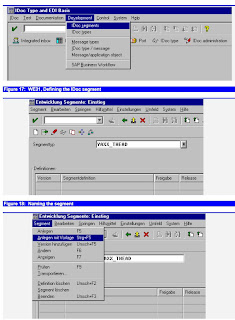
To facilitate our work, we will use the "copy-from-template-tool", which reads the
definition of a DDIC structure and inserts the field and the matching definitions as
rows in the IDoc editor. You could, of course, define the structure completely
manually, but using the template makes it easier.
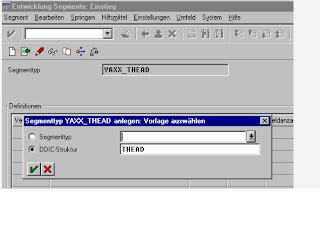
The tool in release 4.0b lets you use both DDIC structures or another IDoc segment
definition as a template.
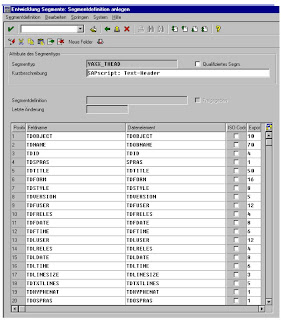
The thus created structure can be edited any time. When saving, it will create a data
dictionary structure based on the definition in WE31. The DDIC structure will retain
the same name. You can view the structure as a table definition with SE11 and use it
in an ABAP the same way.
Defining the Message Type (EDMSG)
The message type defines the context under which an IDoc is transferred to its destination. It allows for using the same IDoc file format for several different applications.
Imagine the situation of sending a purchase order to a supplier. When the IDoc with
the purchase order reaches the supplier, it will be interpreted as a sales order
received from a customer, namely you.
Simultaneously you want to send the IDoc data to the supplier's warehouse to inform
it that a purchase order has been issued and is on the way.
Both IDoc receivers will receive the same IDoc format; however, the IDoc will be
tagged with a different message type. While the IDoc to the supplier will be flagged
as a purchase order (in SAP R/3 standard: message type = ORDERS), the same IDoc
sent to the warehouse should be flagged differently, so that the warehouse can
recognize the order as a mere informational copy and process it differently than a
true purchase order.
The message type together with the IDoc type determine the processing function.
The message types are stored in table EDMSG.
Defining the message type can be done from the transaction WEDI
EDMSG: Defining the message type (1)
The entry is only a base entry which tells the system that the message type is
allowed. Other transactions will use that table as a check table to validate the entry.
IT is as shown .
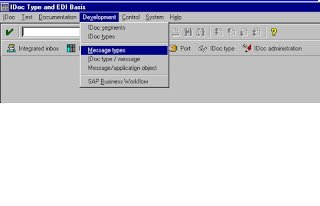
EDMSG: Defining the message type (1):
The entry is only a base entry which tells the system that the message type is
allowed. Other transactions will use that table as a check table to validate the entry.
The segment defines the structure of the records in an IDoc. They are defined with transaction WE31.
We will define a structure to send a text from the text database.
Transaction WE31 calls the IDoc segment editor. The editor defines the fields of a
single segment structure. The thus defined IDoc segment is then created as a data
dictionary structure. You can view the created structure with SE11 and use it in an
ABAP as any TABLES declaration.
To demonstrate the use of the IDoc segment editor we will set up an example, which
allows you to send a single text from the text pool (tables STXH and STXL) as an
IDoc. These are the texts that you can see with SO10 or edit from within many
applications.
We will show the steps to define an IDoc segment YAXX_THEAD with the DDic
structure of THEAD.
To facilitate our work, we will use the "copy-from-template-tool", which reads the
definition of a DDIC structure and inserts the field and the matching definitions as
rows in the IDoc editor. You could, of course, define the structure completely
manually, but using the template makes it easier.
The tool in release 4.0b lets you use both DDIC structures or another IDoc segment
definition as a template.
The thus created structure can be edited any time. When saving, it will create a data
dictionary structure based on the definition in WE31. The DDIC structure will retain
the same name. You can view the structure as a table definition with SE11 and use it
in an ABAP the same way.
Defining the Message Type (EDMSG)
The message type defines the context under which an IDoc is transferred to its destination. It allows for using the same IDoc file format for several different applications.
Imagine the situation of sending a purchase order to a supplier. When the IDoc with
the purchase order reaches the supplier, it will be interpreted as a sales order
received from a customer, namely you.
Simultaneously you want to send the IDoc data to the supplier's warehouse to inform
it that a purchase order has been issued and is on the way.
Both IDoc receivers will receive the same IDoc format; however, the IDoc will be
tagged with a different message type. While the IDoc to the supplier will be flagged
as a purchase order (in SAP R/3 standard: message type = ORDERS), the same IDoc
sent to the warehouse should be flagged differently, so that the warehouse can
recognize the order as a mere informational copy and process it differently than a
true purchase order.
The message type together with the IDoc type determine the processing function.
The message types are stored in table EDMSG.
Defining the message type can be done from the transaction WEDI
EDMSG: Defining the message type (1)
The entry is only a base entry which tells the system that the message type is
allowed. Other transactions will use that table as a check table to validate the entry.
IT is as shown .
EDMSG: Defining the message type (1):
The entry is only a base entry which tells the system that the message type is
allowed. Other transactions will use that table as a check table to validate the entry.
Labels:
SAP ALE IDOC'S
SAP ABAP IDOC'S INBOUND BASIC TOOLS III
The declaration of valid combinations is done to allow validation, if the system can
handle a certain combination.
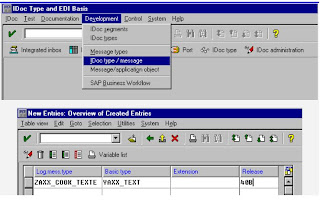
The combination of message type and IDoc type determine the processing algorithm. This is
usually a function module with a well defined interface or a SAP business object and is set up
in table EDIFCT.
The entry made here points to a function module which will be called when the IDoc
is to be processed.
The entries for message code and message function are usually left blank. They can
be used to derive sub types of messages together with the partner profile used.
Figure 25: Assign a handler function to a message/message type
The definition for inbound and outbound IDocs is analogous. Of course, the function
module will be different.
R/3 uses the method of logical process codes to detach the IDoc processing and the
processing function module. They assign a logical name to the function instead of specifying the physical function name.
The IDoc functions are often used for a series of message type/IDoc type
combination. It is necessary to replace the processing function by a different one.
E.g. when you make a copy of a standard function to avoid modifying the standard.
The combination message type/IDoc will determine the logical processing code,
which itself points to a function. If the function changes, only the definition of the processing codes will be changed and the new function will be immediately
effective for all IDocs associated with the process code.
For inbound processing codes you have to specify the method to use for the
determination of the inbound function.
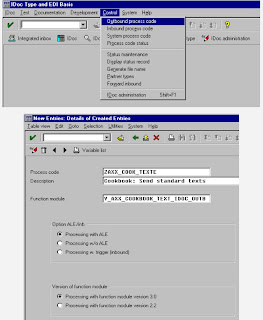
This is the option you would usually choose. It allows processing via the ALE
scenarios.
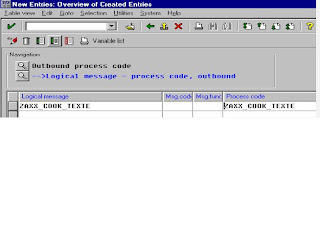
After defining the processing code you have to assign it to one or several logical
message types. This declaration is used to validate, if a message can be handled by
the receiving system.
The inbound processing code is assigned analogously. The processing code is a pointer to a function module which can handle the inbound request for the specified IDoc and message type.
The definition of the processing code is identifying the handler routine and assigning a serious of processing options.
You need to click "Processing with ALE", if your function can be used via the ALE
engine. This is the option you would usually choose. It allows processing via the
ALE scenarios.
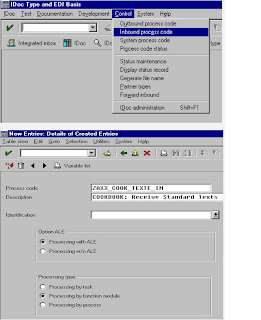
Associate a function module with a process code
For inbound processing you need to indicate whether the function will be capable of
dialog processing. This is meant for those functions which process the inbound data
via call transaction. Those functions can be replayed in visible batch input mode to
check why the processing might have failed.
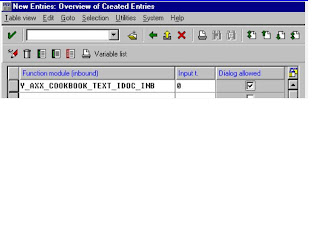
handle a certain combination.
The combination of message type and IDoc type determine the processing algorithm. This is
usually a function module with a well defined interface or a SAP business object and is set up
in table EDIFCT.
The entry made here points to a function module which will be called when the IDoc
is to be processed.
The entries for message code and message function are usually left blank. They can
be used to derive sub types of messages together with the partner profile used.
Figure 25: Assign a handler function to a message/message type
The definition for inbound and outbound IDocs is analogous. Of course, the function
module will be different.
R/3 uses the method of logical process codes to detach the IDoc processing and the
processing function module. They assign a logical name to the function instead of specifying the physical function name.
The IDoc functions are often used for a series of message type/IDoc type
combination. It is necessary to replace the processing function by a different one.
E.g. when you make a copy of a standard function to avoid modifying the standard.
The combination message type/IDoc will determine the logical processing code,
which itself points to a function. If the function changes, only the definition of the processing codes will be changed and the new function will be immediately
effective for all IDocs associated with the process code.
For inbound processing codes you have to specify the method to use for the
determination of the inbound function.
This is the option you would usually choose. It allows processing via the ALE
scenarios.
After defining the processing code you have to assign it to one or several logical
message types. This declaration is used to validate, if a message can be handled by
the receiving system.
The inbound processing code is assigned analogously. The processing code is a pointer to a function module which can handle the inbound request for the specified IDoc and message type.
The definition of the processing code is identifying the handler routine and assigning a serious of processing options.
You need to click "Processing with ALE", if your function can be used via the ALE
engine. This is the option you would usually choose. It allows processing via the
ALE scenarios.
Associate a function module with a process code
For inbound processing you need to indicate whether the function will be capable of
dialog processing. This is meant for those functions which process the inbound data
via call transaction. Those functions can be replayed in visible batch input mode to
check why the processing might have failed.
Labels:
SAP ALE IDOC'S
SAP IDOC OUT BOUND TRIGGERS II
IDocs should be sent out at certain events. Therefore you have to define a trigger. A lot of consideration is required to determine the correct moment when to send out the IDoc. The IDoc can be triggered at a certain time or when an event is raised. R/3 uses several completely different methods to determine the trigger point.
There are messages to tell the system that there is an IDoc waiting for dispatching, there are log files which may be evaluated to see if IDocs are due to send and there can be a workflow chain triggered, which includes the sending of the IDoc.
The simplest way to create IDocs, is to write an ABAP. The individual ABAP can either be a triggering ABAP which runs at certain events, e.g. every night, or it can be an ABAP which does the complete IDoc creation from scratch.
A triggering ABAP would simply try to determine which IDocs need sending and
call the appropriate IDoc creation routines.
You may also imagine the ABAP to do all the job. As this is mostly reinventing the
wheel, it is not really recommended and should be reserved to situation, where the
other solution do not provide an appropriate mean.
You can use the R/3 message concept to trigger IDocs the same way as you trigger SAPscript printing.
One of the key tables in R/3 is the table NAST. This table records reminders written
by applications. Those reminders are called messages.
Every time when an applications sees the necessity to pass information to a third
party. a message is written to NAST. A message handler will eventually check the
entries in the table and cause an appropriate action.
The concept of NAST messages has originally been designed for triggering
SAPscript printing. The very same mechanism is used for IDocs, where the IDoc
processor replaces the print task, as an IDoc is only the paperless form of a printed
document.
The messages are usually be created using the condition technique, a mechanism
available to all major R/3 applications.
The conditions are set up the same way for any output media. So you may define a
condition for printing a document and then just change the output media from
printer to IDoc/EDI or ALE.
Creating NAST messages is a standard functionality in most of the SAP core
applications. Those applications - e.g. VA01, ME21 - perform calls to the central
function module MESSAGING of group V61B. The function module uses
customizing entries, mainly those of the tables T681* to T685*.
A NAST output message is stored as a single record in the table NAST. The record
stores all information that is necessary to create an IDoc. This includes mainly an
object key to identify the processed object and application to the message handler
and the sender and receiver information.
Creating NAST messages is a standard functionality in most of the SAP core
applications. Those applications - e.g. VA01, ME21 - perform calls to the central
function module MESSAGING of group V61B. The function module uses
customizing entries, mainly those of the tables T681* to T685*.
A NAST output message is stored as a single record in the table NAST. The record
stores all information that is necessary to create an IDoc. This includes mainly an
object key to identify the processed object and application to the message handler
and the sender and receiver information.
There are messages to tell the system that there is an IDoc waiting for dispatching, there are log files which may be evaluated to see if IDocs are due to send and there can be a workflow chain triggered, which includes the sending of the IDoc.
The simplest way to create IDocs, is to write an ABAP. The individual ABAP can either be a triggering ABAP which runs at certain events, e.g. every night, or it can be an ABAP which does the complete IDoc creation from scratch.
A triggering ABAP would simply try to determine which IDocs need sending and
call the appropriate IDoc creation routines.
You may also imagine the ABAP to do all the job. As this is mostly reinventing the
wheel, it is not really recommended and should be reserved to situation, where the
other solution do not provide an appropriate mean.
You can use the R/3 message concept to trigger IDocs the same way as you trigger SAPscript printing.
One of the key tables in R/3 is the table NAST. This table records reminders written
by applications. Those reminders are called messages.
Every time when an applications sees the necessity to pass information to a third
party. a message is written to NAST. A message handler will eventually check the
entries in the table and cause an appropriate action.
The concept of NAST messages has originally been designed for triggering
SAPscript printing. The very same mechanism is used for IDocs, where the IDoc
processor replaces the print task, as an IDoc is only the paperless form of a printed
document.
The messages are usually be created using the condition technique, a mechanism
available to all major R/3 applications.
The conditions are set up the same way for any output media. So you may define a
condition for printing a document and then just change the output media from
printer to IDoc/EDI or ALE.
Creating NAST messages is a standard functionality in most of the SAP core
applications. Those applications - e.g. VA01, ME21 - perform calls to the central
function module MESSAGING of group V61B. The function module uses
customizing entries, mainly those of the tables T681* to T685*.
A NAST output message is stored as a single record in the table NAST. The record
stores all information that is necessary to create an IDoc. This includes mainly an
object key to identify the processed object and application to the message handler
and the sender and receiver information.
Creating NAST messages is a standard functionality in most of the SAP core
applications. Those applications - e.g. VA01, ME21 - perform calls to the central
function module MESSAGING of group V61B. The function module uses
customizing entries, mainly those of the tables T681* to T685*.
A NAST output message is stored as a single record in the table NAST. The record
stores all information that is necessary to create an IDoc. This includes mainly an
object key to identify the processed object and application to the message handler
and the sender and receiver information.
Labels:
SAP ALE IDOC'S
SAP IDOCS OUTBOUND TRIGGER II
The messages are typically processed by
FORM ENTRY in PROGRAM RSNAST00.
If we are dealing with printing or faxing and
FORM EDI_PROCESSING in PROGRAM RSNASTED.
If we are dealing with IDocs
FORM ALE_PROCESSING in PROGRAM RSNASTED.
If we are dealing with ALE.
The following piece of code does principally the same thing as RSNAST00 does and
makes full use of all customizing settings for message handling.
TABLES: NAST.
SELECT * FROM NAST ...
PERFORM einzelnachricht IN PROGRAM RSNAST00
The processing routine for the respective media and message is customized in the
table TNAPR. This table records the name of a FORM routine, which processes the
message for the chosen media and the name of an ABAP where this FORM is found.
The ABAP RSNAST00 is the standard ABAP, which is used to collect unprocessed NAST
message and to execute the assigned action.
RSNAST00 can be executed as a collector batch run, that eventually looks for
unprocessed IDocs. The usual way of doing that is to define a batch-run job with
transaction SM37. This job has to be set for periodic processing and start a program
that triggers the IDoc re-sending.
Cave! RSNAST00 will only look for IDocs which are set to NAST-VSZTP = '1' or '2'
(Time of processing). VSZPT = '3' or '4' is ignored by RSNAST00.
Start RSNAST00 in the foreground first and find the parameters that match your
required selection criteria. Save them as a VARIANT and then define the periodic
batch job using the variant.
If RSNAST00 does not meet 100% your needs you can create an own program
similar to RSNAST00. The only requirement for this program are two steps:
* Read the NAST entry to process into structure NAST
tables nast.
data: subrc like sy-subrc.....
select from NAST where .......
* then call FORM einzelnachricht(rsnast00) to process the record
PERFORM einzelnachricht(rsnast00) USING subrc.
FORM ENTRY in PROGRAM RSNAST00.
If we are dealing with printing or faxing and
FORM EDI_PROCESSING in PROGRAM RSNASTED.
If we are dealing with IDocs
FORM ALE_PROCESSING in PROGRAM RSNASTED.
If we are dealing with ALE.
The following piece of code does principally the same thing as RSNAST00 does and
makes full use of all customizing settings for message handling.
TABLES: NAST.
SELECT * FROM NAST ...
PERFORM einzelnachricht IN PROGRAM RSNAST00
The processing routine for the respective media and message is customized in the
table TNAPR. This table records the name of a FORM routine, which processes the
message for the chosen media and the name of an ABAP where this FORM is found.
The ABAP RSNAST00 is the standard ABAP, which is used to collect unprocessed NAST
message and to execute the assigned action.
RSNAST00 can be executed as a collector batch run, that eventually looks for
unprocessed IDocs. The usual way of doing that is to define a batch-run job with
transaction SM37. This job has to be set for periodic processing and start a program
that triggers the IDoc re-sending.
Cave! RSNAST00 will only look for IDocs which are set to NAST-VSZTP = '1' or '2'
(Time of processing). VSZPT = '3' or '4' is ignored by RSNAST00.
Start RSNAST00 in the foreground first and find the parameters that match your
required selection criteria. Save them as a VARIANT and then define the periodic
batch job using the variant.
If RSNAST00 does not meet 100% your needs you can create an own program
similar to RSNAST00. The only requirement for this program are two steps:
* Read the NAST entry to process into structure NAST
tables nast.
data: subrc like sy-subrc.....
select from NAST where .......
* then call FORM einzelnachricht(rsnast00) to process the record
PERFORM einzelnachricht(rsnast00) USING subrc.
Labels:
SAP ALE IDOC'S
SAP IDOC'S OUTBOUND TRIGGER III
Sending IDocs Via RSNASTED
Standard R/3 provides you with powerful routines, to trigger, prepare and send out IDocs in a controlled way. There are only a few rare cases, where you do not want to send IDocs the standard way.
The ABAP RSNAST00 is the standard routine to send IDocs from entries in the message control. This program can be called directly, from a batch routine with variant or you can call the FORM einzelnachricht_screen(RSNAST00) from any other program, while having the structure NAST correctly filled with all necessary information.
If there is an entry in table NAST, RSNAST00 looks up the associated processing
routine in table TNAPR. If it is to send an IDoc with standard means, this will
usually be the routine RSNASTED(EDI_PROCESSING) or RSNASTED(ALE_PROCESSING) in the case of ALE distribution.
RSNASTED itself determines the associated IDoc outbound function module,
executes it to fill the EDIDx tables and passes the prepared IDoc to the port.
You can call the standard processing routines from any ABAP, by executing the
following call to the routine. You only have to make sure that the structure NAST is
declared with the tables statement in the calling routine and that you fill at least the key part and the routine (TNAPR) information before.
TABLES NAST.
NAST-MANDT = SY-MANDT.
NAST-KSCHL = 'ZEDIK'.
NAST-KAPPL = 'V1'.
NAST-OBJKY = '0012345678'.
NAST-PARNR = 'D012345678'.
PERFORM einzelnachricht_screen(RSNAST00).
Calling einzelnachricht_screen determines how the message is processed.
If you want to force the IDoc-processing you can call it directly:
TNAPR-PROGN = ''.
TNAPR-ROUTN = 'ENTRY'.
PERFORM edi_processing(RSNASTED).
Standard R/3 provides you with powerful routines, to trigger, prepare and send out IDocs in a controlled way. There are only a few rare cases, where you do not want to send IDocs the standard way.
The ABAP RSNAST00 is the standard routine to send IDocs from entries in the message control. This program can be called directly, from a batch routine with variant or you can call the FORM einzelnachricht_screen(RSNAST00) from any other program, while having the structure NAST correctly filled with all necessary information.
If there is an entry in table NAST, RSNAST00 looks up the associated processing
routine in table TNAPR. If it is to send an IDoc with standard means, this will
usually be the routine RSNASTED(EDI_PROCESSING) or RSNASTED(ALE_PROCESSING) in the case of ALE distribution.
RSNASTED itself determines the associated IDoc outbound function module,
executes it to fill the EDIDx tables and passes the prepared IDoc to the port.
You can call the standard processing routines from any ABAP, by executing the
following call to the routine. You only have to make sure that the structure NAST is
declared with the tables statement in the calling routine and that you fill at least the key part and the routine (TNAPR) information before.
TABLES NAST.
NAST-MANDT = SY-MANDT.
NAST-KSCHL = 'ZEDIK'.
NAST-KAPPL = 'V1'.
NAST-OBJKY = '0012345678'.
NAST-PARNR = 'D012345678'.
PERFORM einzelnachricht_screen(RSNAST00).
Calling einzelnachricht_screen determines how the message is processed.
If you want to force the IDoc-processing you can call it directly:
TNAPR-PROGN = ''.
TNAPR-ROUTN = 'ENTRY'.
PERFORM edi_processing(RSNASTED).
Labels:
SAP ALE IDOC'S
SAP Work flow based outbound Idoc's
Unfortunately, there are application that do not create messages. This is especially true for master data applications. However, most applications fire a workflow event during update,which can easily be used to trigger the IDoc distribution.
Many SAP R/3 applications issue a call to the function SWE_EVENT_CREATE
during update. This function module ignites a simple workflow event.
Technically a workflow event is a timed call to a function module, which takes the
issuing event as the key to process a subsequent action.
If an application writes regular change documents (ger.: Änderungsbelege) to the
database, it will issue automatically a workflow event. This event is triggered from
within the function CHANGEDOCUMENT_CLOSE.
The change document workflow event is always triggered, independent of the case whether a change document is actually written.
In order to make use of the workflow for IDoc processing, you do not have to go
through the cumbersome workflow design procedure as it is described in the
workflow documentation. For the mentioned purpose, you can register the workflow
handler from the menu, which says Event Coupling from the BALD transaction.
Triggering the IDoc from a workflow event has a disadvantage: if the IDoc has to be
repeated for some reason, the event cannot be repeated easily. This is due to the
nature of a workflow event, which is triggered usually from a precedent action.
Therefore you have to find an own way how to make sure that the IDoc is actually
generated, even in the case of an error. Practically this is not a very big problem for IDocs. In most cases the creation of the IDoc will always take place. If there is a problem, then the IDoc would be stored in the IDoc base with a respective status. It will shown in transaction WE05 and can be resend from there.
Workflow Event From Change Document:
Most application fire a workflow event from the update routine by calling the
function
FUNCTION swe_event_create
You can check if an application fires events by activating the event log from
transaction SWLD. Calling and saving a transaction will write the event’s name and
circumstances into the log file.
If an application does not fire workflow events directly, there is still another chance that a workflow may be used without touching the R/3 original programs.
Every application that writes change documents triggers a workflow event from
within the function module CHANGEDOCUMENT_CLOSE, which is called form the
update processing upon writing the change document. This will call the workflow
processor.
FUNCTION swe_event_create_changedocument:
Both workflow types are not compatible with each other with respect to the function
modules used to handle the event.
Both will call a function module whose name they find in the workflow linkage
tables. swe_event_create will look in table SWETYPECOU while
swe_event_create_changedocument would look in SWECDOBJ for the name of the
function module.
If a name is found, the function module will then be called dynamically. This is all
to say about the linkage of the workflow.
The dynamic call looks like the following.
CALL FUNCTION swecdobj-objtypefb
EXPORTING
changedocument_header = changedocument_header
objecttype = swecdobj-objtype
IMPORTING
objecttype = swecdobj-objtype
TABLES
changedocument_position = changedocument_position.
Many SAP R/3 applications issue a call to the function SWE_EVENT_CREATE
during update. This function module ignites a simple workflow event.
Technically a workflow event is a timed call to a function module, which takes the
issuing event as the key to process a subsequent action.
If an application writes regular change documents (ger.: Änderungsbelege) to the
database, it will issue automatically a workflow event. This event is triggered from
within the function CHANGEDOCUMENT_CLOSE.
The change document workflow event is always triggered, independent of the case whether a change document is actually written.
In order to make use of the workflow for IDoc processing, you do not have to go
through the cumbersome workflow design procedure as it is described in the
workflow documentation. For the mentioned purpose, you can register the workflow
handler from the menu, which says Event Coupling from the BALD transaction.
Triggering the IDoc from a workflow event has a disadvantage: if the IDoc has to be
repeated for some reason, the event cannot be repeated easily. This is due to the
nature of a workflow event, which is triggered usually from a precedent action.
Therefore you have to find an own way how to make sure that the IDoc is actually
generated, even in the case of an error. Practically this is not a very big problem for IDocs. In most cases the creation of the IDoc will always take place. If there is a problem, then the IDoc would be stored in the IDoc base with a respective status. It will shown in transaction WE05 and can be resend from there.
Workflow Event From Change Document:
Most application fire a workflow event from the update routine by calling the
function
FUNCTION swe_event_create
You can check if an application fires events by activating the event log from
transaction SWLD. Calling and saving a transaction will write the event’s name and
circumstances into the log file.
If an application does not fire workflow events directly, there is still another chance that a workflow may be used without touching the R/3 original programs.
Every application that writes change documents triggers a workflow event from
within the function module CHANGEDOCUMENT_CLOSE, which is called form the
update processing upon writing the change document. This will call the workflow
processor.
FUNCTION swe_event_create_changedocument:
Both workflow types are not compatible with each other with respect to the function
modules used to handle the event.
Both will call a function module whose name they find in the workflow linkage
tables. swe_event_create will look in table SWETYPECOU while
swe_event_create_changedocument would look in SWECDOBJ for the name of the
function module.
If a name is found, the function module will then be called dynamically. This is all
to say about the linkage of the workflow.
The dynamic call looks like the following.
CALL FUNCTION swecdobj-objtypefb
EXPORTING
changedocument_header = changedocument_header
objecttype = swecdobj-objtype
IMPORTING
objecttype = swecdobj-objtype
TABLES
changedocument_position = changedocument_position.
Labels:
SAP ALE IDOC'S
SAP ALE Change Pointers
Applications which write change documents will also try to write change pointers for ALE operations. These are log entries to remember all modified data records relevant for ALE.
Most applications write change documents. These are primarily log entries in the
tables CDHDR and CDPOS.
Change documents remember the modified fields made to the database by an
application. They also remember the user name and the time when the modification
took place.
The decision whether a field modification is relevant for a change document is
triggered by a flag of the modified field’s data element. You can set the flag with
SE11 by modifying the data element.
For the purpose of distributing data via ALE to other systems, you may want to
choose other fields, which shall be regarded relevant for triggering a distribution.
Therefore R/3 introduced the concept of change pointers, which are nothing else
than a second log file specially designed for writing the change pointers which are
meant to trigger IDoc distribution via ALE.
So the change pointers will remember the key of the document every time when a
relevant field has changed.
Change pointers are then evaluated by an ABAP which calls the IDoc creation, for
every modified document found in the change pointers.
The Change pointers are written from the routine CHANGEDOCUMENT_CLOSE
when saving the generated change document. So change pointers are automatically
written when a relevant document changes.
The following function is called from within CHANGEDOCUMENT_CLOSE in order to write the change pointers.
CALL FUNCTION 'CHANGE_POINTERS_CREATE'
EXPORTING
change_document_header = cdhdr
TABLES
change_document_position = ins_cdpos.
Activation of change pointer update :
Change pointers are log entries to table BDCP which are written every time a transaction modifies certain fields. The change pointers are designed for ALE distribution and written by the function CHANGE_DOCUMENT_CLOSE.
Change pointers are written for use with ALE. There are ABAPs like RBDMIDOC
which can read the change pointers and trigger an IDoc for ALE distribution.
The change pointers are mainly the same as change documents. They however can
be set up differently, so fields which trigger change documents are not necessarily
the same that cause change pointers to be written.
In order to work with change pointers there are two steps to be performed
1) Turn on change pointer update generally
2) Decide which message types shall be included for change pointer update
R3 allows to activate or deactivate the change pointer update. For this purpose it
maintains a table TBDA1. The decision whether the change pointer update is active
is done with a Function Ale_Component_Check
This check does nothing else than to check, if this table has an entry or not. If there is an entry in TBDA1, the ALE change pointers are generally active. If this table is empty, change pointers are turned off for everybody and everything, regardless of the other settings.
The two points read like you had the choice between turning it on generally or
selectively. This is not the case: you always turn them on selectively. The switch to
turn on generally is meant to activate or deactivate the whole mechanism.
The change pointers which have not been processed yet, can be read with a function
module.
Call Function 'CHANGE_POINTERS_READ'
The ABAP RBDMIDOC will process all open change pointers and distribute the
matching IDocs.
When you want to send out an IDoc unconditionally every time a transaction
updates, you better use the workflow from the change documents.
Most applications write change documents. These are primarily log entries in the
tables CDHDR and CDPOS.
Change documents remember the modified fields made to the database by an
application. They also remember the user name and the time when the modification
took place.
The decision whether a field modification is relevant for a change document is
triggered by a flag of the modified field’s data element. You can set the flag with
SE11 by modifying the data element.
For the purpose of distributing data via ALE to other systems, you may want to
choose other fields, which shall be regarded relevant for triggering a distribution.
Therefore R/3 introduced the concept of change pointers, which are nothing else
than a second log file specially designed for writing the change pointers which are
meant to trigger IDoc distribution via ALE.
So the change pointers will remember the key of the document every time when a
relevant field has changed.
Change pointers are then evaluated by an ABAP which calls the IDoc creation, for
every modified document found in the change pointers.
The Change pointers are written from the routine CHANGEDOCUMENT_CLOSE
when saving the generated change document. So change pointers are automatically
written when a relevant document changes.
The following function is called from within CHANGEDOCUMENT_CLOSE in order to write the change pointers.
CALL FUNCTION 'CHANGE_POINTERS_CREATE'
EXPORTING
change_document_header = cdhdr
TABLES
change_document_position = ins_cdpos.
Activation of change pointer update :
Change pointers are log entries to table BDCP which are written every time a transaction modifies certain fields. The change pointers are designed for ALE distribution and written by the function CHANGE_DOCUMENT_CLOSE.
Change pointers are written for use with ALE. There are ABAPs like RBDMIDOC
which can read the change pointers and trigger an IDoc for ALE distribution.
The change pointers are mainly the same as change documents. They however can
be set up differently, so fields which trigger change documents are not necessarily
the same that cause change pointers to be written.
In order to work with change pointers there are two steps to be performed
1) Turn on change pointer update generally
2) Decide which message types shall be included for change pointer update
R3 allows to activate or deactivate the change pointer update. For this purpose it
maintains a table TBDA1. The decision whether the change pointer update is active
is done with a Function Ale_Component_Check
This check does nothing else than to check, if this table has an entry or not. If there is an entry in TBDA1, the ALE change pointers are generally active. If this table is empty, change pointers are turned off for everybody and everything, regardless of the other settings.
The two points read like you had the choice between turning it on generally or
selectively. This is not the case: you always turn them on selectively. The switch to
turn on generally is meant to activate or deactivate the whole mechanism.
The change pointers which have not been processed yet, can be read with a function
module.
Call Function 'CHANGE_POINTERS_READ'
The ABAP RBDMIDOC will process all open change pointers and distribute the
matching IDocs.
When you want to send out an IDoc unconditionally every time a transaction
updates, you better use the workflow from the change documents.
Labels:
SAP ALE IDOC'S
SAP Dispatching ALE IDocs for Change Pointers
Change pointers must be processed by an ABAP, e.g. RBDMIDOC.
The actual distribution of documents from change pointers must be done by an
ABAP, which reads the change pointers and processes them. The standard ABAP
for that is RBDMIDOC. For recurring execution it can be submitted in a scheduled
job using SM35 .
It then calls dynamically a function module whose name is stored in table TBDME
for each message type.
Call Function Tbdme-Idocfbname
Exporting
Message_Type = Mestyp
Creation_Date_High = Date
Creation_Time_High = Time
Exceptions
Error_Code_1.
Example :
A complex example for a function module, which collects the change pointers, can
be examined in:
MASTERIDOC_CREATE_SMD_DEBMAS .
This one reads change pointers for debtors (customer masters). During the
processing, it calls the actual IDoc creating module
MASTERIDOC_CREATE_DEBMAS .
To summarize the change pointer concept
• Change pointers record relevant updates of transaction data
• Change pointers are written separate from the change documents, while at the
same time
• Change pointers are evaluated by a collector run
BDCPS : Change pointer: Status
BDCP : Change pointer
BDCPV : A view with BDCP and BDCPS combined: Change pointer with status
TBDA2 :
Declare activate message types for change pointers with view V_TBDA2.or
transaction BD50 or .
SALE -> Activate change pointers for message types
TBD62 : The view V_TBD62 defines those fields which are relevant for change pointer
creation. The table is evaluated by the CHANGE_DOCUMENT_CLOSE function.
The object is the same used by the change document. To find out the object name,
look for CHANGE_DOCUMENT_CLOSE in the transaction you are inspecting or
see table CDHDR for traces.
Tables involved in change pointers processing :
Object
Table name
Field
DEBI
KNA1
NAME3
DEBI
Kann1
ORT01
DEBI
Kann1
REGIO
The actual distribution of documents from change pointers must be done by an
ABAP, which reads the change pointers and processes them. The standard ABAP
for that is RBDMIDOC. For recurring execution it can be submitted in a scheduled
job using SM35 .
It then calls dynamically a function module whose name is stored in table TBDME
for each message type.
Call Function Tbdme-Idocfbname
Exporting
Message_Type = Mestyp
Creation_Date_High = Date
Creation_Time_High = Time
Exceptions
Error_Code_1.
Example :
A complex example for a function module, which collects the change pointers, can
be examined in:
MASTERIDOC_CREATE_SMD_DEBMAS .
This one reads change pointers for debtors (customer masters). During the
processing, it calls the actual IDoc creating module
MASTERIDOC_CREATE_DEBMAS .
To summarize the change pointer concept
• Change pointers record relevant updates of transaction data
• Change pointers are written separate from the change documents, while at the
same time
• Change pointers are evaluated by a collector run
BDCPS : Change pointer: Status
BDCP : Change pointer
BDCPV : A view with BDCP and BDCPS combined: Change pointer with status
TBDA2 :
Declare activate message types for change pointers with view V_TBDA2.or
transaction BD50 or .
SALE -> Activate change pointers for message types
TBD62 : The view V_TBD62 defines those fields which are relevant for change pointer
creation. The table is evaluated by the CHANGE_DOCUMENT_CLOSE function.
The object is the same used by the change document. To find out the object name,
look for CHANGE_DOCUMENT_CLOSE in the transaction you are inspecting or
see table CDHDR for traces.
Tables involved in change pointers processing :
Object
Table name
Field
DEBI
KNA1
NAME3
DEBI
Kann1
ORT01
DEBI
Kann1
REGIO
Labels:
SAP ALE IDOC'S
SAP IDOC design and Processing
IDocs are usually created in a four step process: retrieving the data, converting it to IDoc format, adding a control record, and delivering the IDoc to a port.
Collect data from R/3 database :
This is the single most important task in outbound processing. You have to identify
the database tables and data dependencies which are needed in the IDoc to be sent.
The smartest way is usually to select the data from the database into an internal table using SELECT * FROM dbtable INTO itab ... WHERE ...
Wrap data in IDoc format :
The collected data must be transformed into ASCII data and filled into the predefined IDoc segment structures. The segment definitions are done with transaction WE31 and the segments allowed in an IDoc type are set up in transaction WE30. Segments defined with WE31 are automatically created as SAP DDIC structures. They can be viewed with SE11, however, they cannot be edited.
Create the IDoc control record :
Every IDoc must be accompanied by a control record which must contain at least the Idoc type to identify the syntactical structure of the data and the name and role of the sender and the receiver. This header information is checked against the partner definitions for outbound. Only if a matching partner definition exists, can the IDoc be sent. Partner definitions are set up with transaction WE20.
Send data to port :
When the partner profile check matches, the IDoc is forwarded to a logical port, which is also assigned in the partner profile. This port is set up with transaction
WE21 and defines the medium to transport the IDoc, e.g. file or RFC.
The RFC destinations are set up with transaction SM57 and must also be entered in table TBDLS with an SM31 view. Directories for outbound locations of files are set up
with transaction FILE and directly in WE21. It also allows the use of a function
module which generates file names. Standard functions for that purpose begin like
EDI_FILE*.
How SAP Standard Processes Inbound IDocs :
When you receive an IDoc the standard way, the data is stored in the IDoc base and a function module is called, which decides how to process the received information.
EDID4 - Data :
Data is stored in table EDID4 (EDID3 up to release 3.xx, EDIDD up to release 2.xx)
EDIDC - Control Record :
An accompanying control record with important context and administrative
information is stored in table EDIDC.
Event signals readiness :
After the data is stored in the IDoc base tables, an event is fired to signal that there is an IDoc waiting for processing. This event is consumed by the IDoc handler, which decides, whether to process the IDoc immediately, postpone processing, or decline activity for whatever reason.
EDIFCT - Processing function :
When the IDoc processor thinks it is time to process the IDoc it will search the table EDIFCT , where it should find the name of a function module which will be called to process the IDoc data.
This function module is the heart of all inbound processing. The IDoc processor will
call this routine and pass the IDoc data from EDID4 and the control record from
EDIDC for the respective IDoc.
Function has a fixed interface :
Because this routine is called dynamically, it must adhere to a strict convention All
function interface parameters must exactly match the calling convention.
EDIDS - Status log :
The processing steps and their respective status results are stored in table EDIDS.
Status must be logged properly :
In addition, the routine has to properly determine the next status of the IDoc in table EDIDS; usually it will be EDIDS-STATU = 53 for OK or 51 for error.
Collect data from R/3 database :
This is the single most important task in outbound processing. You have to identify
the database tables and data dependencies which are needed in the IDoc to be sent.
The smartest way is usually to select the data from the database into an internal table using SELECT * FROM dbtable INTO itab ... WHERE ...
Wrap data in IDoc format :
The collected data must be transformed into ASCII data and filled into the predefined IDoc segment structures. The segment definitions are done with transaction WE31 and the segments allowed in an IDoc type are set up in transaction WE30. Segments defined with WE31 are automatically created as SAP DDIC structures. They can be viewed with SE11, however, they cannot be edited.
Create the IDoc control record :
Every IDoc must be accompanied by a control record which must contain at least the Idoc type to identify the syntactical structure of the data and the name and role of the sender and the receiver. This header information is checked against the partner definitions for outbound. Only if a matching partner definition exists, can the IDoc be sent. Partner definitions are set up with transaction WE20.
Send data to port :
When the partner profile check matches, the IDoc is forwarded to a logical port, which is also assigned in the partner profile. This port is set up with transaction
WE21 and defines the medium to transport the IDoc, e.g. file or RFC.
The RFC destinations are set up with transaction SM57 and must also be entered in table TBDLS with an SM31 view. Directories for outbound locations of files are set up
with transaction FILE and directly in WE21. It also allows the use of a function
module which generates file names. Standard functions for that purpose begin like
EDI_FILE*.
How SAP Standard Processes Inbound IDocs :
When you receive an IDoc the standard way, the data is stored in the IDoc base and a function module is called, which decides how to process the received information.
EDID4 - Data :
Data is stored in table EDID4 (EDID3 up to release 3.xx, EDIDD up to release 2.xx)
EDIDC - Control Record :
An accompanying control record with important context and administrative
information is stored in table EDIDC.
Event signals readiness :
After the data is stored in the IDoc base tables, an event is fired to signal that there is an IDoc waiting for processing. This event is consumed by the IDoc handler, which decides, whether to process the IDoc immediately, postpone processing, or decline activity for whatever reason.
EDIFCT - Processing function :
When the IDoc processor thinks it is time to process the IDoc it will search the table EDIFCT , where it should find the name of a function module which will be called to process the IDoc data.
This function module is the heart of all inbound processing. The IDoc processor will
call this routine and pass the IDoc data from EDID4 and the control record from
EDIDC for the respective IDoc.
Function has a fixed interface :
Because this routine is called dynamically, it must adhere to a strict convention All
function interface parameters must exactly match the calling convention.
EDIDS - Status log :
The processing steps and their respective status results are stored in table EDIDS.
Status must be logged properly :
In addition, the routine has to properly determine the next status of the IDoc in table EDIDS; usually it will be EDIDS-STATU = 53 for OK or 51 for error.
Labels:
SAP ALE IDOC'S
SAP Creation of the IDoc Data
R/3 provides a sophisticated IDoc processing framework. This framework determines a
function module which is responsible for creating or processing the IDoc.
Function module to generate the IDoc :
The kernel of the IDoc processing is always a distinct function module. For the
outbound processing, the function module creates the IDoc and leaves it in an
internal table, which is passed as an interface parameter.
During inbound processing the function module receives the IDoc via an interface
parameter table. It would interpret the IDoc data and typically update the database
either directly or via a call transaction.
Function are called dynamically :
The function modules are called dynamically from a standard routine. Therefore, the
function must adhere to a well-defined interface.
Function group EDIN with useful routines :
You may want to investigate the function group EDIN, which contains a number of
IDoc handler routines and would call the customised function.
Copy and modify existing routines :
The easiest way to start the development of an outbound IDoc function module is to
copy an existing one. There are many samples in the standard R/3 repository'; most
are named IDOC_OUTBOUND* or IDOC_OUTPUT*
Outbound sample functions are named like IDOC_OUTPUT* :
FUNCTION IDOC_OUTPUT_ORDERS01
Inbound sample functions are named like IDOC_INPUT* :
FUNCTION IDOC_INPUT_ORDERS01
Outbound sample functions for master data are named like MASTERIDOC_INPUT* :
FUNCTION MASTERIDOC_CREATE_MATMAS
Interface Structure of IDoc Processing Functions
To use the standard IDoc processing mechanism, the processing function module must have certain interface parameters because the function is called dynamically from a standard routine.
The automated IDoc processor will call your function module from within the
program RSNASTED, usually either from the FORM ALE_PROCESSING or
EDI_PROCESSING.
In order to be compatible with this automated call, the interface of the function
module must be compliant.
FUNCTION Z_IDOC_OUTBOUND_SAMPLE.
*" IMPORTING
*" VALUE(FL_TEST) LIKE RS38L-OPTIONAL DEFAULT 'X'
*" VALUE(FL_COMMIT) LIKE RS38L-OPTIONAL DEFAULT SPACE
*" EXPORTING
*" VALUE(F_IDOC_HEADER) LIKE EDIDC STRUCTURE EDIDC
*" TABLES
*" T_IDOC_CONTRL STRUCTURE EDIDC
*" T_IDOC_DATA STRUCTURE EDIDD
*" CHANGING
*" VALUE(CONTROL_RECORD_IN) LIKE EDIDC STRUCTURE EDIDC
*" VALUE(OBJECT) LIKE NAST STRUCTURE NAST
*" EXCEPTIONS
*" ERROR_IN_IDOC_CONTROL
*" ERROR_WRITING_IDOC_STATUS
*" ERROR_IN_IDOC_DATA
*" SENDING_LOGICAL_SYSTEM_UNKNOWN
*" UNKNOWN_ERROR
Inbound functions are also called via a standard mechanism.
FUNCTION IDOC_INPUT_SOMETHING.
*" IMPORTING
*" VALUE(INPUT_METHOD) LIKE BDWFAP_PAR-INPUTMETHD
*" VALUE(MASS_PROCESSING) LIKE BDWFAP_PAR-MASS_PROC
*" EXPORTING
*" VALUE(WORKFLOW_RESULT) LIKE BDWFAP_PAR-RESULT
*" VALUE(APPLICATION_VARIABLE) LIKE BDWFAP_PAR-APPL_VAR
*" VALUE(IN_UPDATE_TASK) LIKE BDWFAP_PAR-UPDATETASK
*" VALUE(CALL_TRANSACTION_DONE) LIKE BDWFAP_PAR-CALLTRANS
*" TABLES
*" IDOC_CONTRL STRUCTURE EDIDC
*" IDOC_DATA STRUCTURE EDIDD
*" IDOC_STATUS STRUCTURE BDIDOCSTAT
*" RETURN_VARIABLES STRUCTURE BDWFRETVAR
*" SERIALIZATION_INFO STRUCTURE BDI_SER
function module which is responsible for creating or processing the IDoc.
Function module to generate the IDoc :
The kernel of the IDoc processing is always a distinct function module. For the
outbound processing, the function module creates the IDoc and leaves it in an
internal table, which is passed as an interface parameter.
During inbound processing the function module receives the IDoc via an interface
parameter table. It would interpret the IDoc data and typically update the database
either directly or via a call transaction.
Function are called dynamically :
The function modules are called dynamically from a standard routine. Therefore, the
function must adhere to a well-defined interface.
Function group EDIN with useful routines :
You may want to investigate the function group EDIN, which contains a number of
IDoc handler routines and would call the customised function.
Copy and modify existing routines :
The easiest way to start the development of an outbound IDoc function module is to
copy an existing one. There are many samples in the standard R/3 repository'; most
are named IDOC_OUTBOUND* or IDOC_OUTPUT*
Outbound sample functions are named like IDOC_OUTPUT* :
FUNCTION IDOC_OUTPUT_ORDERS01
Inbound sample functions are named like IDOC_INPUT* :
FUNCTION IDOC_INPUT_ORDERS01
Outbound sample functions for master data are named like MASTERIDOC_INPUT* :
FUNCTION MASTERIDOC_CREATE_MATMAS
Interface Structure of IDoc Processing Functions
To use the standard IDoc processing mechanism, the processing function module must have certain interface parameters because the function is called dynamically from a standard routine.
The automated IDoc processor will call your function module from within the
program RSNASTED, usually either from the FORM ALE_PROCESSING or
EDI_PROCESSING.
In order to be compatible with this automated call, the interface of the function
module must be compliant.
FUNCTION Z_IDOC_OUTBOUND_SAMPLE.
*" IMPORTING
*" VALUE(FL_TEST) LIKE RS38L-OPTIONAL DEFAULT 'X'
*" VALUE(FL_COMMIT) LIKE RS38L-OPTIONAL DEFAULT SPACE
*" EXPORTING
*" VALUE(F_IDOC_HEADER) LIKE EDIDC STRUCTURE EDIDC
*" TABLES
*" T_IDOC_CONTRL STRUCTURE EDIDC
*" T_IDOC_DATA STRUCTURE EDIDD
*" CHANGING
*" VALUE(CONTROL_RECORD_IN) LIKE EDIDC STRUCTURE EDIDC
*" VALUE(OBJECT) LIKE NAST STRUCTURE NAST
*" EXCEPTIONS
*" ERROR_IN_IDOC_CONTROL
*" ERROR_WRITING_IDOC_STATUS
*" ERROR_IN_IDOC_DATA
*" SENDING_LOGICAL_SYSTEM_UNKNOWN
*" UNKNOWN_ERROR
Inbound functions are also called via a standard mechanism.
FUNCTION IDOC_INPUT_SOMETHING.
*" IMPORTING
*" VALUE(INPUT_METHOD) LIKE BDWFAP_PAR-INPUTMETHD
*" VALUE(MASS_PROCESSING) LIKE BDWFAP_PAR-MASS_PROC
*" EXPORTING
*" VALUE(WORKFLOW_RESULT) LIKE BDWFAP_PAR-RESULT
*" VALUE(APPLICATION_VARIABLE) LIKE BDWFAP_PAR-APPL_VAR
*" VALUE(IN_UPDATE_TASK) LIKE BDWFAP_PAR-UPDATETASK
*" VALUE(CALL_TRANSACTION_DONE) LIKE BDWFAP_PAR-CALLTRANS
*" TABLES
*" IDOC_CONTRL STRUCTURE EDIDC
*" IDOC_DATA STRUCTURE EDIDD
*" IDOC_STATUS STRUCTURE BDIDOCSTAT
*" RETURN_VARIABLES STRUCTURE BDWFRETVAR
*" SERIALIZATION_INFO STRUCTURE BDI_SER
Labels:
SAP ALE IDOC'S
SAP Developing an Outbound IDoc Function
This is an individual coding part where you need to retrieve the information from the database and prepare it in the form the recipient of the IDoc will expect the data.
Read data to send :
The first step is reading the data from the database, the one you want to send.
FUNCTION Y_AXX_COOKBOOK_TEXT_IDOC_OUTB.
*"----------------------------------------------------------------------
*"*"Lokale Schnittstelle:
*" IMPORTING
*" VALUE(I_TDOBJECT) LIKE THEAD-TDOBJECT DEFAULT 'TEXT'
*" VALUE(I_TDID) LIKE THEAD-TDID DEFAULT 'ST'
*" VALUE(I_TDNAME) LIKE THEAD-TDNAME
*" VALUE(I_TDSPRAS) LIKE THEAD-TDSPRAS DEFAULT SY-LANGU
*" EXPORTING
*" VALUE(E_THEAD) LIKE THEAD STRUCTURE THEAD
*" TABLES
*" IDOC_DATA STRUCTURE EDIDD OPTIONAL
*" IDOC_CONTRL STRUCTURE EDIDC OPTIONAL
*" TLINES STRUCTURE TLINE OPTIONAL
*" EXCEPTIONS
*" FUNCTION_NOT_EXIST
*" VERSION_NOT_FOUND
*"----------------------------------------------------------------------
CALL FUNCTION 'READ_TEXT'
EXPORTING
ID = ID
LANGUAGE = LANGUAGE
NAME = NAME
OBJECT = OBJECT
TABLES
LINES = LINES.
* now stuff the data into the Idoc record format
PERFORM PACK_LINE TABLES IDOC_DATA USING 'THEAD' E_THEAD.
LOOP AT LINES.
PERFORM PACK_LINE TABLES IDOC_DATA USING 'THEAD' LINES.
ENDLOOP.
ENDFUNCTION.
Converting Data into IDoc Segment Format :
The physical format of the IDocs records is always the same. Therefore, the application data must be converted into a 1000 character string.
Fill the data segments which make up the IDoc :
An IDoc is a file with a rigid formal structure. This allows the correspondents to
correctly interpret the IDoc information. Were it for data exchange between SAPsystems only, the IDoc segments could be simply structured like the correspondent
DDIC structure of the tables whose data is sent.
However, IDocs are usually transported to a variety of legacy systems which do not
run SAP. Both correspondents therefore would agree on an IDoc structure which is
known to the sending and the receiving processes.
Transfer the whole IDoc to an internal table, having the structure of EDIDD :
All data needs to be compiled in an internal table with the structure of the standard
SAP table EDIDD. The records for EDIDD are principally made up of a header
string describing the segment and a variable length character field (called SDATA)
which will contain the actual segment data.
FORM PACK_LINE TABLES IDOC_DATA USING 'THEAD' E_THEAD.
TABLES: THEAD.
MOVE-CORRESPONDING E:THEAD to Z1THEAD.
MOVE ‚Z1THEAD’ TO IDOC_DATA-SEGNAM.
MOVE Z1THEAD TO IDOC_DATA-SDATA.
APPEND IDOC_DATA.
ENDFORM.“
Fill control record :
Finally, the control record has to be filled with meaningful data, especially telling
the IDoc type and message type.
IF IDOC_CONTRL-SNDPRN IS INITIAL.
SELECT SINGLE * FROM T000 WHERE MANDT EQ SY-MANDT.
MOVE T000-LOGSYS TO IDOC_CONTRL-SNDPRN.
ENDIF.
IDOC_CONTRL-SNDPRT = 'LS'.
* Trans we20 -> Outbound Controls muss entsprechend gesetzt werden.
* 2 = Transfer IDoc immediately
* 4 = Collect IDocs
IDOC_CONTRL-OUTMOD = '2'. "1=imediately, subsystem
CLEAR IDOC_CONTRL.
IDOC_CONTRL-IDOCTP = 'YAXX_TEXT'.
APPEND IDOC_CONTRL.
Read data to send :
The first step is reading the data from the database, the one you want to send.
FUNCTION Y_AXX_COOKBOOK_TEXT_IDOC_OUTB.
*"----------------------------------------------------------------------
*"*"Lokale Schnittstelle:
*" IMPORTING
*" VALUE(I_TDOBJECT) LIKE THEAD-TDOBJECT DEFAULT 'TEXT'
*" VALUE(I_TDID) LIKE THEAD-TDID DEFAULT 'ST'
*" VALUE(I_TDNAME) LIKE THEAD-TDNAME
*" VALUE(I_TDSPRAS) LIKE THEAD-TDSPRAS DEFAULT SY-LANGU
*" EXPORTING
*" VALUE(E_THEAD) LIKE THEAD STRUCTURE THEAD
*" TABLES
*" IDOC_DATA STRUCTURE EDIDD OPTIONAL
*" IDOC_CONTRL STRUCTURE EDIDC OPTIONAL
*" TLINES STRUCTURE TLINE OPTIONAL
*" EXCEPTIONS
*" FUNCTION_NOT_EXIST
*" VERSION_NOT_FOUND
*"----------------------------------------------------------------------
CALL FUNCTION 'READ_TEXT'
EXPORTING
ID = ID
LANGUAGE = LANGUAGE
NAME = NAME
OBJECT = OBJECT
TABLES
LINES = LINES.
* now stuff the data into the Idoc record format
PERFORM PACK_LINE TABLES IDOC_DATA USING 'THEAD' E_THEAD.
LOOP AT LINES.
PERFORM PACK_LINE TABLES IDOC_DATA USING 'THEAD' LINES.
ENDLOOP.
ENDFUNCTION.
Converting Data into IDoc Segment Format :
The physical format of the IDocs records is always the same. Therefore, the application data must be converted into a 1000 character string.
Fill the data segments which make up the IDoc :
An IDoc is a file with a rigid formal structure. This allows the correspondents to
correctly interpret the IDoc information. Were it for data exchange between SAPsystems only, the IDoc segments could be simply structured like the correspondent
DDIC structure of the tables whose data is sent.
However, IDocs are usually transported to a variety of legacy systems which do not
run SAP. Both correspondents therefore would agree on an IDoc structure which is
known to the sending and the receiving processes.
Transfer the whole IDoc to an internal table, having the structure of EDIDD :
All data needs to be compiled in an internal table with the structure of the standard
SAP table EDIDD. The records for EDIDD are principally made up of a header
string describing the segment and a variable length character field (called SDATA)
which will contain the actual segment data.
FORM PACK_LINE TABLES IDOC_DATA USING 'THEAD' E_THEAD.
TABLES: THEAD.
MOVE-CORRESPONDING E:THEAD to Z1THEAD.
MOVE ‚Z1THEAD’ TO IDOC_DATA-SEGNAM.
MOVE Z1THEAD TO IDOC_DATA-SDATA.
APPEND IDOC_DATA.
ENDFORM.“
Fill control record :
Finally, the control record has to be filled with meaningful data, especially telling
the IDoc type and message type.
IF IDOC_CONTRL-SNDPRN IS INITIAL.
SELECT SINGLE * FROM T000 WHERE MANDT EQ SY-MANDT.
MOVE T000-LOGSYS TO IDOC_CONTRL-SNDPRN.
ENDIF.
IDOC_CONTRL-SNDPRT = 'LS'.
* Trans we20 -> Outbound Controls muss entsprechend gesetzt werden.
* 2 = Transfer IDoc immediately
* 4 = Collect IDocs
IDOC_CONTRL-OUTMOD = '2'. "1=imediately, subsystem
CLEAR IDOC_CONTRL.
IDOC_CONTRL-IDOCTP = 'YAXX_TEXT'.
APPEND IDOC_CONTRL.
Labels:
SAP ALE IDOC'S
SAP Converting Data into IDoc Segment Format
The physical format of the IDocs records is always the same. Therefore, the application data must be converted into a 1000 character string.
Fill the data segments which make up the IDoc :
An IDoc is a file with a rigid formal structure. This allows the correspondents to
correctly interpret the IDoc information. Were it for data exchange between SAPsystems
only, the IDoc segments could be simply structured like the correspondent DDIC structure of the tables whose data is sent.
However, IDocs are usually transported to a variety of legacy systems which do not run SAP. Both correspondents therefore would agree on an IDoc structure which is known to the sending and the receiving processes.
Transfer the whole IDoc to an internal table, having the structure of EDIDD :
All data needs to be compiled in an internal table with the structure of the standard
SAP table EDIDD. The records for EDIDD are principally made up of a header
string describing the segment and a variable length character field (called SDATA)
which will contain the actual segment data.
FORM PACK_LINE TABLES IDOC_DATA USING 'THEAD' E_THEAD.
TABLES: THEAD.
MOVE-CORRESPONDING E:THEAD to Z1THEAD.
MOVE ‚Z1THEAD’ TO IDOC_DATA-SEGNAM.
MOVE Z1THEAD TO IDOC_DATA-SDATA.
APPEND IDOC_DATA.
ENDFORM.“
Fill control record :
Finally, the control record has to be filled with meaningful data, especially telling
the IDoc type and message type.
IF IDOC_CONTRL-SNDPRN IS INITIAL.
SELECT SINGLE * FROM T000 WHERE MANDT EQ SY-MANDT.
MOVE T000-LOGSYS TO IDOC_CONTRL-SNDPRN.
ENDIF.
IDOC_CONTRL-SNDPRT = 'LS'.
* Trans we20 -> Outbound Controls muss entsprechend gesetzt werden.
* 2 = Transfer IDoc immediately
* 4 = Collect IDocs
IDOC_CONTRL-OUTMOD = '2'. "1=imediately, subsystem
CLEAR IDOC_CONTRL.
IDOC_CONTRL-IDOCTP = 'YAXX_TEXT'.
APPEND IDOC_CONTRL.
Fill the data segments which make up the IDoc :
An IDoc is a file with a rigid formal structure. This allows the correspondents to
correctly interpret the IDoc information. Were it for data exchange between SAPsystems
only, the IDoc segments could be simply structured like the correspondent DDIC structure of the tables whose data is sent.
However, IDocs are usually transported to a variety of legacy systems which do not run SAP. Both correspondents therefore would agree on an IDoc structure which is known to the sending and the receiving processes.
Transfer the whole IDoc to an internal table, having the structure of EDIDD :
All data needs to be compiled in an internal table with the structure of the standard
SAP table EDIDD. The records for EDIDD are principally made up of a header
string describing the segment and a variable length character field (called SDATA)
which will contain the actual segment data.
FORM PACK_LINE TABLES IDOC_DATA USING 'THEAD' E_THEAD.
TABLES: THEAD.
MOVE-CORRESPONDING E:THEAD to Z1THEAD.
MOVE ‚Z1THEAD’ TO IDOC_DATA-SEGNAM.
MOVE Z1THEAD TO IDOC_DATA-SDATA.
APPEND IDOC_DATA.
ENDFORM.“
Fill control record :
Finally, the control record has to be filled with meaningful data, especially telling
the IDoc type and message type.
IF IDOC_CONTRL-SNDPRN IS INITIAL.
SELECT SINGLE * FROM T000 WHERE MANDT EQ SY-MANDT.
MOVE T000-LOGSYS TO IDOC_CONTRL-SNDPRN.
ENDIF.
IDOC_CONTRL-SNDPRT = 'LS'.
* Trans we20 -> Outbound Controls muss entsprechend gesetzt werden.
* 2 = Transfer IDoc immediately
* 4 = Collect IDocs
IDOC_CONTRL-OUTMOD = '2'. "1=imediately, subsystem
CLEAR IDOC_CONTRL.
IDOC_CONTRL-IDOCTP = 'YAXX_TEXT'.
APPEND IDOC_CONTRL.
Labels:
SAP ALE IDOC'S
SAP Partner Profiles and Ports
R/3 defines partner profiles for every EDI partner. The profiles are used to declare the communication channels, schedule, and conditions of processing.
Partner profiles declare the communication medium to be used with a partner.
Ports define the physical characteristics of a communication channel.
If you define an ALE scenario for your IDoc partners, you can use the ALE automated partner profile generation ( → ALE ).
IDoc Type and Message Type
An IDoc file requires a minimum of accompanying information to give sense to it. These are the message type and the IDoc type. While the IDoc type tells you about the fields and segments of the IDoc file, the message type flags the context under which the IDoc was sent.
IDoc type signals syntactical structure :
A receiver of an IDoc must know the exact syntactical structure of the data package
received. Naturally, the receiver only sees a text file with lines of characters.
In order to interpret it, it is necessary to know which segment types the file may
contain and how a segment is structured into fields. SAP sends the name of the IDoc
type in the communication header.
The IDoc type describes the file structure. The IDoc type is defined and viewable
with transaction WE30.
Examples of IDoc types are MATMAS01, ORDERS01, COND_A01 or CLSMAS01.
The message type is an identifier that tags the IDoc to tell the receiver how the IDoc is meant to be interpreted. It is therefore the tag for the semantic content of the IDoc.
Examples of message types are MATMAS, ORDERS, COND_A or CLSMAS.
The combination of IDoc type and message type gives the IDoc the full meaning.
Theoretically, you could define only a single IDoc type for every IDoc you send.
Then, all IDocs would have the same segments and the segments would always have
the same field structure. According to the context some of the record fields are
filled; others are simply void. Many antiquated interfaces are still working that way.
Typical combinations of IDoc and message types are the following:
Message Type IDoc Type
Sales order, older format ORDERS ORDERS01
Sales order, newer format ORDERS ORDERS02
Purchase Requisition PURREQ ORDERS01
The example shows you that sales orders can be exchanged in different file formats.
There may be some customers who accept the latest IDoc format ORDERS02, while
others still insist on receiving the old format ORDERS01.
The IDoc format for sales orders would also be used to transfer a purchase
requisition. While the format remains the same, the different message type signals
that it is not an actual order but a request.
Partner profiles play an important role in EDI communications. They are parameter files which store the EDI partner dependent information.
Partner profiles define the type of data and communication paths of data to be exchanged between partner .
When data is exchanged between partners, it is important that sender and receiver
agree on the exact syntax and semantics of the data to be exchanged. This
agreement is called a partner profile and tells the receiver the structure of the sent file and how its content is to be interpreted.
For any combination of message type and receiving partner, a profile is maintained .
The following information is defined with the partner profile.
• IDoc type and message type as key identifier of the partner profile
• Names of sender and receiver to exchange the IDoc information for the respective IDoc and message type .
• Logical port name via which the sender and receiver, resp. will communicate
The communication media is assigned by the profile.
If you exchange e.g. sales orders with partners, you may do this via different media
with different customers. There may be one customer to communicate with you via
TCP/IP (the Internet) while the other still insists on receiving diskette files.
Profiles cannot be transported :
They must be defined for every R/3 client individually. They cannot be transported
using the R/3 transport management system. This is because the profile contains the
name of the sending system, which is naturally different for consolidation and
production systems.
Profiles define the allowed EDI connections :
The profiles allow you to open and close EDI connection with individual partners
and specify in detail which IDocs are to be exchanged via the interface.
Profiles can also used to block an EDI communication :
The profile is also the place to lock permanently or temporarily an IDoc
communication with an EDI partner. So you shut the gate for external
communication with the profile.
Partner profiles declare the communication medium to be used with a partner.
Ports define the physical characteristics of a communication channel.
If you define an ALE scenario for your IDoc partners, you can use the ALE automated partner profile generation ( → ALE ).
IDoc Type and Message Type
An IDoc file requires a minimum of accompanying information to give sense to it. These are the message type and the IDoc type. While the IDoc type tells you about the fields and segments of the IDoc file, the message type flags the context under which the IDoc was sent.
IDoc type signals syntactical structure :
A receiver of an IDoc must know the exact syntactical structure of the data package
received. Naturally, the receiver only sees a text file with lines of characters.
In order to interpret it, it is necessary to know which segment types the file may
contain and how a segment is structured into fields. SAP sends the name of the IDoc
type in the communication header.
The IDoc type describes the file structure. The IDoc type is defined and viewable
with transaction WE30.
Examples of IDoc types are MATMAS01, ORDERS01, COND_A01 or CLSMAS01.
The message type is an identifier that tags the IDoc to tell the receiver how the IDoc is meant to be interpreted. It is therefore the tag for the semantic content of the IDoc.
Examples of message types are MATMAS, ORDERS, COND_A or CLSMAS.
The combination of IDoc type and message type gives the IDoc the full meaning.
Theoretically, you could define only a single IDoc type for every IDoc you send.
Then, all IDocs would have the same segments and the segments would always have
the same field structure. According to the context some of the record fields are
filled; others are simply void. Many antiquated interfaces are still working that way.
Typical combinations of IDoc and message types are the following:
Message Type IDoc Type
Sales order, older format ORDERS ORDERS01
Sales order, newer format ORDERS ORDERS02
Purchase Requisition PURREQ ORDERS01
The example shows you that sales orders can be exchanged in different file formats.
There may be some customers who accept the latest IDoc format ORDERS02, while
others still insist on receiving the old format ORDERS01.
The IDoc format for sales orders would also be used to transfer a purchase
requisition. While the format remains the same, the different message type signals
that it is not an actual order but a request.
Partner profiles play an important role in EDI communications. They are parameter files which store the EDI partner dependent information.
Partner profiles define the type of data and communication paths of data to be exchanged between partner .
When data is exchanged between partners, it is important that sender and receiver
agree on the exact syntax and semantics of the data to be exchanged. This
agreement is called a partner profile and tells the receiver the structure of the sent file and how its content is to be interpreted.
For any combination of message type and receiving partner, a profile is maintained .
The following information is defined with the partner profile.
• IDoc type and message type as key identifier of the partner profile
• Names of sender and receiver to exchange the IDoc information for the respective IDoc and message type .
• Logical port name via which the sender and receiver, resp. will communicate
The communication media is assigned by the profile.
If you exchange e.g. sales orders with partners, you may do this via different media
with different customers. There may be one customer to communicate with you via
TCP/IP (the Internet) while the other still insists on receiving diskette files.
Profiles cannot be transported :
They must be defined for every R/3 client individually. They cannot be transported
using the R/3 transport management system. This is because the profile contains the
name of the sending system, which is naturally different for consolidation and
production systems.
Profiles define the allowed EDI connections :
The profiles allow you to open and close EDI connection with individual partners
and specify in detail which IDocs are to be exchanged via the interface.
Profiles can also used to block an EDI communication :
The profile is also the place to lock permanently or temporarily an IDoc
communication with an EDI partner. So you shut the gate for external
communication with the profile.
Labels:
SAP ALE IDOC'S
SAP Defining the partner profile for ALE IDOC
The transaction WE20 is used to set up the partner profile.
WE20 :
The profiles are defined with transaction WE20, which is also found in the EDI master menu WEDI. From there you need to specify partner and partner type and whether you define a profile for inbound or outbound. Additionally, you may assign the profile to a NAST message type.
Partner type :
e.g. : LI=Supplier ,CU=Customer, LS=Logical system
The partner type defines from which master data set the partner number originates.
The partner types are the ones which are used in the standard applications for SD, MM or FI. The most important types for EDI are LI (=Lieferant, supplier), CU (Customer) or LS (Logical system). The logical system is of special interest when you exchange data with computer subsystems via ALE or other RFC means.
Inbound and outbound definitions :
For every partner and every direction of communication, whether you receive or send IDocs, a different profile is maintained. The inbound profile defines the processing routine. The outbound profile defines mainly the target, where to send the data .
Link message type to outbound profile :
If you send IDocs out of an application’s messaging, i.e. a communication via the NAST table, then you have to link the message type with an IDoc profile. This is also done in transaction WE20.
Inbound profiles determine the processing logic :
The processing code is a logical name for the processing function module or object method. The processing code is used to uniquely determine a function module that will process the received IDoc data. The inbound profile will point to a processing code.
WE20 :
The profiles are defined with transaction WE20, which is also found in the EDI master menu WEDI. From there you need to specify partner and partner type and whether you define a profile for inbound or outbound. Additionally, you may assign the profile to a NAST message type.
Partner type :
e.g. : LI=Supplier ,CU=Customer, LS=Logical system
The partner type defines from which master data set the partner number originates.
The partner types are the ones which are used in the standard applications for SD, MM or FI. The most important types for EDI are LI (=Lieferant, supplier), CU (Customer) or LS (Logical system). The logical system is of special interest when you exchange data with computer subsystems via ALE or other RFC means.
Inbound and outbound definitions :
For every partner and every direction of communication, whether you receive or send IDocs, a different profile is maintained. The inbound profile defines the processing routine. The outbound profile defines mainly the target, where to send the data .
Link message type to outbound profile :
If you send IDocs out of an application’s messaging, i.e. a communication via the NAST table, then you have to link the message type with an IDoc profile. This is also done in transaction WE20.
Inbound profiles determine the processing logic :
The processing code is a logical name for the processing function module or object method. The processing code is used to uniquely determine a function module that will process the received IDoc data. The inbound profile will point to a processing code.
Labels:
SAP ALE IDOC'S
SAP Data Ports ( WE21 ) in idoc
IDoc data can be sent and received through a multitude of different media. In order to decouple the definition of the media characteristics from the application using it, the media is accessed via ports.
A port is a logical name for an input/output device. A program talks to a port which
is presented to it with a common standard interface. The port takes care of the
translation between the standard interface format and the device dependent format.
Communication media is defined via a port definition.
Instead of defining the communication path directly in the partner profile, a port
number is assigned. The port number then designates the actual medium. This
allows you to define the characteristics of a port individually and use that port in
multiple profiles. Changes in the port will then reflect automatically to all profiles without touching them.
Typical ports for data exchange :
• Disk file with a fixed name
• Disk file with dynamic names
• Disk file with trigger of a batch routine
• Standard RFC connection via TCP/IP
• A network channel
• TCP/IP FTP destination (The Internet)
• Call to a individual program e.g. EDI converter
Every application should send or receive its data via the logical ports only. This
allows you to easily change the hardware and software used to make the physical
I/O connection without interfering with the program itself.
The transactions used to define the ports are
• WE21 to create the port and assign a logical name, and
• SM59 to define the physical characteristics of the I/O device used.
The difference between the port types is mainly the length of some fields. E.g. does
port type 3 allow segment names up to 30 characters in length, while port type 3 is
constrained to a maximum segment name of 8 characters.
A port is a logical name for an input/output device. A program talks to a port which
is presented to it with a common standard interface. The port takes care of the
translation between the standard interface format and the device dependent format.
Communication media is defined via a port definition.
Instead of defining the communication path directly in the partner profile, a port
number is assigned. The port number then designates the actual medium. This
allows you to define the characteristics of a port individually and use that port in
multiple profiles. Changes in the port will then reflect automatically to all profiles without touching them.
Typical ports for data exchange :
• Disk file with a fixed name
• Disk file with dynamic names
• Disk file with trigger of a batch routine
• Standard RFC connection via TCP/IP
• A network channel
• TCP/IP FTP destination (The Internet)
• Call to a individual program e.g. EDI converter
Every application should send or receive its data via the logical ports only. This
allows you to easily change the hardware and software used to make the physical
I/O connection without interfering with the program itself.
The transactions used to define the ports are
• WE21 to create the port and assign a logical name, and
• SM59 to define the physical characteristics of the I/O device used.
The difference between the port types is mainly the length of some fields. E.g. does
port type 3 allow segment names up to 30 characters in length, while port type 3 is
constrained to a maximum segment name of 8 characters.
Labels:
SAP ALE IDOC'S
SAP RFC in R/3
RFC provides interface shims for different operating systems and platforms, which provide the communication APIs for doing RFC from and to R/3.
SAP R/3 is designed as a multiserver architecture. Therefore, R/3 is equipped with a
communication architecture that allows data exchange and communication between
individual R/3 application and database servers. This communication channel also
enables R/3 to execute programs running on a remotely connected server using RFC
technology.
SAP R/3 provides special routines to enable RFC from and to R/3 for several
operation systems. For NT and WINDOWS the DLLs are delivered with the
SAPGUI Non SAP R/3 programs can access function modules in R/3, which is done by
calling an SAP provided interface stem. Interfaces exist for UNIX, Windows and
IBM S/390 platforms.
R/3 systems which are tied together via TCP/IP are always RFC capable. One R/3
system can call function modules in a remote RFC system, just as if the function
where part of the own calling system.
A function module can be called via RFC if the function has RFC enabled. This is a
simple flag on the interface screen of the function.
Enabling RFC for a function does not change the function. The only difference
between RFC-enabled and standard functions is that RFC functions have some
restriction: namely, they cannot have untyped parameters.
A text in SAP is an ordinary document, not a customizing or development object.
Therefore, texts are never automatically transported from a development system to a
production system. This example helps to copy text into a remote system.
R/3 RFC is not limited to communication between R/3 systems. Every computer providing
support for the RFC protocol can be called from R/3 via RFC. SAP provides necessary API libraries for all operating systems which support R/3 and many major programming languages e.g. C++, Visual Basic or Delphi.
Calling a program via RFC on a PC or a UNIX system is very much like calling it in
another R/3 system. Indeed, the calling system will not even be able to recognize
whether the called program runs on another R/3 or on a PC.
To make a system RFC compliant, you have to run an RFC server program on the
remote computer. This program has to have a calling interface which is well defined
by SAP. In order to create such a server program, SAP delivers an RFC
development kit along with the SAPGUI.
The RFC call to Windows follows the OLE/ACTIVE-X standard, while UNIX is
connected via TCP/IP RFC which is a standard in all TCP-compliant systems.
In order to call rfcexec, it has to be defined as a TCP/IP destination in SM59. R/3
comes with two destinations predefined which will call rfcexec either on the R/3
application server SERVER_EXEC or on the front end LOCAL_EXEC.
By specifying another computer name you can redirect the call for RFCEXEC to the
named computer. Of course, the target computer needs to be accessible from the R/3
application server (not from the workstation) and have rfcexec installed.
The object interface of rfcexec supports two methods only, which are called as
remote function call from R/3.
SAP R/3 is designed as a multiserver architecture. Therefore, R/3 is equipped with a
communication architecture that allows data exchange and communication between
individual R/3 application and database servers. This communication channel also
enables R/3 to execute programs running on a remotely connected server using RFC
technology.
SAP R/3 provides special routines to enable RFC from and to R/3 for several
operation systems. For NT and WINDOWS the DLLs are delivered with the
SAPGUI Non SAP R/3 programs can access function modules in R/3, which is done by
calling an SAP provided interface stem. Interfaces exist for UNIX, Windows and
IBM S/390 platforms.
R/3 systems which are tied together via TCP/IP are always RFC capable. One R/3
system can call function modules in a remote RFC system, just as if the function
where part of the own calling system.
A function module can be called via RFC if the function has RFC enabled. This is a
simple flag on the interface screen of the function.
Enabling RFC for a function does not change the function. The only difference
between RFC-enabled and standard functions is that RFC functions have some
restriction: namely, they cannot have untyped parameters.
A text in SAP is an ordinary document, not a customizing or development object.
Therefore, texts are never automatically transported from a development system to a
production system. This example helps to copy text into a remote system.
R/3 RFC is not limited to communication between R/3 systems. Every computer providing
support for the RFC protocol can be called from R/3 via RFC. SAP provides necessary API libraries for all operating systems which support R/3 and many major programming languages e.g. C++, Visual Basic or Delphi.
Calling a program via RFC on a PC or a UNIX system is very much like calling it in
another R/3 system. Indeed, the calling system will not even be able to recognize
whether the called program runs on another R/3 or on a PC.
To make a system RFC compliant, you have to run an RFC server program on the
remote computer. This program has to have a calling interface which is well defined
by SAP. In order to create such a server program, SAP delivers an RFC
development kit along with the SAPGUI.
The RFC call to Windows follows the OLE/ACTIVE-X standard, while UNIX is
connected via TCP/IP RFC which is a standard in all TCP-compliant systems.
In order to call rfcexec, it has to be defined as a TCP/IP destination in SM59. R/3
comes with two destinations predefined which will call rfcexec either on the R/3
application server SERVER_EXEC or on the front end LOCAL_EXEC.
By specifying another computer name you can redirect the call for RFCEXEC to the
named computer. Of course, the target computer needs to be accessible from the R/3
application server (not from the workstation) and have rfcexec installed.
The object interface of rfcexec supports two methods only, which are called as
remote function call from R/3.
Labels:
SAP ALE IDOC'S
SAP Workflow from Change Documents
Every time a change document is written, a workflow event for the change document object is triggered. This can be used to chain unconditionally an action from a transaction.
The most interesting chaining point for workflow events is the creation of the change document. Nearly every transaction writes change documents to the database. This document is committed to the database with the function module CHANGEDOCUMENT_CLOSE. This function will also trigger a workflow event.
The workflow handler triggered by an event which is fired from change documents is defined in table SWECDOBJ . For every change document type, a different event handler can be assigned.
This is usually a function module and the call for it is the following:
CALL FUNCTION swecdobj-objtypefb
EXPORTING
changedocument_header = changedocument_header
objecttype = swecdobj-objtype
IMPORTING
objecttype = swecdobj-objtype
TABLES
changedocument_position = changedocument_position.
Change pointers are created by calling FUNCTION CHANGEDOCUMENT_CLOSE which writes the usual change documents into table CDHDR and CDPOS. This function then calls the routine CHANGE_POINTERS_CREATE, which creates the change pointers.
CALL FUNCTION 'CHANGE_POINTERS_CREATE'
EXPORTING
change_document_header = cdhdr
TABLES
change_document_position = ins_cdpos.
Trigger a Workflow from Messaging :
The third common way to trigger a workflow is doing it from messaging.
When the R/3 messaging creates a message and processes it immediately, then it actually triggers a workflow. You can use this to set up conditional workflow triggers, by defining a message with the message finding and link the message to a
workflow.
You define the message the usual way for your application as you would do it for
defining a message for SAPscript etc. As a processing media you can assign either
the type W for workflow or 8 for special processing.
The media type W for workflow would require defining an object in the object repository. We will only show how you can trigger the workflow with a standard
ABAP using the media type 8.
You need to assign a program and a form routine to the message in table TNAPR.
The form routine you specify needs exactly two USING-parameters as in the
example below.
TABLES: NAST.
FORM ENTRY USING RETURN_CODE US_SCREEN.
na call your workflow action
RETURN_CODE = 0.
SY-MSGID = '38'.
SY-MSGNO = '000'.
SY-MSGNO = 'I'.
SY-MSGV1 = 'Workflow called via NAST'.
CALL FUNCTION 'NAST_PROTOCOL_UPDATE'
EXPORTING
MSG_ARBGB = SYST-MSGID
MSG_NR = SYST-MSGNO
MSG_TY = SYST-MSGTY
MSG_V1 = SYST-MSGV1
MSG_V2 = SYST-MSGV2
MSG_V3 = SYST-MSGV3
MSG_V4 = SYST-MSGV4
EXCEPTIONS
OTHERS = 1.
ENDFORM.
In addition, you need to declare the table NAST with a tables statement public in the
ABAP where the form routinely resides. When the form is called, the variable NAST
is filled with the values of the calling NAST message.
The most interesting chaining point for workflow events is the creation of the change document. Nearly every transaction writes change documents to the database. This document is committed to the database with the function module CHANGEDOCUMENT_CLOSE. This function will also trigger a workflow event.
The workflow handler triggered by an event which is fired from change documents is defined in table SWECDOBJ . For every change document type, a different event handler can be assigned.
This is usually a function module and the call for it is the following:
CALL FUNCTION swecdobj-objtypefb
EXPORTING
changedocument_header = changedocument_header
objecttype = swecdobj-objtype
IMPORTING
objecttype = swecdobj-objtype
TABLES
changedocument_position = changedocument_position.
Change pointers are created by calling FUNCTION CHANGEDOCUMENT_CLOSE which writes the usual change documents into table CDHDR and CDPOS. This function then calls the routine CHANGE_POINTERS_CREATE, which creates the change pointers.
CALL FUNCTION 'CHANGE_POINTERS_CREATE'
EXPORTING
change_document_header = cdhdr
TABLES
change_document_position = ins_cdpos.
Trigger a Workflow from Messaging :
The third common way to trigger a workflow is doing it from messaging.
When the R/3 messaging creates a message and processes it immediately, then it actually triggers a workflow. You can use this to set up conditional workflow triggers, by defining a message with the message finding and link the message to a
workflow.
You define the message the usual way for your application as you would do it for
defining a message for SAPscript etc. As a processing media you can assign either
the type W for workflow or 8 for special processing.
The media type W for workflow would require defining an object in the object repository. We will only show how you can trigger the workflow with a standard
ABAP using the media type 8.
You need to assign a program and a form routine to the message in table TNAPR.
The form routine you specify needs exactly two USING-parameters as in the
example below.
TABLES: NAST.
FORM ENTRY USING RETURN_CODE US_SCREEN.
na call your workflow action
RETURN_CODE = 0.
SY-MSGID = '38'.
SY-MSGNO = '000'.
SY-MSGNO = 'I'.
SY-MSGV1 = 'Workflow called via NAST'.
CALL FUNCTION 'NAST_PROTOCOL_UPDATE'
EXPORTING
MSG_ARBGB = SYST-MSGID
MSG_NR = SYST-MSGNO
MSG_TY = SYST-MSGTY
MSG_V1 = SYST-MSGV1
MSG_V2 = SYST-MSGV2
MSG_V3 = SYST-MSGV3
MSG_V4 = SYST-MSGV4
EXCEPTIONS
OTHERS = 1.
ENDFORM.
In addition, you need to declare the table NAST with a tables statement public in the
ABAP where the form routinely resides. When the form is called, the variable NAST
is filled with the values of the calling NAST message.
Labels:
SAP ALE IDOC'S
SAP ALE Distribution Scenario
ALE is a simple add-on application based on the IDoc concept of SAP R/3. It consists of a couple of predefined ABAPs which rely on the customisable distribution scenario. These scenarios simply define the IDoc types and the pairs of partners which exchange data.
ALE defines the logic and the triggering events which describe how and when IDocs are exchanged between the systems. If the ALEE engine has determined which data to distribute, it will call an appropriate routine to create an IDoc. The actual istribution is then performed by the IDoc layer.
The predefined distribution ABAPs can be used as templates for own development ALE uses IDocs to transmit data between systems.
ALE is, of course, not restricted to the data types which are already predefined in
the BALE transaction. You can write your ALE distribution handlers which should
only comply with some formal standards, e.g., not bypassing the ALE scenarios.
All ALE distribution uses IDocs to replicate the data to the target system. The ALE
applications check with the distribution scenario and do nothing more than call the
matching IDoc function module, which is alone responsible for gathering the
requested data and bringing them to the required data port. You need to thoroughly
understand the IDoc concept of SAP beforehand, in order to understand ALE.
The process is extremely simple: Every time a data object, which is mentioned in an
ALE scenario changes, an IDoc is triggered from one of the defined triggering
mechanisms. These are usually an ABAP or a technical workflow event.
Distribution ABAPs are started manually or can be set up as a triggered or timed
batch job. Sample ABAPs for ALE distribution are those used for master data
distribution in transaction BALE, like the ones behind the transaction BD10, BD12
etc.
The workflow for ALE is based on change pointers. Change pointers are entries in a
special database entity, which record the creation or modification of a database
object. These change pointers are very much like the SAP change documents. They
are also written from within a change document, i.e. from the function
CHANGEDOCUMENT_CLOSE. The workflow is also triggered from within this
function.
SAP writes those ALE change pointers to circumvent a major draw back of the
change documents. Change documents are only written if a value of a table column
changes, if this column is associated with a data element which is marked as
relevant for change documents (see SE11). ALE change pointers use a customised
table which contains the names of those table fields which are relevant for change
pointers.
ALE defines the logic and the triggering events which describe how and when IDocs are exchanged between the systems. If the ALEE engine has determined which data to distribute, it will call an appropriate routine to create an IDoc. The actual istribution is then performed by the IDoc layer.
The predefined distribution ABAPs can be used as templates for own development ALE uses IDocs to transmit data between systems.
ALE is, of course, not restricted to the data types which are already predefined in
the BALE transaction. You can write your ALE distribution handlers which should
only comply with some formal standards, e.g., not bypassing the ALE scenarios.
All ALE distribution uses IDocs to replicate the data to the target system. The ALE
applications check with the distribution scenario and do nothing more than call the
matching IDoc function module, which is alone responsible for gathering the
requested data and bringing them to the required data port. You need to thoroughly
understand the IDoc concept of SAP beforehand, in order to understand ALE.
The process is extremely simple: Every time a data object, which is mentioned in an
ALE scenario changes, an IDoc is triggered from one of the defined triggering
mechanisms. These are usually an ABAP or a technical workflow event.
Distribution ABAPs are started manually or can be set up as a triggered or timed
batch job. Sample ABAPs for ALE distribution are those used for master data
distribution in transaction BALE, like the ones behind the transaction BD10, BD12
etc.
The workflow for ALE is based on change pointers. Change pointers are entries in a
special database entity, which record the creation or modification of a database
object. These change pointers are very much like the SAP change documents. They
are also written from within a change document, i.e. from the function
CHANGEDOCUMENT_CLOSE. The workflow is also triggered from within this
function.
SAP writes those ALE change pointers to circumvent a major draw back of the
change documents. Change documents are only written if a value of a table column
changes, if this column is associated with a data element which is marked as
relevant for change documents (see SE11). ALE change pointers use a customised
table which contains the names of those table fields which are relevant for change
pointers.
Labels:
SAP ALE IDOC'S
SAP Useful ALE Transaction Codes
ALE is customised via three main transaction. These are SALE, WEDI and BALE.
This is the core transaction for SALE customizsng. Here you find everything ALE
related which has not already been covered by the other customising transactions.
WEDI - IDoc Administration :
Here you define all the IDoc related parts, which make up most of the work related
to ALE.
BDBG - Automatically generate IDocs From A BAPI :
Good stuff for power developers. It allows you to generate all IDoc definitions
including segments and IDoc types from the DDIC entries for a BAPI definition.
ALE Customizing SALE
All ALE special customiing is done from within the transaction SALE, which links
you to a subset of the SAP IMG.
The scenario defines the IDoc types and the pairs of IDoc partners which participate
in the ALE distribution. The distribution scenario is the reference for all ABAPs and
functionality to determine which data is to be replicated and who could be the
receiving candidates. This step is, of course, mandatory.
The change pointers can be used to trigger the ALE distribution. This is only
necessary if you really want to use that mechanism. You can, however, send out
IDocs every time an application changes data. This does not require the set-up of the
change pointers.
SAP allows the definition of rules, which allow a filtering of data, before they are
stored in the IDoc base. This allows you to selectively accept or decline individual
IDoc segments.
ALE allows the definition of conversion rules. These rules allow the transition of
individual field data according mapping tables. Unfortunately, the use of a function
module to convert the data is not realized in the current R/3 release.
The filter and conversion functionality is only attractive on a first glance. Form
practical experience we can state that they are not really helpful. It takes a long time to set up the rules, and rules usually are not powerful enough to avoid modifications in an individual scenario. Conversion rules tend to remain stable, after they have once been defined. Thus, it is usually easier to call an individual IDoc processing function module, which performs your desired task more flexibly and easily.
Basic settings have to be adjusted before you can start working with ALE.
Before we start, we need to maintain some logical systems. These are names for the
RFC destinations which are used as communication partners. An entry for the
logical system is created in the table TBDLS.
Finally. you will have to assign a logical system to the clients involved in ALE or
IDoc distribution. This is done in table T000, which can be edited via SM31 or via
the respective SALE tree element.
The distribution model (also referred to as ALE-Scenario) is a more or less graphical approach to define the relationship between the participating senders and receivers.
The distribution model is shared among all participating partners. It can, therefore,
only be maintained in one of the systems, which we shall call the leading system.
Only one system can be the leading system, but you can set the leading system to
any of the partners at any time, even if the scenario is already active.
This will be the name under which you will address the scenario. It serves as a
container in which you put all the from-to relations.
You can have many scenarios for eventual different purposes. You may also want to
put everything in a single scenario. As a rule of thumb, it proved as successful that
you create one scenario per administrator. If you have only one ALE administrator,
there is no use having more than one scenario. If you have several departments with
different requirements, then it might be helpful to create one scenario per
department.
The model view displays graphically the from-to relations between logical systems.
You now have to generate the partner profiles which are used to identify the
physical means of data transportation between the partners.
A very useful utility is the automatic generation of partner profiles out of the ALE scenario.
Even if you do not use ALE in your installation, it could be only helpful to define the EDI partners as ALE scenario partners and generate the partner profiles.
If you define the first profile for a partner, you have to create the profile header first.
The partner class is only a classification value. You can give an arbitrary name in order to group the type of partners, e.g. EDI for external ones, ALE for internal ones, and IBM for connection with IBM OS/390 systems.
This is the core transaction for SALE customizsng. Here you find everything ALE
related which has not already been covered by the other customising transactions.
WEDI - IDoc Administration :
Here you define all the IDoc related parts, which make up most of the work related
to ALE.
BDBG - Automatically generate IDocs From A BAPI :
Good stuff for power developers. It allows you to generate all IDoc definitions
including segments and IDoc types from the DDIC entries for a BAPI definition.
ALE Customizing SALE
All ALE special customiing is done from within the transaction SALE, which links
you to a subset of the SAP IMG.
The scenario defines the IDoc types and the pairs of IDoc partners which participate
in the ALE distribution. The distribution scenario is the reference for all ABAPs and
functionality to determine which data is to be replicated and who could be the
receiving candidates. This step is, of course, mandatory.
The change pointers can be used to trigger the ALE distribution. This is only
necessary if you really want to use that mechanism. You can, however, send out
IDocs every time an application changes data. This does not require the set-up of the
change pointers.
SAP allows the definition of rules, which allow a filtering of data, before they are
stored in the IDoc base. This allows you to selectively accept or decline individual
IDoc segments.
ALE allows the definition of conversion rules. These rules allow the transition of
individual field data according mapping tables. Unfortunately, the use of a function
module to convert the data is not realized in the current R/3 release.
The filter and conversion functionality is only attractive on a first glance. Form
practical experience we can state that they are not really helpful. It takes a long time to set up the rules, and rules usually are not powerful enough to avoid modifications in an individual scenario. Conversion rules tend to remain stable, after they have once been defined. Thus, it is usually easier to call an individual IDoc processing function module, which performs your desired task more flexibly and easily.
Basic settings have to be adjusted before you can start working with ALE.
Before we start, we need to maintain some logical systems. These are names for the
RFC destinations which are used as communication partners. An entry for the
logical system is created in the table TBDLS.
Finally. you will have to assign a logical system to the clients involved in ALE or
IDoc distribution. This is done in table T000, which can be edited via SM31 or via
the respective SALE tree element.
The distribution model (also referred to as ALE-Scenario) is a more or less graphical approach to define the relationship between the participating senders and receivers.
The distribution model is shared among all participating partners. It can, therefore,
only be maintained in one of the systems, which we shall call the leading system.
Only one system can be the leading system, but you can set the leading system to
any of the partners at any time, even if the scenario is already active.
This will be the name under which you will address the scenario. It serves as a
container in which you put all the from-to relations.
You can have many scenarios for eventual different purposes. You may also want to
put everything in a single scenario. As a rule of thumb, it proved as successful that
you create one scenario per administrator. If you have only one ALE administrator,
there is no use having more than one scenario. If you have several departments with
different requirements, then it might be helpful to create one scenario per
department.
The model view displays graphically the from-to relations between logical systems.
You now have to generate the partner profiles which are used to identify the
physical means of data transportation between the partners.
A very useful utility is the automatic generation of partner profiles out of the ALE scenario.
Even if you do not use ALE in your installation, it could be only helpful to define the EDI partners as ALE scenario partners and generate the partner profiles.
If you define the first profile for a partner, you have to create the profile header first.
The partner class is only a classification value. You can give an arbitrary name in order to group the type of partners, e.g. EDI for external ones, ALE for internal ones, and IBM for connection with IBM OS/390 systems.
Labels:
SAP ALE IDOC'S
BAPI Creating IDocs and ALE Interface
There is a very powerful utility which allows you to generate most IDoc and ALE interface objects directly from a BAPI’s method interface.
Every time BAPI is executed, the ALE distribution is checked.
For each of the parameters in the BAPI's interface, the generator created a segment for the IDoc type. Some segments are used for IDoc inbound only; others for IDoc outbound instead. Parameter fields that are not structured will be combined in a single segment which is placed as first segment of the IDoc type and contains all these fields. This collection segment receives the name of the IDoc type.
Defining Filter Rules :
ALE allows you to define simple filter and transformation rules. These are table entries which are processed every time the IDoc is handed over to the port. Depending on the assigned path, this happens either on inbound or outbound.
Using the OLE/Active-X functionality of R/3 you can call R/3 from any object aware language.
Actually it must be able to do DLL calls to the RFC libraries of R/3. SAP R/3 scatters the documentation for these facilities in several subdirectories of the SAPGUI installation.
R/3 can exchange its IDoc by calling a program that resides on the server
The programs can be written in any language that supports OLE-2/Active-X technology
Programming skills are mainly required on the PC side, e.g. you need to know Delphi, JavaScript or Visual Basic well .
Every time BAPI is executed, the ALE distribution is checked.
For each of the parameters in the BAPI's interface, the generator created a segment for the IDoc type. Some segments are used for IDoc inbound only; others for IDoc outbound instead. Parameter fields that are not structured will be combined in a single segment which is placed as first segment of the IDoc type and contains all these fields. This collection segment receives the name of the IDoc type.
Defining Filter Rules :
ALE allows you to define simple filter and transformation rules. These are table entries which are processed every time the IDoc is handed over to the port. Depending on the assigned path, this happens either on inbound or outbound.
Using the OLE/Active-X functionality of R/3 you can call R/3 from any object aware language.
Actually it must be able to do DLL calls to the RFC libraries of R/3. SAP R/3 scatters the documentation for these facilities in several subdirectories of the SAPGUI installation.
R/3 can exchange its IDoc by calling a program that resides on the server
The programs can be written in any language that supports OLE-2/Active-X technology
Programming skills are mainly required on the PC side, e.g. you need to know Delphi, JavaScript or Visual Basic well .
Labels:
SAP ALE IDOC'S
R/3 RFC from MS Office Via Visual Basic
The Microsoft Office suite incorporates with Visual Basic for Applications (VBA) a fully object oriented language. JavaScript and JAVA are naturally object oriented. Therefore you can easily connect from JavaScript, JAVA, WORD, EXCEL and all the other VBA compliant software to R/3 via the CORBA compatible object library (in WINDOWS known also DLLs or ACTIVE-X (=OLE/2) components).
Visual Basic is finally designed as an object oriented language compliant to DCOM
standard.
JavaScript is a typical object oriented language which is compliant to basic CORBA,
DCOM and other popular object standards.
SAP R/3 provides a set of object libraries, which can be registered with Visual
Basic. The library adds object types to VBA which allow RFC calls to R/3.
The libraries are installed to the workstation with the SAPGUI installation. They are
technically public linkable objects, in WINDOWS these are DLLs or ACTIVE-X
controls (which are DLLs themselves).
The object library SAP contains among others the object type FUNCTIONS whose
basic method CALL performs an RFC call to a specified R/3 function module. With
the call you can pass object properties which will be interpreted as the interface
parameters of the called function module.
If the RFC call appear not to be working, you should first try out to call one of the
standard R/3 RFC function like RFC_CALL_TRANSACTION_USING (calls a
specified transaction or RFC_GET_TABLE (returns the content of a specified R/3
database table).
SAP R/3 provides a set of object libraries, which can be registered with JavaScript
to allow RFC calls to R/3.
The object library SAP contains among others the object type FUNCTIONS whose
basic method CALL performs an RFC call to a specified R/3 function module.
If the RFC call appears to be not working, you should first try out to call one of the standard R/3 RFC functions like RFC_CALL_TRANSACTION_USING (calls a
specified transaction) or RFC_GET_TABLE (returns the content of a specified R/3
database table).
Call Transaction From Visual Basic for WORD 97
This is a little WORD 97 macro, that demonstrates how R/3 can be called with a mouse click directly from within WORD 97.
This macro calls the function module RFC_CALL_TRANSACTIION_USING .
This function executes a dynamic call transaction using the transaction code
specified as the parameter.
You can call the macro from within word, by attaching it to a pseudo-hyperlink.
This is done by adding a MACROBUTTON field to the WORD text. The macrobutton statement must call the VBA macro R3CallTransaction and have as the one and only parameter the name of the requested transaction MACROBUTTON R3CallTransaction VA02
This will call transaction VA02 when you click on the macrobutton in the text
document. You can replace VA02 with the code of your transaction.
R/3 RFC from JavaScript
JavaScript is a typical object oriented language which is compliant to basic CORBA,
DCOM and other popular object standards.
SAP R/3 provides a set of object libraries, which can be registered with JavaScript
to allow RFC calls to R/3.
The libraries are installed to the workstation with the SAPGUI installation.
The object library SAP contains among others the object type FUNCTIONS whose
basic method CALL performs an RFC call to a specified R/3 function module.
If the RFC call appears to be not working, you should first try out to call one of the standard R/3 RFC functions like RFC_CALL_TRANSACTION_USING (calls a
specified transaction) or RFC_GET_TABLE (returns the content of a specified R/3
database table).
Visual Basic is finally designed as an object oriented language compliant to DCOM
standard.
JavaScript is a typical object oriented language which is compliant to basic CORBA,
DCOM and other popular object standards.
SAP R/3 provides a set of object libraries, which can be registered with Visual
Basic. The library adds object types to VBA which allow RFC calls to R/3.
The libraries are installed to the workstation with the SAPGUI installation. They are
technically public linkable objects, in WINDOWS these are DLLs or ACTIVE-X
controls (which are DLLs themselves).
The object library SAP contains among others the object type FUNCTIONS whose
basic method CALL performs an RFC call to a specified R/3 function module. With
the call you can pass object properties which will be interpreted as the interface
parameters of the called function module.
If the RFC call appear not to be working, you should first try out to call one of the
standard R/3 RFC function like RFC_CALL_TRANSACTION_USING (calls a
specified transaction or RFC_GET_TABLE (returns the content of a specified R/3
database table).
SAP R/3 provides a set of object libraries, which can be registered with JavaScript
to allow RFC calls to R/3.
The object library SAP contains among others the object type FUNCTIONS whose
basic method CALL performs an RFC call to a specified R/3 function module.
If the RFC call appears to be not working, you should first try out to call one of the standard R/3 RFC functions like RFC_CALL_TRANSACTION_USING (calls a
specified transaction) or RFC_GET_TABLE (returns the content of a specified R/3
database table).
Call Transaction From Visual Basic for WORD 97
This is a little WORD 97 macro, that demonstrates how R/3 can be called with a mouse click directly from within WORD 97.
This macro calls the function module RFC_CALL_TRANSACTIION_USING .
This function executes a dynamic call transaction using the transaction code
specified as the parameter.
You can call the macro from within word, by attaching it to a pseudo-hyperlink.
This is done by adding a MACROBUTTON field to the WORD text. The macrobutton statement must call the VBA macro R3CallTransaction and have as the one and only parameter the name of the requested transaction MACROBUTTON R3CallTransaction VA02
This will call transaction VA02 when you click on the macrobutton in the text
document. You can replace VA02 with the code of your transaction.
R/3 RFC from JavaScript
JavaScript is a typical object oriented language which is compliant to basic CORBA,
DCOM and other popular object standards.
SAP R/3 provides a set of object libraries, which can be registered with JavaScript
to allow RFC calls to R/3.
The libraries are installed to the workstation with the SAPGUI installation.
The object library SAP contains among others the object type FUNCTIONS whose
basic method CALL performs an RFC call to a specified R/3 function module.
If the RFC call appears to be not working, you should first try out to call one of the standard R/3 RFC functions like RFC_CALL_TRANSACTION_USING (calls a
specified transaction) or RFC_GET_TABLE (returns the content of a specified R/3
database table).
Labels:
SAP ALE IDOC'S
SD WORK FLOW SCENARIOS I
Processing Credit Memo Requests (SD-SLS-RE)
Purpose
Credit memo requests normally need to be checked by the employee who entered them as well as approved by an additional decision-maker. The value of the credit memo determines who is able to approve it.
Once a credit memo request is created, the system normally creates a billing block. This block prevents you from billing the credit memo request and can only be removed by an authorized employee.
Using the workflow, you can represent the whole business process, with all the people involved, for approving credit memo requests within your company. This enables you to process credit memo requests simply and efficiently. If you do not use the workflow, the system does not control the process flow so you will have to organize the steps in credit memo processing yourself.
If the value of a credit memo request is below a minimum value, the system
automatically releases it for billing by removing the billing block.
If the credit memo request exceeds a certain value, the system automatically informs the employee responsible. She or he receives a work item in their inbox and can process it directly from there.
The employee responsible can cancel, release, or process a credit memo request.
If the employee cancels the request, the system automatically creates a reason for rejection in the credit memo request and ends processing.
If the employee releases the request, the system automatically removes the billing block in the
credit memo request and releases it for billing.
If the employee processes the request, she or he can use all the functions available in the change transaction.
The people informed by the workflow do not need to know either the name of the transaction or the menu path of the transactions involved.
Prerequisites
You have configured the settings in Customizing for the workflow and created an
organizational plan (see Preparation and Customizing (SD-SLS-RE) [Page 17]).
When you create credit memo requests, the system normally sets a billing block, which prevents it from being billed. Only authorized employees may remove this billing block, thus releasing the document for billing. The person who is able to check the credit memo before releasing it depends on the value of the credit memo.
You create the billing block for credit memo requests in Customizing for Sales and
Distribution when you define the order type (Sales and Distribution __Sales __Sales
Documents_ Sales Document Header _ Define sales document types).
When using the workflow for processing credit memo requests, we recommend that you
should only allow the billing block to be removed by the people who are authorized to
release credit memos of any value.
Process Flow
Depending on the value of the credit memo request, the system runs through one of the following processes when you enter a credit memo request:
If the value of the credit memo request is smaller or equal to a certain limit (L1), the system automatically releases the credit memo request. The system removes the
billing block in the background, releasing the credit memo request for billing.
If the value of the credit memo request is between limit L1 and limit L2, or equal to L2, the job responsible is informed that the credit memo request should be checked. All the people assigned to this job receive a work item in their integrated inbox, where they can cancel, release or process the credit memo request.
Cancel credit memo request
The employee has to enter a reason for rejection. The system automatically transfers
the reason for rejection into the credit memo request and stops processing.
Release credit memo request
The system automatically removes the billing block in the credit memo request and
releases the document for billing.
Process credit memo request
Here, the user branches into the “Change sales order” transaction, where they can
use all the functions in this transaction. According to the user’s authorization, he or she can remove a billing block, enter a reason for rejection, or process individual items (for example, delete or add order items, or change the order quantity).
The system checks whether the billing block was removed manually. If there is a
billing block, the system re-checks the value of credit memo request and informs the
employee responsible. This process is repeated until the credit memo request has
either been rejected or released.
Purpose
Credit memo requests normally need to be checked by the employee who entered them as well as approved by an additional decision-maker. The value of the credit memo determines who is able to approve it.
Once a credit memo request is created, the system normally creates a billing block. This block prevents you from billing the credit memo request and can only be removed by an authorized employee.
Using the workflow, you can represent the whole business process, with all the people involved, for approving credit memo requests within your company. This enables you to process credit memo requests simply and efficiently. If you do not use the workflow, the system does not control the process flow so you will have to organize the steps in credit memo processing yourself.
If the value of a credit memo request is below a minimum value, the system
automatically releases it for billing by removing the billing block.
If the credit memo request exceeds a certain value, the system automatically informs the employee responsible. She or he receives a work item in their inbox and can process it directly from there.
The employee responsible can cancel, release, or process a credit memo request.
If the employee cancels the request, the system automatically creates a reason for rejection in the credit memo request and ends processing.
If the employee releases the request, the system automatically removes the billing block in the
credit memo request and releases it for billing.
If the employee processes the request, she or he can use all the functions available in the change transaction.
The people informed by the workflow do not need to know either the name of the transaction or the menu path of the transactions involved.
Prerequisites
You have configured the settings in Customizing for the workflow and created an
organizational plan (see Preparation and Customizing (SD-SLS-RE) [Page 17]).
When you create credit memo requests, the system normally sets a billing block, which prevents it from being billed. Only authorized employees may remove this billing block, thus releasing the document for billing. The person who is able to check the credit memo before releasing it depends on the value of the credit memo.
You create the billing block for credit memo requests in Customizing for Sales and
Distribution when you define the order type (Sales and Distribution __Sales __Sales
Documents_ Sales Document Header _ Define sales document types).
When using the workflow for processing credit memo requests, we recommend that you
should only allow the billing block to be removed by the people who are authorized to
release credit memos of any value.
Process Flow
Depending on the value of the credit memo request, the system runs through one of the following processes when you enter a credit memo request:
If the value of the credit memo request is smaller or equal to a certain limit (L1), the system automatically releases the credit memo request. The system removes the
billing block in the background, releasing the credit memo request for billing.
If the value of the credit memo request is between limit L1 and limit L2, or equal to L2, the job responsible is informed that the credit memo request should be checked. All the people assigned to this job receive a work item in their integrated inbox, where they can cancel, release or process the credit memo request.
Cancel credit memo request
The employee has to enter a reason for rejection. The system automatically transfers
the reason for rejection into the credit memo request and stops processing.
Release credit memo request
The system automatically removes the billing block in the credit memo request and
releases the document for billing.
Process credit memo request
Here, the user branches into the “Change sales order” transaction, where they can
use all the functions in this transaction. According to the user’s authorization, he or she can remove a billing block, enter a reason for rejection, or process individual items (for example, delete or add order items, or change the order quantity).
The system checks whether the billing block was removed manually. If there is a
billing block, the system re-checks the value of credit memo request and informs the
employee responsible. This process is repeated until the credit memo request has
either been rejected or released.
Labels:
SD Work Flow Scenarios
SD WORK FLOW SCENARIOS II
Processing Credit Memo Requests
Each employee in the sales department is allowed to release credit memo requests up to a value of USD 300. The following authorization procedure has been defined for credit memo requests that exceed this limit:
Credit memo requests with a value of between USD 300 and USD 5,000 may only be
released by the group leader.
Credit memo requests that exceed a value of USD 5,000, may only be released by the
sales manager.
Object Types (SD-SLS-RE)
The interface between R/3 functionality and the workflow system is created using object technology.
In the following scenario, the business application object for
Credit memo requests is Object type BUS 2094.
Initial Values (SD-SLS-RE)
In the workflow, the person who releases or processes the credit memo request is decided according to the value of the credit memo request. You can determine two limit values: Amount limit 1 and amount limit 2.
In order to ensure correct, cross-company code credit memo processing, you also need to specify a reference currency. The document currency for the credit memo request is then converted into the reference currency.
The following company codes and their house currencies exist in one company:
Company code 1: House currency FRF
Company code 2: House currency DEM
The employees assigned to the sales organization process the credit memo requests
for company code 1 and company code 2.
A reference currency (for example, USD) is defined in the workflow container. The
net values in the sales documents are converted into the reference currency which
means that the credit memo requests can then be processed and checked,
independently of the currency in the company code.
Workflow Template (SD-SLS-RE)
Definition
The following two workflow templates are delivered in the standard system for credit memo processing:
Identification:WS20000009
Identification code: Credit memos
Long text: Credit memo processing
Identification: WS20000019
Identification code:CMR_CHECK
Long text: Check credit memo requests
For additional information, see:
Flow of Workflow Template [Page 14].
Use
Workflow Template 20000009 Credit Memo Processing
Triggering Event in Workflow Template
Updating the credit memo request triggers the event created for object type BUS2094 which starts the workflow template.
Workflow Container and Data Flow
The information needed for the workflow is contained in the credit memo request. This
information is available as an event parameter in the container for the triggered event and have to be transferred into the workflow container using data flow.
The following data flow definition between the triggering event and the workflow container is therefore defined in the standard system:
Workflow Container Event Parameter Container
WF_Initiator <-- _EVT_Object (credit memo request)
RefCurrency (reference currency)
CUSTCOMPLAINTORDER
(credit memo request)
NetValue_Limit_1
(amount limit 1)
NetValue_Limit_2
(amount limit 2)
End_Flag
(End indicator)
The _WF_Initiator element is available in the workflow container in the standard system, while the other elements listed here have been added to the workflow container.
Terminating Events
The workflow template for credit memo requests is terminated with the Release credit memo request and Reject credit memo request events.
Check Workflow Template 20000019 Credit Memo Processing
Workflow Container
The workflow container contains the end indicator (End_Flag), information about the credit memo request (CUSTCOMPLAINTORDER) and the employee responsible (ResponsibleAgents).
Processor Assignment
All people or organizational units that are assigned to the workflow template are informed.
Maintain Processor Assignment
Depending on the net value of the credit memo request and the defined organizational plan, the employee responsible receives a workitem in his or hers integrated inbox.
For this to take place, you must list the various objects from organization management in Customizing for the SAP Business Workflow who can work with workflow-relevant credit memo requests, for example, jobs or positions. Before you do that, you need to set up the organizational plan.
User Haywood has the group leader position while user Miller is in the sales
manager position.
Flow for Workflow Template
When you create a credit memo request, the created event is triggered for object BUS2094 and the workflow template 20000009 is started.
The system checks how high the net value of the credit memo request is. If the net value is below limit 1 (minimum limit), the system automatically releases the credit memo request in background processing.
If the net value of the credit memo request is over limit value 1, the system
terminates workflow
template 20000009 and initiates workflow template 20000019.
The relevant employee, depending on the value of the credit memo request and the
organizational structure in use (sales organization, distribution channel, division), is then informed of this by the arrival of a work item in their integrated inbox. If the employee releases the credit memo request, the system ends the workflow and deletes the work item from the inbox.
If the employee stops processing the work item, it remains in the inbox until it has been completed and only then is the workflow finished.
If the employee changes any of the determining factors in the credit memo request (such as net value), the net value of the credit memo request has to be re-checked. The system deletes the work item from the inbox.
Workflow template 20000009 receives a terminating event and workflow template 20000019 is triggered. Depending on the value of the item, the relevant employee is informed and receives a work item in their integrated inbox. Once the employee has finished processing the work item (by rejecting or releasing the credit memo request), the workflow is concluded. If the credit memo request is changed, workflow template 20000019 is called up. Processing continues until the credit memo request has either been rejected or released.
Terminating Events
The workflow template for checking credit memo requests is terminated with the Release credit memo request and Reject credit memo request events.
Standard Tasks (SD-SLS-RE)
Definition
Standard tasks are single-step tasks supplied by SAP that describe basic business activities.
Each employee in the sales department is allowed to release credit memo requests up to a value of USD 300. The following authorization procedure has been defined for credit memo requests that exceed this limit:
Credit memo requests with a value of between USD 300 and USD 5,000 may only be
released by the group leader.
Credit memo requests that exceed a value of USD 5,000, may only be released by the
sales manager.
Object Types (SD-SLS-RE)
The interface between R/3 functionality and the workflow system is created using object technology.
In the following scenario, the business application object for
Credit memo requests is Object type BUS 2094.
Initial Values (SD-SLS-RE)
In the workflow, the person who releases or processes the credit memo request is decided according to the value of the credit memo request. You can determine two limit values: Amount limit 1 and amount limit 2.
In order to ensure correct, cross-company code credit memo processing, you also need to specify a reference currency. The document currency for the credit memo request is then converted into the reference currency.
The following company codes and their house currencies exist in one company:
Company code 1: House currency FRF
Company code 2: House currency DEM
The employees assigned to the sales organization process the credit memo requests
for company code 1 and company code 2.
A reference currency (for example, USD) is defined in the workflow container. The
net values in the sales documents are converted into the reference currency which
means that the credit memo requests can then be processed and checked,
independently of the currency in the company code.
Workflow Template (SD-SLS-RE)
Definition
The following two workflow templates are delivered in the standard system for credit memo processing:
Identification:WS20000009
Identification code: Credit memos
Long text: Credit memo processing
Identification: WS20000019
Identification code:CMR_CHECK
Long text: Check credit memo requests
For additional information, see:
Flow of Workflow Template [Page 14].
Use
Workflow Template 20000009 Credit Memo Processing
Triggering Event in Workflow Template
Updating the credit memo request triggers the event created for object type BUS2094 which starts the workflow template.
Workflow Container and Data Flow
The information needed for the workflow is contained in the credit memo request. This
information is available as an event parameter in the container for the triggered event and have to be transferred into the workflow container using data flow.
The following data flow definition between the triggering event and the workflow container is therefore defined in the standard system:
Workflow Container Event Parameter Container
WF_Initiator <-- _EVT_Object (credit memo request)
RefCurrency (reference currency)
CUSTCOMPLAINTORDER
(credit memo request)
NetValue_Limit_1
(amount limit 1)
NetValue_Limit_2
(amount limit 2)
End_Flag
(End indicator)
The _WF_Initiator element is available in the workflow container in the standard system, while the other elements listed here have been added to the workflow container.
Terminating Events
The workflow template for credit memo requests is terminated with the Release credit memo request and Reject credit memo request events.
Check Workflow Template 20000019 Credit Memo Processing
Workflow Container
The workflow container contains the end indicator (End_Flag), information about the credit memo request (CUSTCOMPLAINTORDER) and the employee responsible (ResponsibleAgents).
Processor Assignment
All people or organizational units that are assigned to the workflow template are informed.
Maintain Processor Assignment
Depending on the net value of the credit memo request and the defined organizational plan, the employee responsible receives a workitem in his or hers integrated inbox.
For this to take place, you must list the various objects from organization management in Customizing for the SAP Business Workflow who can work with workflow-relevant credit memo requests, for example, jobs or positions. Before you do that, you need to set up the organizational plan.
User Haywood has the group leader position while user Miller is in the sales
manager position.
Flow for Workflow Template
When you create a credit memo request, the created event is triggered for object BUS2094 and the workflow template 20000009 is started.
The system checks how high the net value of the credit memo request is. If the net value is below limit 1 (minimum limit), the system automatically releases the credit memo request in background processing.
If the net value of the credit memo request is over limit value 1, the system
terminates workflow
template 20000009 and initiates workflow template 20000019.
The relevant employee, depending on the value of the credit memo request and the
organizational structure in use (sales organization, distribution channel, division), is then informed of this by the arrival of a work item in their integrated inbox. If the employee releases the credit memo request, the system ends the workflow and deletes the work item from the inbox.
If the employee stops processing the work item, it remains in the inbox until it has been completed and only then is the workflow finished.
If the employee changes any of the determining factors in the credit memo request (such as net value), the net value of the credit memo request has to be re-checked. The system deletes the work item from the inbox.
Workflow template 20000009 receives a terminating event and workflow template 20000019 is triggered. Depending on the value of the item, the relevant employee is informed and receives a work item in their integrated inbox. Once the employee has finished processing the work item (by rejecting or releasing the credit memo request), the workflow is concluded. If the credit memo request is changed, workflow template 20000019 is called up. Processing continues until the credit memo request has either been rejected or released.
Terminating Events
The workflow template for checking credit memo requests is terminated with the Release credit memo request and Reject credit memo request events.
Standard Tasks (SD-SLS-RE)
Definition
Standard tasks are single-step tasks supplied by SAP that describe basic business activities.
Labels:
SD Work Flow Scenarios
SD WORK FLOW SCENARIOS III
Preparation and Customizing (SD-SLS-RE)
Activities
Organizational Plan
All the users who have been identified in Customizing for the SAP Business Workflow may release credit memo requests. These users can also be assigned to different organizational units.
Organizational units are areas within a company that belong together for organizational and business purposes, such as a department.
The following organizational units, positions and the people who fill them have been
set up in the system:
Organizational unit Chief position Filled by
Sales organization 0001 Sales manager Miller
Sales area 0001/01/01 Group leader Haywood
You can set up the organizational plan in Customizing for Basis. In the Implementation Guide, choose Basic Components _ Business Management _ SAP Business Workflow _ Edit organizational plan.
Event-Receiver Linkage
The event created for object type BUS2094 (credit memo request) is the triggering event for the workflow template 20000009 and is the standard entry in the event linkage table. In order to start the workflow template, you must activate the linkage between the triggering event and the workflow template, as the receiver for the event, in Customizing for the SAP Business Workflow.
Activate Event-Receiver Linkage
1. Make the settings in Customizing (choose Basic Components _ Business Management
SAP Business Workflow __Perform task-specific Customizing).
2. Activate the event linkage for the workflow template (Sales and distribution
Sales
Activate event linking).
You can also activate the event-linkage by generating workflow template 2000009
directly.
Using and Linking to the Application Functions (SDSLS- RE)
Activities
In the following description, we assume that you have created a credit memo request.
Generating Events The created event that triggers the workflow is created automatically once a credit memo request has been created.
Processing Credit Memos
The people who have been assigned to this task receive a work item in their inbox. If this work item is executed, the credit memo can be released, canceled or processed.
You can call up the inbox by choosing Office __Inbox.
Change Master Contract (SD-SLS-OA)
Purpose
In companies that use a high number of contracts, several contracts are often subject to the same business controls (for example, agreements on pricing or terms of payment). Contracts with the same business requirements can be linked to a master contract as lower level contracts.
The general requirements stipulated in the master contract are then valid for all the lower level contracts assigned to it. The referencing procedure acts as a set of rules in Customizing which enables you to control which data from the lower level contract can be changed and which data has to agree with the master contract. This ensures that the defined requirements remain consistent in all the assigned lower level contracts.
If any of the fields in the master contract that have to be identical to the equivalent fields in the lower level contract are changed, these fields must also be changed in all assigned lower level contracts.
The workflow enables you to control the process of changing master contracts simply and efficiently . All the lower level contracts assigned to a master contract are updated and the employees involved are automatically informed if an error occurs, such as an application error or if the document is blocked.
Process Flow
Changing the master contract triggers a workflow that accesses the assigned lower level contracts and automatically copies the changes to the lower level contract. If an error occurs, a work item appears in the inbox of the person who changed the master contract, who has to process it manually. A separate window displays all the changes that have been made for information purposes.
If a temporary error occurs in a lower level contract that you want to change, for instance, it is blocked because someone is processing it, the system carries out the changes later on in the background. You can decide how much later on the system makes the changes by making the settings for a time span in Customizing. If the system cannot make the changes after several attempts, the person who changed the master contract receives a work item in their integrated inbox. When you trigger the work item, the system tries to change the lower level contract in the background again. If an application error then occurs, the system replaces the work item with a
new one that can only be processed online.
In order to guarantee consistent data retention, all the lower level contracts that are to be changed are blocked until the workflow has finished. Once the changes have been made, the workflow finishes and the document is unblocked.
Activities
Organizational Plan
All the users who have been identified in Customizing for the SAP Business Workflow may release credit memo requests. These users can also be assigned to different organizational units.
Organizational units are areas within a company that belong together for organizational and business purposes, such as a department.
The following organizational units, positions and the people who fill them have been
set up in the system:
Organizational unit Chief position Filled by
Sales organization 0001 Sales manager Miller
Sales area 0001/01/01 Group leader Haywood
You can set up the organizational plan in Customizing for Basis. In the Implementation Guide, choose Basic Components _ Business Management _ SAP Business Workflow _ Edit organizational plan.
Event-Receiver Linkage
The event created for object type BUS2094 (credit memo request) is the triggering event for the workflow template 20000009 and is the standard entry in the event linkage table. In order to start the workflow template, you must activate the linkage between the triggering event and the workflow template, as the receiver for the event, in Customizing for the SAP Business Workflow.
Activate Event-Receiver Linkage
1. Make the settings in Customizing (choose Basic Components _ Business Management
SAP Business Workflow __Perform task-specific Customizing).
2. Activate the event linkage for the workflow template (Sales and distribution
Sales
Activate event linking).
You can also activate the event-linkage by generating workflow template 2000009
directly.
Using and Linking to the Application Functions (SDSLS- RE)
Activities
In the following description, we assume that you have created a credit memo request.
Generating Events The created event that triggers the workflow is created automatically once a credit memo request has been created.
Processing Credit Memos
The people who have been assigned to this task receive a work item in their inbox. If this work item is executed, the credit memo can be released, canceled or processed.
You can call up the inbox by choosing Office __Inbox.
Change Master Contract (SD-SLS-OA)
Purpose
In companies that use a high number of contracts, several contracts are often subject to the same business controls (for example, agreements on pricing or terms of payment). Contracts with the same business requirements can be linked to a master contract as lower level contracts.
The general requirements stipulated in the master contract are then valid for all the lower level contracts assigned to it. The referencing procedure acts as a set of rules in Customizing which enables you to control which data from the lower level contract can be changed and which data has to agree with the master contract. This ensures that the defined requirements remain consistent in all the assigned lower level contracts.
If any of the fields in the master contract that have to be identical to the equivalent fields in the lower level contract are changed, these fields must also be changed in all assigned lower level contracts.
The workflow enables you to control the process of changing master contracts simply and efficiently . All the lower level contracts assigned to a master contract are updated and the employees involved are automatically informed if an error occurs, such as an application error or if the document is blocked.
Process Flow
Changing the master contract triggers a workflow that accesses the assigned lower level contracts and automatically copies the changes to the lower level contract. If an error occurs, a work item appears in the inbox of the person who changed the master contract, who has to process it manually. A separate window displays all the changes that have been made for information purposes.
If a temporary error occurs in a lower level contract that you want to change, for instance, it is blocked because someone is processing it, the system carries out the changes later on in the background. You can decide how much later on the system makes the changes by making the settings for a time span in Customizing. If the system cannot make the changes after several attempts, the person who changed the master contract receives a work item in their integrated inbox. When you trigger the work item, the system tries to change the lower level contract in the background again. If an application error then occurs, the system replaces the work item with a
new one that can only be processed online.
In order to guarantee consistent data retention, all the lower level contracts that are to be changed are blocked until the workflow has finished. Once the changes have been made, the workflow finishes and the document is unblocked.
Labels:
SD Work Flow Scenarios
SD WORK FLOW SCENARIOS IV
Using Workflow to Change the Master
Contract
As well as selling office equipment, Miller Ltd also offer their customers an extensive maintenance service. Miller Ltd has signed several maintenance contracts with one of their customers.
The same terms of payment are valid for all the maintenance contracts signed with that customer. These maintenance contracts are assigned to a master contract which contains all terms of payment.
The customer would like to change the terms of payment. The employee responsible at Miller Ltd, Ms. Connelly, changes the terms of payment in the master contract and the changes are automatically copied into all the assigned lower level contracts.
If an error occurs in the system to prevent the changes from being made, Ms. Connelly receives a work item in her integrated inbox for each of the lower level contracts that could not be changed. She can change the lower level contract directly from the inbox using the information displayed in another window about the changes made in the master contract.
If any of the lower level contracts that need to be changed are blocked by another employee, the system carries out the changes in the background. If the document remains blocked, Ms. Connelly receives a work item for that lower level contract in her integrated inbox. Starting the work item causes the system to try and change the lower level contract in the background. The work item stays in Ms. Connelly’s inbox until the changes could be made or an application error occurs. If an application error occurs, Ms. Connelly receives another work item in her integrated inbox that can only be processed online. Once the lower level contract has been changed, the
work item is completed and the document is unblocked.
The lower level contracts that have not yet been updated are blocked for manual processing until the workflow has finished successfully.
Object Types (SD-SLS-OA)
The interface between R/3 functions and the workflow system is created using object technology.
The following scenario explains how:
Master contracts: Object type BUS 2095
Customer contract (lower level contract): Object type BUS 2034
are processed.
Workflow Template (SD-SLS-OA)
The following two workflow templates are delivered in the standard system for changing master contacts:
Identification:WS20000048
Identification code: SD_KK_WF
Long text: Workflow for changing customer contracts
Identification: WS20000049
identification code: SD_GK_WF
Long text: Updates according to master contract
Workflow Template WS20000049
Triggering Event in Workflow Template
When you change the master contract, the changed event for object type BUS 2095 (master contract) is triggered and starts the workflow template. Workflow template WS20000048 starts for all the lower level contracts assigned to the master contract. Workflow template WS20000048 generates a work item for each lower level contract.
Workflow Container and Data Flow Information on object reference for the master contract to be processed (_EVT_OBJECT), the name of the person who changed the master contract (_EVT_CREATOR), a list of all the lower level contracts that should be changed (CONTRACTLIST), and the values that should be changed according to the referencing procedure (CHANGEDVALUES) must be available in the workflow.
This information is available as an event parameter in the container for the triggered event and has to be transferred into the workflow container using data flow.
The following data flow definitions between the triggering event and the workflow container have been defined in the standard system:
Workflow Container Event Parameter Container
GroupContract <-- _EVT_CREATOR
CustomerContracts <-- _EVT_OBJECT
ChangedValues <-- CONTRACTLIST
<-- CHANGEDVALUES
Terminating Events
Workflow template WS20000049 finishes if all the workflows have finished for the lower level contracts (event changed to object type BUS2034). Before this happens, task TS20000233 is triggered (workflow indicator is deleted from table VBAK).
Workflow Template WS20000048 (Change Contract)
Triggering Event
Workflow template WS2000049 triggers workflow template WS2000048 to change all lower level contracts. The workflow template contains the two standard tasks - TS20000140 (change contracts in background processing) and TS20000141 (change contract online).
Workflow Container and Data Flow
The workflow container receives the following information:
CustomerContract
ChangedValues
For the text display of the work item in the employee’s integrated inbox:
msgv4 (MessageVariable 4)
msgv3 (MessageVariable 3)
msgv2 (MessageVariable 2)
msgv1 (MessageVariable 1)
msgtext (short text with replaced variables)
msgno (MessageNo)
msgid (MessageId)
GroupContract
Terminating Events
There is a workflow for each lower level contract which finishes once the lower level contract has been changed (changed event for object type BUS2034).
The complete workflow finishes once all the lower level contracts have been changed.
Contract
As well as selling office equipment, Miller Ltd also offer their customers an extensive maintenance service. Miller Ltd has signed several maintenance contracts with one of their customers.
The same terms of payment are valid for all the maintenance contracts signed with that customer. These maintenance contracts are assigned to a master contract which contains all terms of payment.
The customer would like to change the terms of payment. The employee responsible at Miller Ltd, Ms. Connelly, changes the terms of payment in the master contract and the changes are automatically copied into all the assigned lower level contracts.
If an error occurs in the system to prevent the changes from being made, Ms. Connelly receives a work item in her integrated inbox for each of the lower level contracts that could not be changed. She can change the lower level contract directly from the inbox using the information displayed in another window about the changes made in the master contract.
If any of the lower level contracts that need to be changed are blocked by another employee, the system carries out the changes in the background. If the document remains blocked, Ms. Connelly receives a work item for that lower level contract in her integrated inbox. Starting the work item causes the system to try and change the lower level contract in the background. The work item stays in Ms. Connelly’s inbox until the changes could be made or an application error occurs. If an application error occurs, Ms. Connelly receives another work item in her integrated inbox that can only be processed online. Once the lower level contract has been changed, the
work item is completed and the document is unblocked.
The lower level contracts that have not yet been updated are blocked for manual processing until the workflow has finished successfully.
Object Types (SD-SLS-OA)
The interface between R/3 functions and the workflow system is created using object technology.
The following scenario explains how:
Master contracts: Object type BUS 2095
Customer contract (lower level contract): Object type BUS 2034
are processed.
Workflow Template (SD-SLS-OA)
The following two workflow templates are delivered in the standard system for changing master contacts:
Identification:WS20000048
Identification code: SD_KK_WF
Long text: Workflow for changing customer contracts
Identification: WS20000049
identification code: SD_GK_WF
Long text: Updates according to master contract
Workflow Template WS20000049
Triggering Event in Workflow Template
When you change the master contract, the changed event for object type BUS 2095 (master contract) is triggered and starts the workflow template. Workflow template WS20000048 starts for all the lower level contracts assigned to the master contract. Workflow template WS20000048 generates a work item for each lower level contract.
Workflow Container and Data Flow Information on object reference for the master contract to be processed (_EVT_OBJECT), the name of the person who changed the master contract (_EVT_CREATOR), a list of all the lower level contracts that should be changed (CONTRACTLIST), and the values that should be changed according to the referencing procedure (CHANGEDVALUES) must be available in the workflow.
This information is available as an event parameter in the container for the triggered event and has to be transferred into the workflow container using data flow.
The following data flow definitions between the triggering event and the workflow container have been defined in the standard system:
Workflow Container Event Parameter Container
GroupContract <-- _EVT_CREATOR
CustomerContracts <-- _EVT_OBJECT
ChangedValues <-- CONTRACTLIST
<-- CHANGEDVALUES
Terminating Events
Workflow template WS20000049 finishes if all the workflows have finished for the lower level contracts (event changed to object type BUS2034). Before this happens, task TS20000233 is triggered (workflow indicator is deleted from table VBAK).
Workflow Template WS20000048 (Change Contract)
Triggering Event
Workflow template WS2000049 triggers workflow template WS2000048 to change all lower level contracts. The workflow template contains the two standard tasks - TS20000140 (change contracts in background processing) and TS20000141 (change contract online).
Workflow Container and Data Flow
The workflow container receives the following information:
CustomerContract
ChangedValues
For the text display of the work item in the employee’s integrated inbox:
msgv4 (MessageVariable 4)
msgv3 (MessageVariable 3)
msgv2 (MessageVariable 2)
msgv1 (MessageVariable 1)
msgtext (short text with replaced variables)
msgno (MessageNo)
msgid (MessageId)
GroupContract
Terminating Events
There is a workflow for each lower level contract which finishes once the lower level contract has been changed (changed event for object type BUS2034).
The complete workflow finishes once all the lower level contracts have been changed.
Labels:
SD Work Flow Scenarios
SD WORK FLOW SCENARIOS V
Standard Tasks (SD-SLS-OA)
Standard tasks are single-step tasks supplied by SAP that describe basic business activities.
The following standard tasks are delivered:
TS20000140
TS20000141
TS20000409
TS20000233
Standard task: TS20000140
Identification code: SD_KK_CHANGE
Description: Change customer contract in the background
Referenced method, attributes Object type: BUS2034 (master contract)
Method: CHANGEINBACKGROUND
Attributes: Background processing
In this task, the system tries to change the lower level contracts, according to the changes in the group contract, in the background. If a temporary error occurs (for example, the document is locked), the system calls up task TS20000409. If this task cannot be implemented because of an application error, the system calls up task TS20000141.
Standard task: TS20000141
Identification code: SD_KK_EDIT
Description: Change customer contract online
Referenced method, attributes
Object type: BUS2034 (master contract)
Method: EDIT (online method)
Attributes: None
If the system could not change the lower level contract in background processing, the person who changed the master contract in task TS20000141 receives a work item in the inbox and can then make the change online.
Maintain Processor Assignment We recommend that you classify TS20000141 as a general task so that the person who changed the master contract is also permitted to process the lower level contracts. If any errors occur, the person who changed the master contract receives a work item in their inbox.
Standard task: TS20000409
Standard Tasks (SD-SLS-OA)
30 April 2001
Identification code: SD_KK_EDIT
Description: Change customer contract in the background (inbox)
Referenced method, attributes
Object type: BUS2034 (master contract)
Method: CHANGEINBACKGROUND
Attributes: Background processing
If a temporary error occurs (for example, the document is blocked), the system will try to change the master contract again in the background at a later point. You can define the time span at which this occurs in Customizing. If the system cannot make the changes, the person who changed the master contract receives a work item in their integrated inbox.
Starting the work item causes the system to try and change the lower level contract in the background. The work item stays in the employee’s inbox until the changes could be made or an application error occurs.
If an application error occurs, task TS200000141 is called up and the person who changed the document receives another work item in their integrated inbox that can only be processed online.
Standard task: TS20000233
Identification code: SD_GK_DQ
Description: Unlock master contract
Referenced method, attributes
Object type: BUS2095 (master contract)
Method: DEQUEUE (synchronous method)
Attributes: Background processing
Once workflow has started, the system automatically sets the ENQUEUE_GRP indicator (block master contract until all lower level contracts have been updated) in table VBAK (sales document header data). Once the whole workflow has finished, the system deselects this indicator using task TS20000233.
Preparation and Customizing (SD-SLS-OA)
Application-Specific Customizing
You need to make the following settings in Customizing for Sales and Distribution:
Update lower level contracts Select the Update lower level contract field for sales document type group contract, so that the workflow copies all the changes in the master contract into the assigned lower level contracts, according to the referencing procedure.
Make this setting by going to Customizing for Sales and Distribution and choosing Sales __Sales Documents __Sales Document Header _ Define sales document types for the
sales document type group contract.
Processor assignment
Assign a processor by going to Customizing for Sales and Distribution and choosing
Sales __Sales Documents __Contracts _ Master Contract __Activate Workflow for
Master Contracts.
Event linkage
You must activate event linkage for object types BUS2095 and BUS2034. You can do
this by going to Customizing for Sales and Distribution and choosing Sales Documents
__Contracts _ Master Contract _ _Activate Workflow for Master Contracts. For more
information on this Customizing activity, see the online Implementation Guide.
Customizing for SAP Business Workflow.
Note that the changes in the lower level contracts are made according to the
referencing procedure for the master contract that was agreed on in Customizing.
See the relevant chapter in the Implementation Guideline for master contracts.
Organizational Plan You can also assign the people who can change the master contract to other organizational units.
Organizational units are areas within a company that belong together for organizational and business purposes, such as a department. However, they are not normally required for the workflow scenario. Only those employees who are authorized to change master contracts and who have changed a master contract, receive a work item in their inbox if an application error occurs, for example, if the workflow is incorrectly implemented. The work item can be forwarded to all the people who are listed in the employee assignment but the employees who process it must also be authorized to change the contracts.
You can set up the organizational plan in Customizing for Basis. In the Implementation Guide, choose Basis Components _ Business Management _ SAP Business Workflow _ Edit organizational plan.
Change customer contract in the background: Set time span
If a temporary error occurs when you change the contract (for example, the lower-level contract is blocked), the system will try to change the master contract again in the background at a later point. You can define the time span at which this occurs in Customizing.
You can define the time span in Customizing for Workflows (Basis Components _ SAP Business Workflow _ Basic Settings (System, SAP Business Workflow) _ Activate automatic monitoring of incorrect work items).
Using and Linking to the Application Functions (SDSLS- OA)
Prerequisites
You have created the link to the workflow (see application-specific Customizing), created a master contract, and assigned the lower level contracts to the master contract.
Process Flow
1. Change a field in the master contract for which there is a rule in the referencing
procedure (Customizing for master contracts).
2. This triggers the changed event for business object BUS2094 (master contracts) and
initiates the workflow template WS20000049.
3. The workflow template WS2000048 is called up for each lower level contract related to the changed master contract.
4. The system implements the standard task TS20000140 (change in background) for all
the lower level contracts:
The system calls up standard task TS20000141 (implement change online) for all
lower level contracts that cannot be changed in the background (change failed event
for object type BUS2094).
The person who changed the master contract receives a work item in their inbox.
The employee can change the lower level contract directly from the inbox using the
information displayed in another window about the changes made in the master
contract. The whole workflow finishes if all the lower level contracts are changed.
The system calls up task TS20000409 (background change of customer contract) for
all lower level contracts that contain a temporary error (blocked by processing).
After a certain time span, which has been defined in Customizing for workflows, the
system tries to change the lower level contracts in the background again. The
workflow is complete once all the lower level contracts have been changed. If the
system cannot change the contract because it is still blocked, for example, the
person who changed the master contract receives a work item in their integrated
inbox.
When they execute the work item, the system changes the lower level
contract in the background. The work item remains in the inbox until the lower level
contract has been changed. If an application error occurs when the system changes
the contract in the background, it calls up task TS20000141. The employee receives
a work item in their integrated inbox that can only be processed online.
Once all the workflows are finished for the lower level contracts, the whole workflow ends.
In order to guarantee consistent data retention, all the lower level contracts that are to be changed are blocked until the relevant workflow has finished for the lower level contract.
Standard tasks are single-step tasks supplied by SAP that describe basic business activities.
The following standard tasks are delivered:
TS20000140
TS20000141
TS20000409
TS20000233
Standard task: TS20000140
Identification code: SD_KK_CHANGE
Description: Change customer contract in the background
Referenced method, attributes Object type: BUS2034 (master contract)
Method: CHANGEINBACKGROUND
Attributes: Background processing
In this task, the system tries to change the lower level contracts, according to the changes in the group contract, in the background. If a temporary error occurs (for example, the document is locked), the system calls up task TS20000409. If this task cannot be implemented because of an application error, the system calls up task TS20000141.
Standard task: TS20000141
Identification code: SD_KK_EDIT
Description: Change customer contract online
Referenced method, attributes
Object type: BUS2034 (master contract)
Method: EDIT (online method)
Attributes: None
If the system could not change the lower level contract in background processing, the person who changed the master contract in task TS20000141 receives a work item in the inbox and can then make the change online.
Maintain Processor Assignment We recommend that you classify TS20000141 as a general task so that the person who changed the master contract is also permitted to process the lower level contracts. If any errors occur, the person who changed the master contract receives a work item in their inbox.
Standard task: TS20000409
Standard Tasks (SD-SLS-OA)
30 April 2001
Identification code: SD_KK_EDIT
Description: Change customer contract in the background (inbox)
Referenced method, attributes
Object type: BUS2034 (master contract)
Method: CHANGEINBACKGROUND
Attributes: Background processing
If a temporary error occurs (for example, the document is blocked), the system will try to change the master contract again in the background at a later point. You can define the time span at which this occurs in Customizing. If the system cannot make the changes, the person who changed the master contract receives a work item in their integrated inbox.
Starting the work item causes the system to try and change the lower level contract in the background. The work item stays in the employee’s inbox until the changes could be made or an application error occurs.
If an application error occurs, task TS200000141 is called up and the person who changed the document receives another work item in their integrated inbox that can only be processed online.
Standard task: TS20000233
Identification code: SD_GK_DQ
Description: Unlock master contract
Referenced method, attributes
Object type: BUS2095 (master contract)
Method: DEQUEUE (synchronous method)
Attributes: Background processing
Once workflow has started, the system automatically sets the ENQUEUE_GRP indicator (block master contract until all lower level contracts have been updated) in table VBAK (sales document header data). Once the whole workflow has finished, the system deselects this indicator using task TS20000233.
Preparation and Customizing (SD-SLS-OA)
Application-Specific Customizing
You need to make the following settings in Customizing for Sales and Distribution:
Update lower level contracts Select the Update lower level contract field for sales document type group contract, so that the workflow copies all the changes in the master contract into the assigned lower level contracts, according to the referencing procedure.
Make this setting by going to Customizing for Sales and Distribution and choosing Sales __Sales Documents __Sales Document Header _ Define sales document types for the
sales document type group contract.
Processor assignment
Assign a processor by going to Customizing for Sales and Distribution and choosing
Sales __Sales Documents __Contracts _ Master Contract __Activate Workflow for
Master Contracts.
Event linkage
You must activate event linkage for object types BUS2095 and BUS2034. You can do
this by going to Customizing for Sales and Distribution and choosing Sales Documents
__Contracts _ Master Contract _ _Activate Workflow for Master Contracts. For more
information on this Customizing activity, see the online Implementation Guide.
Customizing for SAP Business Workflow.
Note that the changes in the lower level contracts are made according to the
referencing procedure for the master contract that was agreed on in Customizing.
See the relevant chapter in the Implementation Guideline for master contracts.
Organizational Plan You can also assign the people who can change the master contract to other organizational units.
Organizational units are areas within a company that belong together for organizational and business purposes, such as a department. However, they are not normally required for the workflow scenario. Only those employees who are authorized to change master contracts and who have changed a master contract, receive a work item in their inbox if an application error occurs, for example, if the workflow is incorrectly implemented. The work item can be forwarded to all the people who are listed in the employee assignment but the employees who process it must also be authorized to change the contracts.
You can set up the organizational plan in Customizing for Basis. In the Implementation Guide, choose Basis Components _ Business Management _ SAP Business Workflow _ Edit organizational plan.
Change customer contract in the background: Set time span
If a temporary error occurs when you change the contract (for example, the lower-level contract is blocked), the system will try to change the master contract again in the background at a later point. You can define the time span at which this occurs in Customizing.
You can define the time span in Customizing for Workflows (Basis Components _ SAP Business Workflow _ Basic Settings (System, SAP Business Workflow) _ Activate automatic monitoring of incorrect work items).
Using and Linking to the Application Functions (SDSLS- OA)
Prerequisites
You have created the link to the workflow (see application-specific Customizing), created a master contract, and assigned the lower level contracts to the master contract.
Process Flow
1. Change a field in the master contract for which there is a rule in the referencing
procedure (Customizing for master contracts).
2. This triggers the changed event for business object BUS2094 (master contracts) and
initiates the workflow template WS20000049.
3. The workflow template WS2000048 is called up for each lower level contract related to the changed master contract.
4. The system implements the standard task TS20000140 (change in background) for all
the lower level contracts:
The system calls up standard task TS20000141 (implement change online) for all
lower level contracts that cannot be changed in the background (change failed event
for object type BUS2094).
The person who changed the master contract receives a work item in their inbox.
The employee can change the lower level contract directly from the inbox using the
information displayed in another window about the changes made in the master
contract. The whole workflow finishes if all the lower level contracts are changed.
The system calls up task TS20000409 (background change of customer contract) for
all lower level contracts that contain a temporary error (blocked by processing).
After a certain time span, which has been defined in Customizing for workflows, the
system tries to change the lower level contracts in the background again. The
workflow is complete once all the lower level contracts have been changed. If the
system cannot change the contract because it is still blocked, for example, the
person who changed the master contract receives a work item in their integrated
inbox.
When they execute the work item, the system changes the lower level
contract in the background. The work item remains in the inbox until the lower level
contract has been changed. If an application error occurs when the system changes
the contract in the background, it calls up task TS20000141. The employee receives
a work item in their integrated inbox that can only be processed online.
Once all the workflows are finished for the lower level contracts, the whole workflow ends.
In order to guarantee consistent data retention, all the lower level contracts that are to be changed are blocked until the relevant workflow has finished for the lower level contract.
Labels:
SD Work Flow Scenarios
SD WORK FLOW SCENARIOS VI
Removing Errors in Internet Sales Orders (SD-SLS)
Purpose
In the Internet application component Online Store, customers can obtain quotes and enter orders over the Internet. They can choose to pay either by invoice, credit card or cash on delivery.
If a quotation or order cannot be created because certain master data or Customizing settings are missing or not properly maintained, the transaction is cancelled and an error message is displayed in the customer’s browser.
This workflow enables the relevant associates to be informed automatically about the error so that they can be corrected as quickly as possible.
Process Flow
The event triggering the workflow is generated automatically when an error occurs in the entry of a sales order or quotation in an Online Store.
A work item containing information about the errors that occurred and all the details required to correct the error is sent to the inbox of the sales associates responsible for the Online Store.
Technical Implementation (SD-SLS)
Object Types Used
Object technology is used to create the interface between the R/3 functions and the workflow system. The information given below is of a technical nature and is not necessary for an initial overview.
Standard Tasks
The standard tasks provided by SAP as single steps describe the basic business activities from an organizational point of view. A single-step task relates to a single object method (= technical link to R/3 functionality), and is linked to the agents possible from an organizational point of view.
Workflow Template
The actual operational procedure is implemented as a workflow template. You can find this workflow template in your R/3 system.
Object: Sales Order (SD-SLS)
Definition
The sales order business object (object type BUS2032) is a request from a customer to a company asking for a specific quantity of materials to be delivered, or services to be rendered, on a given date.
A sales order is sent to a sales area, and this sales area is then responsible for fulfilling the contract.
Use
It is also possible to simulate a sales order. In this process, prices are determined, taking account of customer-specific conditions, and current delivery data is determined for a sales order, but the sales order itself is not created. A simulated sales order is referred to as a quotation in this case (not to be confused with the customer quotation business object, object type BUS2031).
Location in object repository: Sales and distribution _ Sales _ Customer quotation
Standard Task TS20000357: Error in Quotation (SD-SLS)
Use
This standard task is used to decide whether an error that occurred during creation of a quotation (in this case, equivalent to the simulation of a sales order in the online store) is to be corrected.
The agent is provided with all information needed to reconstruct and correct the error. This includes the error message plus long text, the online store in which the error occurred, the sales are responsible, the ordering party (customer), all materials in the order items, the pricing date and the delivery date.
The agent can end processing of the task by choosing Error corrected. The agent can also cancel the task, in which case the task remains in the agent’s integrated inbox for further processing.
Object method referenced: object type DECISION, method: Process
Agent assignment: For the validity period, this standard task is addressed to the agents in the sales office or sales area which are responsible for the online store. These employees are determined via standard role 20000045 (agent for Internet sales orders).
Standard Task TS20000347: Error in Order on Account(SD-SLS)
Use
This standard task is used to decide whether an error that occurred during creation of a order for which an invoice is to be issued to the customer is to be corrected. As in standard task TS20000357, the agent is provided with all information needed to reconstruct and correct the error. In addition, the agent is told that the customer wanted the order to go on his/her account and that an invoice was to be issued.
The agent can end processing of the task by choosing Error corrected. The agent can also cancel the task, in which case the task remains in the agent’s integrated inbox for further processing.
Object method referenced: object type DECISION, method: Process
Agent assignment: For the validity period, this standard task is addressed to the agents in the sales office or sales area which are responsible for the online store. These employees are determined via standard role 20000045 (agent for Internet sales orders).
Standard Task TS20000346: Error in Credit Card Order (SD-SLS)
Use
This standard task is used to decide whether an error that occurred during creation of a credit card order is to be corrected. As in standard task TS20000357, the agent is provided with all information needed to reconstruct and correct the error. In addition, the agent is told that the customer wanted to pay by credit card, and is informed of the type of credit card, the card number, and the expiration date.
The agent can end processing of the task by choosing Error corrected. The agent can also cancel the task, in which case the task remains in the agent’s integrated inbox for further processing.
Object method referenced: object type DECISION, method: Process
agent assignment: For the validity period, this standard task is addressed to the agents in the sales office or sales area which are responsible for the online store. These employees are determined via standard role 20000045 (agent for Internet sales orders).
Standard Task TS20000372: Error in Cash-on-Delivery Order (SD-SLS)
Use
This standard task is used to decide whether an error that occurred during creation of a cash-ondelivery order is to be corrected. As in standard task TS20000357, the agent is provided with all information needed to reconstruct and correct the error. In addition, the agent is told that the customer wanted to pay by cash on delivery.
The agent can end processing of the task by choosing Error corrected. The agent can also cancel the task, in which case the task remains in the agent’s integrated inbox for further processing.
Object method referenced: object type DECISION, method: Process,
Agent assignment: For the validity period, this standard task is addressed to the agents in the sales office or sales area which are responsible for the online store. These employees are determined via standard role 20000045 (agent for Internet sales orders).
Purpose
In the Internet application component Online Store, customers can obtain quotes and enter orders over the Internet. They can choose to pay either by invoice, credit card or cash on delivery.
If a quotation or order cannot be created because certain master data or Customizing settings are missing or not properly maintained, the transaction is cancelled and an error message is displayed in the customer’s browser.
This workflow enables the relevant associates to be informed automatically about the error so that they can be corrected as quickly as possible.
Process Flow
The event triggering the workflow is generated automatically when an error occurs in the entry of a sales order or quotation in an Online Store.
A work item containing information about the errors that occurred and all the details required to correct the error is sent to the inbox of the sales associates responsible for the Online Store.
Technical Implementation (SD-SLS)
Object Types Used
Object technology is used to create the interface between the R/3 functions and the workflow system. The information given below is of a technical nature and is not necessary for an initial overview.
Standard Tasks
The standard tasks provided by SAP as single steps describe the basic business activities from an organizational point of view. A single-step task relates to a single object method (= technical link to R/3 functionality), and is linked to the agents possible from an organizational point of view.
Workflow Template
The actual operational procedure is implemented as a workflow template. You can find this workflow template in your R/3 system.
Object: Sales Order (SD-SLS)
Definition
The sales order business object (object type BUS2032) is a request from a customer to a company asking for a specific quantity of materials to be delivered, or services to be rendered, on a given date.
A sales order is sent to a sales area, and this sales area is then responsible for fulfilling the contract.
Use
It is also possible to simulate a sales order. In this process, prices are determined, taking account of customer-specific conditions, and current delivery data is determined for a sales order, but the sales order itself is not created. A simulated sales order is referred to as a quotation in this case (not to be confused with the customer quotation business object, object type BUS2031).
Location in object repository: Sales and distribution _ Sales _ Customer quotation
Standard Task TS20000357: Error in Quotation (SD-SLS)
Use
This standard task is used to decide whether an error that occurred during creation of a quotation (in this case, equivalent to the simulation of a sales order in the online store) is to be corrected.
The agent is provided with all information needed to reconstruct and correct the error. This includes the error message plus long text, the online store in which the error occurred, the sales are responsible, the ordering party (customer), all materials in the order items, the pricing date and the delivery date.
The agent can end processing of the task by choosing Error corrected. The agent can also cancel the task, in which case the task remains in the agent’s integrated inbox for further processing.
Object method referenced: object type DECISION, method: Process
Agent assignment: For the validity period, this standard task is addressed to the agents in the sales office or sales area which are responsible for the online store. These employees are determined via standard role 20000045 (agent for Internet sales orders).
Standard Task TS20000347: Error in Order on Account(SD-SLS)
Use
This standard task is used to decide whether an error that occurred during creation of a order for which an invoice is to be issued to the customer is to be corrected. As in standard task TS20000357, the agent is provided with all information needed to reconstruct and correct the error. In addition, the agent is told that the customer wanted the order to go on his/her account and that an invoice was to be issued.
The agent can end processing of the task by choosing Error corrected. The agent can also cancel the task, in which case the task remains in the agent’s integrated inbox for further processing.
Object method referenced: object type DECISION, method: Process
Agent assignment: For the validity period, this standard task is addressed to the agents in the sales office or sales area which are responsible for the online store. These employees are determined via standard role 20000045 (agent for Internet sales orders).
Standard Task TS20000346: Error in Credit Card Order (SD-SLS)
Use
This standard task is used to decide whether an error that occurred during creation of a credit card order is to be corrected. As in standard task TS20000357, the agent is provided with all information needed to reconstruct and correct the error. In addition, the agent is told that the customer wanted to pay by credit card, and is informed of the type of credit card, the card number, and the expiration date.
The agent can end processing of the task by choosing Error corrected. The agent can also cancel the task, in which case the task remains in the agent’s integrated inbox for further processing.
Object method referenced: object type DECISION, method: Process
agent assignment: For the validity period, this standard task is addressed to the agents in the sales office or sales area which are responsible for the online store. These employees are determined via standard role 20000045 (agent for Internet sales orders).
Standard Task TS20000372: Error in Cash-on-Delivery Order (SD-SLS)
Use
This standard task is used to decide whether an error that occurred during creation of a cash-ondelivery order is to be corrected. As in standard task TS20000357, the agent is provided with all information needed to reconstruct and correct the error. In addition, the agent is told that the customer wanted to pay by cash on delivery.
The agent can end processing of the task by choosing Error corrected. The agent can also cancel the task, in which case the task remains in the agent’s integrated inbox for further processing.
Object method referenced: object type DECISION, method: Process,
Agent assignment: For the validity period, this standard task is addressed to the agents in the sales office or sales area which are responsible for the online store. These employees are determined via standard role 20000045 (agent for Internet sales orders).
Labels:
SD Work Flow Scenarios
SD WORK FLOW SCENARIOS VII
Standard Role AC2000045: Agent for Internet Sales
Order (SD-SLS)
Use
This standard role determines positions or organizational units that are assigned to a sales office or sales area transferred in a role container.
If this container includes a reference to a sales office (parameter Sales office), the employees responsible for this sales office are determined. If this role resolution leads to no employees being determined, or the container does not contain a sales office (because one is no defined for the online store), the employees responsible for the sales area (parameter SalesAndDistribArea)
are selected.
The structure and assignment of SAP organizational object types Sales office and Sales area to object types of organizational management in Customizing is described later in this document.
Workflow Template: Correcting errors in Internet sales
orders (SD-SLS)
Use
If an error occurs in a sales order or quotation in the IAC “Online Store”, the system starts a workflow based on the template SD_KI_WF.
Workflow template: 20000169, abbreviation: SD_KI_WF, name: Correct errors in Internet sales order Triggering events of the workflow template
The event erroInternetCreate (error creating in the Internet) for object type BUS2032 (sales order) is the triggering event for the workflow template.
This “link” between the event and the workflow template to be triggered is
deactivated in the standard system and must first be activated in Customizing for
SAP Business Workflow, before the workflow template is actually triggered.
Preparation and Customizing (SD-SLS)
Workflow container and binding
As the workflow can only be started if a sales order or quotation is not created because of an error, no object reference to a sales order is available. Event parameter _Evt_Object in the container of the triggering event is initially empty.
The information exists as event parameters in the container of the triggering event and must be transferred to the workflow container via a binding.
As a result, the following binding definition between the triggering event and the
workflow container is defined in the standard system:
Workflow container Event parameter container
MessageType MessageType
MessageID MessageID
MessageNumber MessageNumber
MessageText MessageText
MessageDetail MessageDetail
OnlineStore OnlineStore
OstoreDescription OstoreDescription
SalesDocumentType SalesDocumentType
RequestedDelivDate RequestedDelivDate
PricingDate PricingDate
SalesOffice SalesOffice
SalesAndDistribArea SalesAndDistribArea
OrderingParty OrderingParty
MaterialList MaterialList
SalesOrderSimulate SalesOrderSimulate
PaymentMethod PaymentMethod
PaymentCardType PaymentCardType
CardNumber CardNumber
ExpirationDate ExpirationDate
These elements have been created in addition to the elements available in the standard system.
Preparation and Customizing (SD-SLS)
Use
In addition to the general Customizing procedures that must be performed to make sure workflow system functions properly, several other customizing steps are necessary for this workflow template.
Activities
Processing the organizational structure
Various users are able to check and correct errors in Internet sales orders. These users must be entered in Customizing for SAP Business Workflow. Only those users responsible for handling incorrect Internet sales orders in the sales office or sales areas are to be selected.
First assign a sales order to the online store by choosing Logistics - General _ Logistics Basic Data: Product Catalog _ Internet-application components.
In the container of the triggering event, the sales office and sales area are copied to parameters SalesOffice and SalesAndDistribArea. From here, they are transferred via a binding to the workflow container, and from there to the role container for standard role 20000045 (agent for Internet sales orders), which carries out role resolution in workflow. If this container includes a reference to a sales office, the employees responsible for this sales office are determined. If this role resolution leads to no employees being determined, or the container does not contain a
sales office (because one is not defined for the online store), employees transferred for the sales area are selected.
Enter your organizational plan by choosing Customizing activity Basis Components _ Business Management _ SAP Business Workflow _ Edit organizational plan.
Execute Customizing activity Basis Components _ Business Management _ SAP Business
Workflow _ Basic Settings _ Maintain assignments for SAP organizational object types, and enter the SAP organizational object types Sales office (object type TVBUR) and Sales area (object type BUS0006003), if necessary. List all organizational management object types that are used to correct errors in Internet store orders, such as positions and/or organizational units.
You then use transaction PFOM to assign the appropriate sales office (object type TBVUR) or sales area (object type BUS0006003) to the organizational units and/or positions that represent the sales office or sales area responsible.
Performing task-specific Customizing
Classify the general tasks.
You assign tasks in Sales and Distribution as follows:
1. Execute the Customizing activity (Basis _ Business Management _ SAP Business
Workflow _ Perform task-specific Customizing.
2. Here, under Sales and Distribution _ Sales, choose the activity Assign tasks to agent.
3. Classify the standard tasks TS20000357 (error in quotation), TS20000347 (error in order on account), TS20000346 (error in credit card orders) and TS20000372 (error in cashon- delivery order) as general tasks.
Activating event-receiver linkage
Event ErrorInternetCreate (error creating in Internet) for object type BUS2032 (sales order) is the triggering event for workflow template 20000169 (correct error in Internet sales order) and as such is entered as standard in the event linkage table. So that the workflow template is actually started, you must activate the linkage between the triggering event and the workflow template, as the receiver of the event, in Customizing for SAP Business Workflow.
Activate the workflow template SD_KI_WF in your system as follows:
1. Execute the Customizing activity Basis Component _ Business Management _ SAP
Business Workflow _ Perform task-specific Customizing.
2. Activate the event linkage for the workflow template (Sales and Distribution _ Sales _ Activate event linking).
(Alternatively, you can activate event-receiver linkage by working directly in the workflow template)
Handling of Exceptions at Store Goods Receipt (SDPOS)
Purpose You can use the functions of store goods receipt for stores that donot have a direct link to the central SAP System and therefore post their goods receipt in a store merchandise management system. This goods receipt data is then transferred in the form of an IDoc to the central SAP System, where it is processed automatically. If the data is complete and error-free, the goods receipts of the stores are posted in the central system.
In IDoc inbound processes, exceptions may occur, and you can process these using workflow.
Exceptions are situations in which the system is not able to process data automatically, because information on the goods movement item is missing.
Exceptions therefore usually apply to a single goods movement item. Exception handling is required, for example, if one of the following situations occurs:
The open goods receipt quantity is too low
Quantity variances were determined in the goods receipt check
The system could not uniquely assign a purchase order or delivery to the store goods receipt
The system could not determine a purchase order or delivery to the store goods receipt
The system could not expand a shipping unit into its individual articles
The workflow described below is used to handle these exceptions.
Process Flow
A store associate enters goods receipts and other goods movements in a store's merchandise management system.
As a result, IDocs of type WPUWBW01 are created and used to transfer the information relating to goods receipt to the central SAP System automatically. The central SAP System posts the IDocs in the background.
If one of the above-mentioned exceptions occurs during inbound processing for the IDoc, the system triggers workflow for the item concerned, and creates a work item. The person responsible for processing the exception receives the work item in his/her integrated inbox.
Workflow is complete when no further errors occur for a goods movement item, which means that the data can be successfully posted in the central SAP System.
Technical Implementation (SD-POS)
The following information is of a technical nature. You need the information if you are interested in the details of implementation, or want to carry out enhancements yourself.
Object Types
Object technology is used to create the interface between the SAP functions and the Workflow system.
During POS inbound processing, an IDoc of type WPUWBW01 is created. This contains the data that the central SAP System needs to process the goods receipts that were posted in the store.
The methods for processing work items are provided by business object IDOCPUWB (POS
inbound goods movements). This object type represents the purely technical interface for executing work items, not a concrete IDoc.
Task Group
Task groups are collections of standard tasks, workflow templates and other task groups that are used in a common context.
For this workflow, two technical solutions were implemented that are assigned to the following task groups:
The single-step task for workflow linkage of store goods receipt are grouped together under task group 20000029.
A revised version, in the form of a workflow template (implemented as of Release 4.6) is stored under task group 20000023.
If you want to use this workflow, you must select one of these two solutions in Customizing for POS Interface.
Preparation and Customizing (SD-POS)
Use
Several other specific customizing steps are necessary for this workflow template in addition to the general customizing that is necessary to make sure that the workflow system functions correctly.
Prerequisites
You have carried out the general customizing for SAP Business Workflow.
Customizing Activities for Workflow "Handling Exceptions at Store Goods
Receipt" In the "POS Goods Movements Control " section of Customizing for POS Interface, you define whether you use "old" workflow exception processing (single-step tasks) or "new" workflow exception processing (workflow template), or whether you want to completely deactivate workflow exception processing.
Here, you can also define whether the system handles exceptions for goods receipts for PO items for which the "Delivery complete" indicator has been selected by triggering workflow, or whether the quantity is to be posted directly providing the quantity requirements (such as tolerances) are met.
You choose Workflow _ Store goods receipt to find the Customizing activities generated for old and new workflow exception processing. You can use these Customizing activities to perform task-specific Customizing for both workflow solutions. At this point, you can use the organizational plan to assign the person responsible for processing the exception.
Operation and Link to Application (SD-POS)
Use
When goods receipts are posted in the store, an IDoc of type WPUWBW01 is created.
When the information contained in this IDoc is transferred to the central SAP System, checks are automatically carried out. If exceptions are determined during these checks, the data relating to the goods receipt item(s) concerned is written to the workflow container. This data is transferred to a work item, which is displayed in the integrated inbox of the person responsible for processing the exception. You use the organizational plan to assign the people responsible for processing exceptions.
The methods for processing the work items are provided by business object IDOCPUWB, on which IDoc WPUWBW01 is based.
New Workflow Link (Workflow Template)
In the new version, workflow is executed using a workflow template. This contains the following single-step tasks:
Store goods receipt: Processing step
When the work item is executed, a user dialog is called in a separate window. In this
window, the prepared data for the incorrect goods receipt item is displayed from the
relevant IDoc segment for which workflow was started. An error message relating to the specific problem is also displayed.
Depending on the exception that occurred, the person responsible has various options
for pocessing the item. For example, the person responsible can reject, or post the data, or create an automatic purchase order.
It is possible to process partial quantities of the transferred quantities in sequence. Once a partial quantity has been posted successfully, a new work item is created for the remaining quantity, and you can continue processing with this work item.
Concrete posting of the item is carried out by batch input, which means that the
corrected information is transferred to the central system in the background. If a problem occurs during processing, background processing is terminated so that the person responsible can intervene online at the point where the problem occurred.
Background processing then continues.
Store goods receipt: Delete error log for exception processing
Workflow is complete when there are no remaining quantities to be processed. At this
point, the error log that is displayed in the POS monitor for this POS goods receipt item is deleted.
Old Workflow Link
The old version of workflow is executed with the following single-step tasks:
Store goods receipt for purchase order
Store goods receipt for unknown purchase order
Store goods receipt with automatic purchase order
Operation and Link to Application (SD-POS)
Store goods receipt with quantity variance
Store goods receipt for delivery
Store goods receipt for shipping unit
When the work item is executed, these single-step tasks are run in batch input, with the exception of the single-step task for processing quantity variances. For this step a dialog box is displayed in which the person responsible can correct the quantity variances. Background processing is starts.
All the data determined by the system is transferred to the batch input. If a problem occurs during processing, batch input continues online, so that the person responsible can analyze the problem.
Workflow is complete when the item can be successfully posted.
The error log displayed in the POS monitor for the POS goods receipt item is updated once the work item has been processed successfully.
Order (SD-SLS)
Use
This standard role determines positions or organizational units that are assigned to a sales office or sales area transferred in a role container.
If this container includes a reference to a sales office (parameter Sales office), the employees responsible for this sales office are determined. If this role resolution leads to no employees being determined, or the container does not contain a sales office (because one is no defined for the online store), the employees responsible for the sales area (parameter SalesAndDistribArea)
are selected.
The structure and assignment of SAP organizational object types Sales office and Sales area to object types of organizational management in Customizing is described later in this document.
Workflow Template: Correcting errors in Internet sales
orders (SD-SLS)
Use
If an error occurs in a sales order or quotation in the IAC “Online Store”, the system starts a workflow based on the template SD_KI_WF.
Workflow template: 20000169, abbreviation: SD_KI_WF, name: Correct errors in Internet sales order Triggering events of the workflow template
The event erroInternetCreate (error creating in the Internet) for object type BUS2032 (sales order) is the triggering event for the workflow template.
This “link” between the event and the workflow template to be triggered is
deactivated in the standard system and must first be activated in Customizing for
SAP Business Workflow, before the workflow template is actually triggered.
Preparation and Customizing (SD-SLS)
Workflow container and binding
As the workflow can only be started if a sales order or quotation is not created because of an error, no object reference to a sales order is available. Event parameter _Evt_Object in the container of the triggering event is initially empty.
The information exists as event parameters in the container of the triggering event and must be transferred to the workflow container via a binding.
As a result, the following binding definition between the triggering event and the
workflow container is defined in the standard system:
Workflow container Event parameter container
MessageType MessageType
MessageID MessageID
MessageNumber MessageNumber
MessageText MessageText
MessageDetail MessageDetail
OnlineStore OnlineStore
OstoreDescription OstoreDescription
SalesDocumentType SalesDocumentType
RequestedDelivDate RequestedDelivDate
PricingDate PricingDate
SalesOffice SalesOffice
SalesAndDistribArea SalesAndDistribArea
OrderingParty OrderingParty
MaterialList MaterialList
SalesOrderSimulate SalesOrderSimulate
PaymentMethod PaymentMethod
PaymentCardType PaymentCardType
CardNumber CardNumber
ExpirationDate ExpirationDate
These elements have been created in addition to the elements available in the standard system.
Preparation and Customizing (SD-SLS)
Use
In addition to the general Customizing procedures that must be performed to make sure workflow system functions properly, several other customizing steps are necessary for this workflow template.
Activities
Processing the organizational structure
Various users are able to check and correct errors in Internet sales orders. These users must be entered in Customizing for SAP Business Workflow. Only those users responsible for handling incorrect Internet sales orders in the sales office or sales areas are to be selected.
First assign a sales order to the online store by choosing Logistics - General _ Logistics Basic Data: Product Catalog _ Internet-application components.
In the container of the triggering event, the sales office and sales area are copied to parameters SalesOffice and SalesAndDistribArea. From here, they are transferred via a binding to the workflow container, and from there to the role container for standard role 20000045 (agent for Internet sales orders), which carries out role resolution in workflow. If this container includes a reference to a sales office, the employees responsible for this sales office are determined. If this role resolution leads to no employees being determined, or the container does not contain a
sales office (because one is not defined for the online store), employees transferred for the sales area are selected.
Enter your organizational plan by choosing Customizing activity Basis Components _ Business Management _ SAP Business Workflow _ Edit organizational plan.
Execute Customizing activity Basis Components _ Business Management _ SAP Business
Workflow _ Basic Settings _ Maintain assignments for SAP organizational object types, and enter the SAP organizational object types Sales office (object type TVBUR) and Sales area (object type BUS0006003), if necessary. List all organizational management object types that are used to correct errors in Internet store orders, such as positions and/or organizational units.
You then use transaction PFOM to assign the appropriate sales office (object type TBVUR) or sales area (object type BUS0006003) to the organizational units and/or positions that represent the sales office or sales area responsible.
Performing task-specific Customizing
Classify the general tasks.
You assign tasks in Sales and Distribution as follows:
1. Execute the Customizing activity (Basis _ Business Management _ SAP Business
Workflow _ Perform task-specific Customizing.
2. Here, under Sales and Distribution _ Sales, choose the activity Assign tasks to agent.
3. Classify the standard tasks TS20000357 (error in quotation), TS20000347 (error in order on account), TS20000346 (error in credit card orders) and TS20000372 (error in cashon- delivery order) as general tasks.
Activating event-receiver linkage
Event ErrorInternetCreate (error creating in Internet) for object type BUS2032 (sales order) is the triggering event for workflow template 20000169 (correct error in Internet sales order) and as such is entered as standard in the event linkage table. So that the workflow template is actually started, you must activate the linkage between the triggering event and the workflow template, as the receiver of the event, in Customizing for SAP Business Workflow.
Activate the workflow template SD_KI_WF in your system as follows:
1. Execute the Customizing activity Basis Component _ Business Management _ SAP
Business Workflow _ Perform task-specific Customizing.
2. Activate the event linkage for the workflow template (Sales and Distribution _ Sales _ Activate event linking).
(Alternatively, you can activate event-receiver linkage by working directly in the workflow template)
Handling of Exceptions at Store Goods Receipt (SDPOS)
Purpose You can use the functions of store goods receipt for stores that donot have a direct link to the central SAP System and therefore post their goods receipt in a store merchandise management system. This goods receipt data is then transferred in the form of an IDoc to the central SAP System, where it is processed automatically. If the data is complete and error-free, the goods receipts of the stores are posted in the central system.
In IDoc inbound processes, exceptions may occur, and you can process these using workflow.
Exceptions are situations in which the system is not able to process data automatically, because information on the goods movement item is missing.
Exceptions therefore usually apply to a single goods movement item. Exception handling is required, for example, if one of the following situations occurs:
The open goods receipt quantity is too low
Quantity variances were determined in the goods receipt check
The system could not uniquely assign a purchase order or delivery to the store goods receipt
The system could not determine a purchase order or delivery to the store goods receipt
The system could not expand a shipping unit into its individual articles
The workflow described below is used to handle these exceptions.
Process Flow
A store associate enters goods receipts and other goods movements in a store's merchandise management system.
As a result, IDocs of type WPUWBW01 are created and used to transfer the information relating to goods receipt to the central SAP System automatically. The central SAP System posts the IDocs in the background.
If one of the above-mentioned exceptions occurs during inbound processing for the IDoc, the system triggers workflow for the item concerned, and creates a work item. The person responsible for processing the exception receives the work item in his/her integrated inbox.
Workflow is complete when no further errors occur for a goods movement item, which means that the data can be successfully posted in the central SAP System.
Technical Implementation (SD-POS)
The following information is of a technical nature. You need the information if you are interested in the details of implementation, or want to carry out enhancements yourself.
Object Types
Object technology is used to create the interface between the SAP functions and the Workflow system.
During POS inbound processing, an IDoc of type WPUWBW01 is created. This contains the data that the central SAP System needs to process the goods receipts that were posted in the store.
The methods for processing work items are provided by business object IDOCPUWB (POS
inbound goods movements). This object type represents the purely technical interface for executing work items, not a concrete IDoc.
Task Group
Task groups are collections of standard tasks, workflow templates and other task groups that are used in a common context.
For this workflow, two technical solutions were implemented that are assigned to the following task groups:
The single-step task for workflow linkage of store goods receipt are grouped together under task group 20000029.
A revised version, in the form of a workflow template (implemented as of Release 4.6) is stored under task group 20000023.
If you want to use this workflow, you must select one of these two solutions in Customizing for POS Interface.
Preparation and Customizing (SD-POS)
Use
Several other specific customizing steps are necessary for this workflow template in addition to the general customizing that is necessary to make sure that the workflow system functions correctly.
Prerequisites
You have carried out the general customizing for SAP Business Workflow.
Customizing Activities for Workflow "Handling Exceptions at Store Goods
Receipt" In the "POS Goods Movements Control " section of Customizing for POS Interface, you define whether you use "old" workflow exception processing (single-step tasks) or "new" workflow exception processing (workflow template), or whether you want to completely deactivate workflow exception processing.
Here, you can also define whether the system handles exceptions for goods receipts for PO items for which the "Delivery complete" indicator has been selected by triggering workflow, or whether the quantity is to be posted directly providing the quantity requirements (such as tolerances) are met.
You choose Workflow _ Store goods receipt to find the Customizing activities generated for old and new workflow exception processing. You can use these Customizing activities to perform task-specific Customizing for both workflow solutions. At this point, you can use the organizational plan to assign the person responsible for processing the exception.
Operation and Link to Application (SD-POS)
Use
When goods receipts are posted in the store, an IDoc of type WPUWBW01 is created.
When the information contained in this IDoc is transferred to the central SAP System, checks are automatically carried out. If exceptions are determined during these checks, the data relating to the goods receipt item(s) concerned is written to the workflow container. This data is transferred to a work item, which is displayed in the integrated inbox of the person responsible for processing the exception. You use the organizational plan to assign the people responsible for processing exceptions.
The methods for processing the work items are provided by business object IDOCPUWB, on which IDoc WPUWBW01 is based.
New Workflow Link (Workflow Template)
In the new version, workflow is executed using a workflow template. This contains the following single-step tasks:
Store goods receipt: Processing step
When the work item is executed, a user dialog is called in a separate window. In this
window, the prepared data for the incorrect goods receipt item is displayed from the
relevant IDoc segment for which workflow was started. An error message relating to the specific problem is also displayed.
Depending on the exception that occurred, the person responsible has various options
for pocessing the item. For example, the person responsible can reject, or post the data, or create an automatic purchase order.
It is possible to process partial quantities of the transferred quantities in sequence. Once a partial quantity has been posted successfully, a new work item is created for the remaining quantity, and you can continue processing with this work item.
Concrete posting of the item is carried out by batch input, which means that the
corrected information is transferred to the central system in the background. If a problem occurs during processing, background processing is terminated so that the person responsible can intervene online at the point where the problem occurred.
Background processing then continues.
Store goods receipt: Delete error log for exception processing
Workflow is complete when there are no remaining quantities to be processed. At this
point, the error log that is displayed in the POS monitor for this POS goods receipt item is deleted.
Old Workflow Link
The old version of workflow is executed with the following single-step tasks:
Store goods receipt for purchase order
Store goods receipt for unknown purchase order
Store goods receipt with automatic purchase order
Operation and Link to Application (SD-POS)
Store goods receipt with quantity variance
Store goods receipt for delivery
Store goods receipt for shipping unit
When the work item is executed, these single-step tasks are run in batch input, with the exception of the single-step task for processing quantity variances. For this step a dialog box is displayed in which the person responsible can correct the quantity variances. Background processing is starts.
All the data determined by the system is transferred to the batch input. If a problem occurs during processing, batch input continues online, so that the person responsible can analyze the problem.
Workflow is complete when the item can be successfully posted.
The error log displayed in the POS monitor for the POS goods receipt item is updated once the work item has been processed successfully.
Labels:
SD Work Flow Scenarios
Monday, October 13, 2008
MM WORK FLOW SCENORIOS I
Releasing a Purchase Requisition (MM-PUR-REQ)
Purpose
Release procedures for purchase requisitions (PReqs) can be used both for individual items and for all the items of a requisition (i.e. for the complete requisition). Such release procedures are necessary, for example, if the requisition exceeds a certain value and authorization is required for the relevant expenditure. It is sensible, for example, to define separate release strategies for different groups of materials for which different departments are responsible, and to define separate release strategies for capital goods and consumption goods.
The document type determines whether the release procedure applies to certain
items only or to the complete requisition.
Release Procedure With/Without Classification
If a complete purchase requisition or a requisition item fulfills certain conditions (e.g. the order value exceeds $10,000), it needs to be approved before it can be converted into a request for quotation (RFQ) or a purchase order (PO). In the SAP System, the release procedure replicates this approval process. Two procedures are available for purchase requisitions:
Release procedure without classification
With this procedure, it is not possible to implement a link to workflow. For this reason, it will not be dealt with here. For more information, refer to the MM Purchasing documentation.
Release procedure with classification
This procedure works with MM Classification, permitting a link to SAP Business
Workflow.
All further information provided here is based on the release procedure with
classification.
Each individual involved in the release procedure signifies approval with his or her release code using a release transaction. Once effected, a release can also be cancelled with the same code (that is to say, the original status is reinstated).
If linkage to SAP Business Workflow has been defined, refusal to release (rejection of a requisition or requisition item) is also possible.
SAP Business Workflow The system can be set up in such a way that a person authorized to release purchase requisitions but whose daily duties primarily involve other tasks is advised via workflow when such a document is awaiting release. That is to say, this person sees a work item in his or her integrated inbox, which can be processed directly from within the inbox. When the item is processed, the release transaction is automatically invoked and the requisition item awaiting release is offered for release or refusal. The individuals who have been informed via workflow that a document is awaiting release thus need to know neither the transaction name (or menu
path) nor their release code.
Releasing a Purchase Requisition (MM-PUR-REQ)
An individual workflow is started for each release step (i.e. for each release code).
IDES A release procedure linked to workflow has been set up in the International Demonstration and Education System (IDES), which you can run through. If you wish to do so, first read the documentation on the demo system (MM Materials Management documentation, section Purchase Requisition - Release Procedure with Workflow and Classification).
Example Scenario for a Release Procedure
All the examples quoted in the following are based on this scenario:
In the Sales and Distribution Department, each employee may prepare and submit purchase requisitions for PCs. Depending on the total order value (and on certain other conditions, see Release Conditions [Page 11]) purchase requisitions are subject to an approval procedure as follows:
Release strategy KF (cost center release)
Requisitions with an order value of up to $10,000 are subject to the following procedure:
irst, a member of the Technical Services Department must check the configuration of
the PCs. Different members of Technical Services are responsible for checking,
depending on the purpose for which the PC is to be used (e.g. for scientific or
administrative purposes). At this point, an alternative release is possible, i.e. only one of the staff members need release the requisition item.
After this, the Sales Manager must approve the requisition, since it is the latter’s cost center that will be charged.
Release strategy TF (technical release)
If the order value exceeds $10,000, the release procedure is basically the same as in the case of requisitions whose total value does not exceed $10,000. However, a member of the Executive Board is additionally required to signify approval (effect release).
Since, as a rule, Sales Managers and Executive Board members are seldom required to approve purchase requisitions, they are informed via Workflow when a requisition is awaiting release.
Release Conditions
Definition
The release conditions determine the release strategy in accordance with which a complete purchase requisition or a requisition item is to be released. The conditions are formulated via characteristic values and are stored in the Purchasing Customizing facility (under the release strategy).
A prerequisite for this is that the characteristics have previously been created in the classification system. For more information on this topic, refer to CA Characte [Ext.]ristics and CA Classification System [Ext.] and the Implementation Guide (IMG) for Purchasing.
To enable a release strategy to be assigned to it, a complete purchase requisition or a requisition item must have one of the possible values for each characteristic.
Release conditions for release strategy KF:
In plant 1000, the preliminary account assignment specified for a purchase
requisition item covering two PCs (material number R-1003, material group 002) is
Asset no. 3221. The total value amounts to $4,920. Purchasing group 001 is
responsible for ordering this item, to which the system automatically assigns the
release strategy KF.
Release Conditions
If a complete requisition or requisition item does not fulfill any of the conditions for a release strategy, it is automatically released for the issue of an RFQ or a PO.
Purpose
Release procedures for purchase requisitions (PReqs) can be used both for individual items and for all the items of a requisition (i.e. for the complete requisition). Such release procedures are necessary, for example, if the requisition exceeds a certain value and authorization is required for the relevant expenditure. It is sensible, for example, to define separate release strategies for different groups of materials for which different departments are responsible, and to define separate release strategies for capital goods and consumption goods.
The document type determines whether the release procedure applies to certain
items only or to the complete requisition.
Release Procedure With/Without Classification
If a complete purchase requisition or a requisition item fulfills certain conditions (e.g. the order value exceeds $10,000), it needs to be approved before it can be converted into a request for quotation (RFQ) or a purchase order (PO). In the SAP System, the release procedure replicates this approval process. Two procedures are available for purchase requisitions:
Release procedure without classification
With this procedure, it is not possible to implement a link to workflow. For this reason, it will not be dealt with here. For more information, refer to the MM Purchasing documentation.
Release procedure with classification
This procedure works with MM Classification, permitting a link to SAP Business
Workflow.
All further information provided here is based on the release procedure with
classification.
Each individual involved in the release procedure signifies approval with his or her release code using a release transaction. Once effected, a release can also be cancelled with the same code (that is to say, the original status is reinstated).
If linkage to SAP Business Workflow has been defined, refusal to release (rejection of a requisition or requisition item) is also possible.
SAP Business Workflow The system can be set up in such a way that a person authorized to release purchase requisitions but whose daily duties primarily involve other tasks is advised via workflow when such a document is awaiting release. That is to say, this person sees a work item in his or her integrated inbox, which can be processed directly from within the inbox. When the item is processed, the release transaction is automatically invoked and the requisition item awaiting release is offered for release or refusal. The individuals who have been informed via workflow that a document is awaiting release thus need to know neither the transaction name (or menu
path) nor their release code.
Releasing a Purchase Requisition (MM-PUR-REQ)
An individual workflow is started for each release step (i.e. for each release code).
IDES A release procedure linked to workflow has been set up in the International Demonstration and Education System (IDES), which you can run through. If you wish to do so, first read the documentation on the demo system (MM Materials Management documentation, section Purchase Requisition - Release Procedure with Workflow and Classification).
Example Scenario for a Release Procedure
All the examples quoted in the following are based on this scenario:
In the Sales and Distribution Department, each employee may prepare and submit purchase requisitions for PCs. Depending on the total order value (and on certain other conditions, see Release Conditions [Page 11]) purchase requisitions are subject to an approval procedure as follows:
Release strategy KF (cost center release)
Requisitions with an order value of up to $10,000 are subject to the following procedure:
irst, a member of the Technical Services Department must check the configuration of
the PCs. Different members of Technical Services are responsible for checking,
depending on the purpose for which the PC is to be used (e.g. for scientific or
administrative purposes). At this point, an alternative release is possible, i.e. only one of the staff members need release the requisition item.
After this, the Sales Manager must approve the requisition, since it is the latter’s cost center that will be charged.
Release strategy TF (technical release)
If the order value exceeds $10,000, the release procedure is basically the same as in the case of requisitions whose total value does not exceed $10,000. However, a member of the Executive Board is additionally required to signify approval (effect release).
Since, as a rule, Sales Managers and Executive Board members are seldom required to approve purchase requisitions, they are informed via Workflow when a requisition is awaiting release.
Release Conditions
Definition
The release conditions determine the release strategy in accordance with which a complete purchase requisition or a requisition item is to be released. The conditions are formulated via characteristic values and are stored in the Purchasing Customizing facility (under the release strategy).
A prerequisite for this is that the characteristics have previously been created in the classification system. For more information on this topic, refer to CA Characte [Ext.]ristics and CA Classification System [Ext.] and the Implementation Guide (IMG) for Purchasing.
To enable a release strategy to be assigned to it, a complete purchase requisition or a requisition item must have one of the possible values for each characteristic.
Release conditions for release strategy KF:
In plant 1000, the preliminary account assignment specified for a purchase
requisition item covering two PCs (material number R-1003, material group 002) is
Asset no. 3221. The total value amounts to $4,920. Purchasing group 001 is
responsible for ordering this item, to which the system automatically assigns the
release strategy KF.
Release Conditions
If a complete requisition or requisition item does not fulfill any of the conditions for a release strategy, it is automatically released for the issue of an RFQ or a PO.
Labels:
MM Work Flow Scenarios
MM WORK FLOW SCENORIOS II
Release Strategy
Definition
The release strategy defines the approval process for purchase requisitions. The strategy specifies the release codes with which a complete purchase requisition or a requisition item must be released (approved) and the sequence in which approvals have to be given. You can assign a maximum of eight release codes to the release strategy.
The assignment of the release strategy to a complete purchase requisition or a requisition item is based on the release conditions.
If the release strategy assignment process is carried out on an item-by-item basis, a
single purchase requisition can contain items with different strategies. The individual items can thus be released separately for the issue of RFQs or POs.
Release strategies KF and TF have been defined.
Release Code
The release code (denoting a release point) is a two-character ID allowing a person to process a requisition item. The release codes are defined in the Customizing facility of Purchasing and assigned to the release strategy. Who may work with which release codes is basically controlled via a system of authorizations (authorization object M_EINK_FRG).
The assignment of a release codes to processors (processing staff members) can additionally be defined as follows:
Organizationally
In this case, the relevant department stipulates which users will be working with which release codes..
With organizational release codes, a purchase requisition item can be released or the
release cancelled.
In Customizing
In this case, there must be a linkage with SAP Business Workflow. You must define the
release codes for which Workflow is to automatically determine the responsible
processor. These release codes are designated as workflow-relevant. A processor ID is
assigned to the workflow-relevant release codes. The processor assignment can be
carried out directly or indirectly:
Directly
The processor is a user name.
Indirectly
The processor ID is a job or a position, for example. At the runtime, the system then
determines the responsible processing staff member.
Jobs are general work areas within an enterprise that are described by tasks (e.g.
Executive Board).
Positions are to be understood as planned employees and can, for example, be
held by a user. E.g. position of Sales Manager (held by user SEAGOON).
With workflow-relevant release codes, refusal is possible in addition to release and
cancellation of release.
An individual release strategy can comprise both organizational and workflow-relevant release codes.
The organizational release codes T1 and T2 (Technical Services) and the workflow relevant release codes KY (Sales Manager) and EX (Executive Board) have been
defined.
Release Prerequisites
Definition
The release prerequisites indicate the sequence in which a complete purchase requisition or requisition item must be approved via the release codes. The release prerequisites are defined in Customizing for Purchasing (in the release strategy).
Release strategy KF (purchase orders up to $10,000)
With the two-step release strategy KF, release by either T1 or T2 is the prerequisite
for release with KY. That is to say, a member of the Technical Services staff (T1 or
T2) must release the requisition item before the more senior level of Sales Manager
(KY).
Release strategy TF (purchase orders above $10,000)
Release strategy TF basically corresponds to the strategy KF. However, the
requisition item must additionally be released by a member of the Executive Board
(release code EX). A prerequisite for release by EX is release by the Sales Manager
(release code KY).
Release Indicator
When a complete requisition or a requisition item has been processed via a release code, a release indicator is assigned to it. The latter shows whether:
The requisition can be changed by materials planning and control
An RFQ referencing the item can be created
A PO referencing the item can be issued
Purchasing can change the quantity or the delivery date
The item can be changed subsequent to the start of the release procedure
You define when the system sets which release indicator in Customizing for Purchasing under "Set Up Procedure with Classification".
Release indicators for strategy KF:
An RFQ or a PO referencing the requisition item can be created if releases have
been effected by T1 or T2 and then with KY.
Release indicators for strategy TF:
Definition
The release strategy defines the approval process for purchase requisitions. The strategy specifies the release codes with which a complete purchase requisition or a requisition item must be released (approved) and the sequence in which approvals have to be given. You can assign a maximum of eight release codes to the release strategy.
The assignment of the release strategy to a complete purchase requisition or a requisition item is based on the release conditions.
If the release strategy assignment process is carried out on an item-by-item basis, a
single purchase requisition can contain items with different strategies. The individual items can thus be released separately for the issue of RFQs or POs.
Release strategies KF and TF have been defined.
Release Code
The release code (denoting a release point) is a two-character ID allowing a person to process a requisition item. The release codes are defined in the Customizing facility of Purchasing and assigned to the release strategy. Who may work with which release codes is basically controlled via a system of authorizations (authorization object M_EINK_FRG).
The assignment of a release codes to processors (processing staff members) can additionally be defined as follows:
Organizationally
In this case, the relevant department stipulates which users will be working with which release codes..
With organizational release codes, a purchase requisition item can be released or the
release cancelled.
In Customizing
In this case, there must be a linkage with SAP Business Workflow. You must define the
release codes for which Workflow is to automatically determine the responsible
processor. These release codes are designated as workflow-relevant. A processor ID is
assigned to the workflow-relevant release codes. The processor assignment can be
carried out directly or indirectly:
Directly
The processor is a user name.
Indirectly
The processor ID is a job or a position, for example. At the runtime, the system then
determines the responsible processing staff member.
Jobs are general work areas within an enterprise that are described by tasks (e.g.
Executive Board).
Positions are to be understood as planned employees and can, for example, be
held by a user. E.g. position of Sales Manager (held by user SEAGOON).
With workflow-relevant release codes, refusal is possible in addition to release and
cancellation of release.
An individual release strategy can comprise both organizational and workflow-relevant release codes.
The organizational release codes T1 and T2 (Technical Services) and the workflow relevant release codes KY (Sales Manager) and EX (Executive Board) have been
defined.
Release Prerequisites
Definition
The release prerequisites indicate the sequence in which a complete purchase requisition or requisition item must be approved via the release codes. The release prerequisites are defined in Customizing for Purchasing (in the release strategy).
Release strategy KF (purchase orders up to $10,000)
With the two-step release strategy KF, release by either T1 or T2 is the prerequisite
for release with KY. That is to say, a member of the Technical Services staff (T1 or
T2) must release the requisition item before the more senior level of Sales Manager
(KY).
Release strategy TF (purchase orders above $10,000)
Release strategy TF basically corresponds to the strategy KF. However, the
requisition item must additionally be released by a member of the Executive Board
(release code EX). A prerequisite for release by EX is release by the Sales Manager
(release code KY).
Release Indicator
When a complete requisition or a requisition item has been processed via a release code, a release indicator is assigned to it. The latter shows whether:
The requisition can be changed by materials planning and control
An RFQ referencing the item can be created
A PO referencing the item can be issued
Purchasing can change the quantity or the delivery date
The item can be changed subsequent to the start of the release procedure
You define when the system sets which release indicator in Customizing for Purchasing under "Set Up Procedure with Classification".
Release indicators for strategy KF:
An RFQ or a PO referencing the requisition item can be created if releases have
been effected by T1 or T2 and then with KY.
Release indicators for strategy TF:
Labels:
MM Work Flow Scenarios
MM WORK FLOW SCENORIOS III
Release Procedure with Classification and Workflow
(MM-PUR-REQ)
The following graphic illustrates the implementation of a release procedure with a link to workflow using the release strategy KF as an example. Since the Sales Manager is seldom required to release requisition items, his or her release code is workflow-relevant. That is to say, in such cases a work item will appear in the integrated inbox of the processor responsible for this code.
Process Flow
1. The characteristic values from the complete purchase requisition or the requisition item are passed on to Classification.
2. The system checks whether the values satisfy release conditions. If so, it assigns a release strategy (in the example, KF). The release strategy is determined independently of SAP Business Workflow.
3. The persons responsible for the release codes process the complete purchase
requisition or the requisition item in the sequence prescribed by the release strategy.
In the case of strategy KF, the sequence is as follows:
Once the strategy has been assigned, the employees from the technical department (T1
and T2) see the requisition item in their worklist of requisitions requiring release. When one of these employees has effected release, the Sales Manager (KY) sees a work item in his or her SAP Business Workplace inbox. Once the Sales Manager has signified
approval, an RFQ or a purchase order can be issued.
If the Sales Manager refuses to release the item, no further processing can take place and the requisition item may have to be amended.
If strategy TF is assigned, processing is basically carried out as in the case of
strategy KF except that an additional work item is generated after the Sales Manager
(KY) has effected release. This work item appears in the inbox of the relevant
member of the Executive Board (EX).
If the Sales Manager (or afterwards the member of the Executive Board) refuses to
release the item, no further processing can take place and the requisition item may
have to be amended.
An individual workflow is started for each workflow-relevant release code.
Object Types Used
Object technology is used to create the interface between the SAP functionality and the Workflow system. The information given below is primarily of a technical nature and is not necessary for an initial overview.
Tasks
The single-step tasks provided by SAP describe basic business activities from an organizational point of view. A single-step task relates to a single object method (= technical link to SAP functionality) in each case, and is linked to its organizationally possible processors.
Object Types (MM-PUR-REQ)
In this scenario, the following business application objects are processed (i.e. a purchase requisition is released or rejected using a release code).
Purchase Requisition for Item-Wise Release
Type BUS2009 (PurchaseReqItem)
Purchase Requisition for Overall Release
Type BUS2105 (PurchaseRequisition)
Location in Object Repository:
Materials management _ Purchasing
Tasks: Release of Requisition (MM-PUR-REQ)
In these tasks, a purchase requisition is released or rejected using a release code.
Item-Wise Release
Task: TS00007986
Identifier: req_rel
Description: Release of purchase requisition
Referenced Object Method, Attributes
Object type: BUS2009 (Purchase requisition)
Method: SingleRelease (individual release)
Attributes: None
Overall Release
Task: TS20000159
Identifier: mm_req_rel_c
Description: Overall release of purchase requisition
Referenced Object Method, Attributes
Object type: BUS2105 (Purchase requisition)
Method: SingleRelease (individual release)
Attributes: None
Maintaining Processor Assignment
At runtime, these tasks are addressed to the processor(s) (processing staff member(s)) to whom
the release code has been assigned via a role resolution. You must make the following settings in Customizing for this:
In Task-Specific Customizing for SAP Business Workflow you must list all organization management objects that are generally permitted to work with workflow-relevant release codes (e.g. jobs or positions).
Prior to this, the organizational plan (defining the organizational structure) must be finalized.
User HUBBARD holds the position Member of Executive Board, and user
SEAGOON the position Sales Manager.
By assigning a release code to a processor in Customizing for Purchasing, you specify who in concrete terms may process a document (i.e. effect releases) using this code. Take care that this assignment is compatible with the processor assignment in Task-Specific Customizing. If you enter a user, for example, the latter must also be the holder of a position in Task-Specific Customizing. If you enter a position, precisely this position must also be defined in Task-Specific Customizing and have users assigned to it.
Release codes EX (Executive Board) and KY (Sales Manager) are assigned to the
object type User and have the processor IDs HUBBARD and SEAGOON assigned to
them respectively.
It is also necessary for the release codes to be marked as “relevant to Workflow”.
See also Preparation and Customizing (MM-PUR-REQ) [Page 33]
Determining the Processor In determining the processor (the person who is to process the document), the system searches the Purchasing Customizing facility for the processor ID for a release code. This is achieved via role resolution.
For this purpose, the following roles are defined for the relevant task:
Item-Wise Release
Role 00000148 (Person responsible for requisition release)
Overall Release
Role 20000026 (Person responsible for requisition release)
Input for the role comprises the release code and the purchase requisition. These were passed on to the role container from the task container.
Role Container Task container requisition <- _WI_OBJECT_ID ReleaseCode <- ReleaseCode Then, using this data, the Customizing settings for Purchasing containing the linkage between release code and processor ID are read.
After this, the system checks whether these settings agree with those of Task-Specific Customizing. If they do not, the workflow terminates and the system administrator responsible for workflow is informed by mail accordingly. In the Customizing facility for Purchasing, user SEAGOON is assigned to the workflow-relevant release code KY as processor.
In addition, in Task-Specific Customizing, SEAGOON is assigned to the position Technical Services. Terminating Events The tasks for releasing complete purchase requisitions or requisition items are terminated by the events Release refused, Release effected, or Requisition significantly changed. Tasks: Release of Requisition Effected (MM-PUR-REQ) via these tasks, the creator of the purchase requisition is informed that release has been effected (approval has been signified).
He or she receives this information via the text of the work item representing the task. The creator processes the work item and thus concludes it. There is no further functionality besides this conclusion of the work item. Item-Wise Release Task: TS00008018 Identifier: req_rel_ok Description: Requisition release effected. Referenced Object Method, Attributes Object type: BUS2009 (Purchase requisition) Method: InfoReleaseEffected (Info: release effected) Attributes: None Overall Release Task: TS20000162 Identifier: mm_req_ok_c Description: Requisition release effected.
Referenced Object Method, Attributes Object type: BUS2105 (Purchase requisition) Method: InfoReleaseEffected (Info: release effected) Attributes: None Maintaining Processor Assignment These tasks should be classified as general tasks. General tasks do not have to be assigned to a processor because anyone may execute them. The processor (= creator of the purchase requisition) is determined from the context of the workflow. Tasks: Release of Requisition Refused (MM-PUR-REQ) Via these tasks, the creator of the purchase requisition is informed that release has been refused. He or she receives this information via the text of the work item representing the task.
When the creator carries out the work item, he or she can change the rejected requisition. Maintaining Processor Assignment These tasks should be classified as general tasks. General tasks do not have to be assigned to a processor because anyone may execute them. The processor (= creator of the purchase requisition) is determined from the context of the workflow.
(MM-PUR-REQ)
The following graphic illustrates the implementation of a release procedure with a link to workflow using the release strategy KF as an example. Since the Sales Manager is seldom required to release requisition items, his or her release code is workflow-relevant. That is to say, in such cases a work item will appear in the integrated inbox of the processor responsible for this code.
Process Flow
1. The characteristic values from the complete purchase requisition or the requisition item are passed on to Classification.
2. The system checks whether the values satisfy release conditions. If so, it assigns a release strategy (in the example, KF). The release strategy is determined independently of SAP Business Workflow.
3. The persons responsible for the release codes process the complete purchase
requisition or the requisition item in the sequence prescribed by the release strategy.
In the case of strategy KF, the sequence is as follows:
Once the strategy has been assigned, the employees from the technical department (T1
and T2) see the requisition item in their worklist of requisitions requiring release. When one of these employees has effected release, the Sales Manager (KY) sees a work item in his or her SAP Business Workplace inbox. Once the Sales Manager has signified
approval, an RFQ or a purchase order can be issued.
If the Sales Manager refuses to release the item, no further processing can take place and the requisition item may have to be amended.
If strategy TF is assigned, processing is basically carried out as in the case of
strategy KF except that an additional work item is generated after the Sales Manager
(KY) has effected release. This work item appears in the inbox of the relevant
member of the Executive Board (EX).
If the Sales Manager (or afterwards the member of the Executive Board) refuses to
release the item, no further processing can take place and the requisition item may
have to be amended.
An individual workflow is started for each workflow-relevant release code.
Object Types Used
Object technology is used to create the interface between the SAP functionality and the Workflow system. The information given below is primarily of a technical nature and is not necessary for an initial overview.
Tasks
The single-step tasks provided by SAP describe basic business activities from an organizational point of view. A single-step task relates to a single object method (= technical link to SAP functionality) in each case, and is linked to its organizationally possible processors.
Object Types (MM-PUR-REQ)
In this scenario, the following business application objects are processed (i.e. a purchase requisition is released or rejected using a release code).
Purchase Requisition for Item-Wise Release
Type BUS2009 (PurchaseReqItem)
Purchase Requisition for Overall Release
Type BUS2105 (PurchaseRequisition)
Location in Object Repository:
Materials management _ Purchasing
Tasks: Release of Requisition (MM-PUR-REQ)
In these tasks, a purchase requisition is released or rejected using a release code.
Item-Wise Release
Task: TS00007986
Identifier: req_rel
Description: Release of purchase requisition
Referenced Object Method, Attributes
Object type: BUS2009 (Purchase requisition)
Method: SingleRelease (individual release)
Attributes: None
Overall Release
Task: TS20000159
Identifier: mm_req_rel_c
Description: Overall release of purchase requisition
Referenced Object Method, Attributes
Object type: BUS2105 (Purchase requisition)
Method: SingleRelease (individual release)
Attributes: None
Maintaining Processor Assignment
At runtime, these tasks are addressed to the processor(s) (processing staff member(s)) to whom
the release code has been assigned via a role resolution. You must make the following settings in Customizing for this:
In Task-Specific Customizing for SAP Business Workflow you must list all organization management objects that are generally permitted to work with workflow-relevant release codes (e.g. jobs or positions).
Prior to this, the organizational plan (defining the organizational structure) must be finalized.
User HUBBARD holds the position Member of Executive Board, and user
SEAGOON the position Sales Manager.
By assigning a release code to a processor in Customizing for Purchasing, you specify who in concrete terms may process a document (i.e. effect releases) using this code. Take care that this assignment is compatible with the processor assignment in Task-Specific Customizing. If you enter a user, for example, the latter must also be the holder of a position in Task-Specific Customizing. If you enter a position, precisely this position must also be defined in Task-Specific Customizing and have users assigned to it.
Release codes EX (Executive Board) and KY (Sales Manager) are assigned to the
object type User and have the processor IDs HUBBARD and SEAGOON assigned to
them respectively.
It is also necessary for the release codes to be marked as “relevant to Workflow”.
See also Preparation and Customizing (MM-PUR-REQ) [Page 33]
Determining the Processor In determining the processor (the person who is to process the document), the system searches the Purchasing Customizing facility for the processor ID for a release code. This is achieved via role resolution.
For this purpose, the following roles are defined for the relevant task:
Item-Wise Release
Role 00000148 (Person responsible for requisition release)
Overall Release
Role 20000026 (Person responsible for requisition release)
Input for the role comprises the release code and the purchase requisition. These were passed on to the role container from the task container.
Role Container Task container requisition <- _WI_OBJECT_ID ReleaseCode <- ReleaseCode Then, using this data, the Customizing settings for Purchasing containing the linkage between release code and processor ID are read.
After this, the system checks whether these settings agree with those of Task-Specific Customizing. If they do not, the workflow terminates and the system administrator responsible for workflow is informed by mail accordingly. In the Customizing facility for Purchasing, user SEAGOON is assigned to the workflow-relevant release code KY as processor.
In addition, in Task-Specific Customizing, SEAGOON is assigned to the position Technical Services. Terminating Events The tasks for releasing complete purchase requisitions or requisition items are terminated by the events Release refused, Release effected, or Requisition significantly changed. Tasks: Release of Requisition Effected (MM-PUR-REQ) via these tasks, the creator of the purchase requisition is informed that release has been effected (approval has been signified).
He or she receives this information via the text of the work item representing the task. The creator processes the work item and thus concludes it. There is no further functionality besides this conclusion of the work item. Item-Wise Release Task: TS00008018 Identifier: req_rel_ok Description: Requisition release effected. Referenced Object Method, Attributes Object type: BUS2009 (Purchase requisition) Method: InfoReleaseEffected (Info: release effected) Attributes: None Overall Release Task: TS20000162 Identifier: mm_req_ok_c Description: Requisition release effected.
Referenced Object Method, Attributes Object type: BUS2105 (Purchase requisition) Method: InfoReleaseEffected (Info: release effected) Attributes: None Maintaining Processor Assignment These tasks should be classified as general tasks. General tasks do not have to be assigned to a processor because anyone may execute them. The processor (= creator of the purchase requisition) is determined from the context of the workflow. Tasks: Release of Requisition Refused (MM-PUR-REQ) Via these tasks, the creator of the purchase requisition is informed that release has been refused. He or she receives this information via the text of the work item representing the task.
When the creator carries out the work item, he or she can change the rejected requisition. Maintaining Processor Assignment These tasks should be classified as general tasks. General tasks do not have to be assigned to a processor because anyone may execute them. The processor (= creator of the purchase requisition) is determined from the context of the workflow.
Labels:
MM Work Flow Scenarios
MM WORK FLOW SCENORIOS IV
Workflow: Release Requisition (MM-PUR-REQ)
If the system recognizes that the release code with which a user must next signify approval in accordance with the release strategy is workflow-relevant, a workflow is started. An individual workflow is started for each workflow-relevant release code. A central task of workflow control is to determine the processor (several may be involved) to whom this release code has been assigned.
When are workflows started in the case of release strategy KF?
When user MILLER, or alternatively user GRITPIPE (both Technical Services), have
released a requisition item with their non-workflow-relevant release codes T1/T2, the
requisition item must then be processed with release code KY. Since KY is workflowrelevant, a workflow is started. The system recognizes that release code KY has been assigned to user SEAGOON (Sales Manager) and creates a work item for the
latter.
When are workflows started in the case of release strategy TF?
A workflow is started as under release strategy KF. When user SEAGOON releases
the requisition item, a further workflow is started and a workflow item appears in the inbox of user HUBBARD (Executive Board).
Item-Wise Release
Workflow: 00000038
Identifier: wf_req_rel
Description: Workflow for requisition release
Overall Release
Workflow: 20000077
Identifier: wf_req_rel_c
Description: Workflow for overall release of requisition
Triggering Event for Workflow
The event ReleaseStepCreated has been entered as the trigger for the workflow for the
relevant object type.
This “linkage” between the event and the workflow to be triggered is deactivated in
the standard system and must first be activated in Customizing for SAP Business
Workflow if the workflow is actually to be started.
Workflow Container and Data Flow
The most important information that must be available within the course of the workflow comprises the reference to the purchase requisition to be processed (_EVT_Object) and the release code (ReleaseCode), as well as the name of the person who the created the purchase requisition (_EVT_Creator). The information is available as an event parameter in the container of the triggering event and must be passed on from there to the workflow container via data flow.
Therefore, the following data flow definition between the triggering event and the workflow container is defined in the standard system:
Workflow container Event container
_WF_Initiator <- _Evt_Creator requisition <- _Evt_Object ReleaseCode <- ReleaseCode In the standard system, the element _WF_Initiator exists in the workflow container. The elements requisition and ReleaseCode have been created in addition to the standard elements that exist. Steps in a Workflow (MM-PUR-REQ) If the release code with which the complete purchase requisition or the requisition item is to be processed according to the release strategy is workflow-relevant, a workflow is started and a release work item generated.
If a user whom workflow control identifies as being responsible for this release code logs on to the system, this user will see this work item in his or her SAP Business Workplace inbox. If, for example, a job is assigned to the release code as a processor ID and several users are allowed to work with this release code, all of these users will see the same work item in their inboxes. An individual workflow is started for each workflow-relevant code. The processing of the work item results in one of the events Release refused or Release effected.
These events terminate the task Release requisition. The entire workflow is ended when the creator of the purchase requisition receives a confirmation via a work item and has processed this work item. The terminating event Requisition significantly changed can also occur outside the workflow process. Changes After the Start of the Release Procedure Changes to a purchase requisition can only be made if no other user is currently processing the requisition and the requisition has not yet been converted into a purchase order or RFQ. In the following, we discuss what happens when a purchase requisition for which the release procedure has already commenced is changed.
The following possible situations may arise: Changes that do not necessitate a different release strategy Significant changes necessitating a different release strategy Since the first case does not necessitate another release strategy, it will not be discussed further here. Significant change The number of PCs requested for Asset 3221 is increased to 5. As a result, the total value of the requisition item increases to $12,300.
It is not possible to simply go ahead and make this change. The system issues a message; the release strategy must be re-determined (TF) and the release procedure restarted from the beginning. If the change is significant, the right-hand path in the graphic would thus be taken, and the workflow terminated due to the occurrence of an event external to the workflow process. This has the following consequences:
If the requisition has already been released for the issue of an RFQ or a PO, it is blocked again by the application and must be processed in accordance with the new release strategy. If a work item was generated, it is no longer visible in the processor’s SAP Business Workplace inbox. Workflow Definition: Details (MM-PUR-REQ) The following details are of interest in connection with the definition for the workflow for releasing (approving) purchase requisitions. Look at the definition in the system.
Data Flow The following data flow is defined for each of the steps Release requisition, Confirmation of refusal and Confirmation of release: Task container Workflow container _WI_Object_ID <- requisition ReleaseCode <- ReleaseCode The elements Requisition and ReleaseCode have been created in the workflow container in addition to the elements available in the standard system and are supplied from the triggering event. Determining the Processor The processor determination facility is stored in the tasks (Release of Purchase Requisition) and not in the workflow definition. See Tasks: Release of Requisition (MM-PUR-REQ) [Page 24] Result of Processing and Termination of Workflow Once the user has processed the complete purchase requisition or requisition item using his or her release code, one of two results is possible: either the requisition or requisition item has been released or release has been refused.
This status information is placed in the SAP Business Workplace inbox of the requisition creator (_WF_Initiator) as a work item. When this work item has been processed, the workflow is terminated. The terminating event Requisition significantly changed can also occur outside the workflow process. Release Procedure with Classification Requisition release with a link to SAP Business Workflow can only be carried out using the release procedure with classification. For this, all characteristics that are used in the release conditions (e.g. plant, purchasing group, account assignment category etc.) must be defined in the classification system.
Customizing the Workflow Several other specific customizing steps are necessary for this workflow in addition to the general customizing that is necessary to make sure that the workflow system functions properly. The following graphics give an overview of the settings that have to be maintained in Customizing. Customizing of SAP Business Workflow You can replicate your enterprise structure in the SAP System using the organizational plan.
You create this structure in Customizing with elements such as organizational units (e.g. Executive Board, U.S.A) and positions (e.g. Board Member, Sales), and assign position holders (e.g. Hubbard) to these positions. In this way, you define the possible release points in the system. Organizational Plan Member of Executive Board, Sales . . . Hubbard Executive Board, U.S.A. . . . Seagoon Production and Sales, U.S.A. Sales Manager SAP supplies predefined tasks (e.g. TS 00007986: Release of Purchase Requisition). You must assign possible processors to these tasks. You can assign these tasks to a release point (position or user) or allow every employee to perform them by defining them as “general tasks”.
If the system recognizes that the release code with which a user must next signify approval in accordance with the release strategy is workflow-relevant, a workflow is started. An individual workflow is started for each workflow-relevant release code. A central task of workflow control is to determine the processor (several may be involved) to whom this release code has been assigned.
When are workflows started in the case of release strategy KF?
When user MILLER, or alternatively user GRITPIPE (both Technical Services), have
released a requisition item with their non-workflow-relevant release codes T1/T2, the
requisition item must then be processed with release code KY. Since KY is workflowrelevant, a workflow is started. The system recognizes that release code KY has been assigned to user SEAGOON (Sales Manager) and creates a work item for the
latter.
When are workflows started in the case of release strategy TF?
A workflow is started as under release strategy KF. When user SEAGOON releases
the requisition item, a further workflow is started and a workflow item appears in the inbox of user HUBBARD (Executive Board).
Item-Wise Release
Workflow: 00000038
Identifier: wf_req_rel
Description: Workflow for requisition release
Overall Release
Workflow: 20000077
Identifier: wf_req_rel_c
Description: Workflow for overall release of requisition
Triggering Event for Workflow
The event ReleaseStepCreated has been entered as the trigger for the workflow for the
relevant object type.
This “linkage” between the event and the workflow to be triggered is deactivated in
the standard system and must first be activated in Customizing for SAP Business
Workflow if the workflow is actually to be started.
Workflow Container and Data Flow
The most important information that must be available within the course of the workflow comprises the reference to the purchase requisition to be processed (_EVT_Object) and the release code (ReleaseCode), as well as the name of the person who the created the purchase requisition (_EVT_Creator). The information is available as an event parameter in the container of the triggering event and must be passed on from there to the workflow container via data flow.
Therefore, the following data flow definition between the triggering event and the workflow container is defined in the standard system:
Workflow container Event container
_WF_Initiator <- _Evt_Creator requisition <- _Evt_Object ReleaseCode <- ReleaseCode In the standard system, the element _WF_Initiator exists in the workflow container. The elements requisition and ReleaseCode have been created in addition to the standard elements that exist. Steps in a Workflow (MM-PUR-REQ) If the release code with which the complete purchase requisition or the requisition item is to be processed according to the release strategy is workflow-relevant, a workflow is started and a release work item generated.
If a user whom workflow control identifies as being responsible for this release code logs on to the system, this user will see this work item in his or her SAP Business Workplace inbox. If, for example, a job is assigned to the release code as a processor ID and several users are allowed to work with this release code, all of these users will see the same work item in their inboxes. An individual workflow is started for each workflow-relevant code. The processing of the work item results in one of the events Release refused or Release effected.
These events terminate the task Release requisition. The entire workflow is ended when the creator of the purchase requisition receives a confirmation via a work item and has processed this work item. The terminating event Requisition significantly changed can also occur outside the workflow process. Changes After the Start of the Release Procedure Changes to a purchase requisition can only be made if no other user is currently processing the requisition and the requisition has not yet been converted into a purchase order or RFQ. In the following, we discuss what happens when a purchase requisition for which the release procedure has already commenced is changed.
The following possible situations may arise: Changes that do not necessitate a different release strategy Significant changes necessitating a different release strategy Since the first case does not necessitate another release strategy, it will not be discussed further here. Significant change The number of PCs requested for Asset 3221 is increased to 5. As a result, the total value of the requisition item increases to $12,300.
It is not possible to simply go ahead and make this change. The system issues a message; the release strategy must be re-determined (TF) and the release procedure restarted from the beginning. If the change is significant, the right-hand path in the graphic would thus be taken, and the workflow terminated due to the occurrence of an event external to the workflow process. This has the following consequences:
If the requisition has already been released for the issue of an RFQ or a PO, it is blocked again by the application and must be processed in accordance with the new release strategy. If a work item was generated, it is no longer visible in the processor’s SAP Business Workplace inbox. Workflow Definition: Details (MM-PUR-REQ) The following details are of interest in connection with the definition for the workflow for releasing (approving) purchase requisitions. Look at the definition in the system.
Data Flow The following data flow is defined for each of the steps Release requisition, Confirmation of refusal and Confirmation of release: Task container Workflow container _WI_Object_ID <- requisition ReleaseCode <- ReleaseCode The elements Requisition and ReleaseCode have been created in the workflow container in addition to the elements available in the standard system and are supplied from the triggering event. Determining the Processor The processor determination facility is stored in the tasks (Release of Purchase Requisition) and not in the workflow definition. See Tasks: Release of Requisition (MM-PUR-REQ) [Page 24] Result of Processing and Termination of Workflow Once the user has processed the complete purchase requisition or requisition item using his or her release code, one of two results is possible: either the requisition or requisition item has been released or release has been refused.
This status information is placed in the SAP Business Workplace inbox of the requisition creator (_WF_Initiator) as a work item. When this work item has been processed, the workflow is terminated. The terminating event Requisition significantly changed can also occur outside the workflow process. Release Procedure with Classification Requisition release with a link to SAP Business Workflow can only be carried out using the release procedure with classification. For this, all characteristics that are used in the release conditions (e.g. plant, purchasing group, account assignment category etc.) must be defined in the classification system.
Customizing the Workflow Several other specific customizing steps are necessary for this workflow in addition to the general customizing that is necessary to make sure that the workflow system functions properly. The following graphics give an overview of the settings that have to be maintained in Customizing. Customizing of SAP Business Workflow You can replicate your enterprise structure in the SAP System using the organizational plan.
You create this structure in Customizing with elements such as organizational units (e.g. Executive Board, U.S.A) and positions (e.g. Board Member, Sales), and assign position holders (e.g. Hubbard) to these positions. In this way, you define the possible release points in the system. Organizational Plan Member of Executive Board, Sales . . . Hubbard Executive Board, U.S.A. . . . Seagoon Production and Sales, U.S.A. Sales Manager SAP supplies predefined tasks (e.g. TS 00007986: Release of Purchase Requisition). You must assign possible processors to these tasks. You can assign these tasks to a release point (position or user) or allow every employee to perform them by defining them as “general tasks”.
Labels:
MM Work Flow Scenarios
MM WORK FLOW SCENORIOS V
Defining the Organizational Structure (MM-PUR-REQ)
A purchase requisition can be released by various users, who must all be identified in Customizing for SAP Business Workflow. They can also be assigned to various organizational units. Organizational units are a means of subdividing an enterprise according to various business criteria (for example, most enterprises are made up of different departments).
The following organizational units, positions, and holders of the positions have been
defined.
Org. unit Position Position holder
Production and Sales, USA Sales manager SEAGOON
Executive Board, USA Board member HUBBARD
Define your organizational structure via the Customizing activity (Basis Components _
Business-Management _ SAP Business Workflow) _ Edit Organizational Plan.
Performing Task-Specific Customizing (MM-PUR-REQ)
Here you list all organization management objects that are generally allowed to effect releases with workflow-relevant release codes (e.g. jobs or positions) and classify the general tasks.
The task TS00007986 (Release Purchase Requisition) is linked with the positions
Sales Manager and Board Member.
The tasks TS00008014 (Release of Requisition Refused) and TS00008018
(Requisition Release Effected) are classified as general tasks.
Procedure
1. Perform the customizing activity (Basis _ Business Management _ SAP Business
Workflow _ Perform Task-Specific Customizing).
2. Then, under Materials Management _ Purchasing, choose the activity Assign Tasks to
Agent (Processor).
3. Assign the tasks Release Purchase Requisition to the processors (“agents”) who release requisitions via workflow in your enterprise (via Agent Assignment _ Create).
4. Classify the tasks Requisition Release Refused, and Requisition Release Effected as general tasks via Edit _ Attributes.
Activating Event-Receiver Linkage (MM-PUR-REQ)
The event ReleaseStepCreated for the relevant object types is the triggering event for the workflow and is entered in the event linkage table as such in the standard system. For the workflow to actually be started, the linkage between the triggering event and the workflow as receiver of the event must be activated in Customizing for SAP Business Workflow.
Procedure
1. Perform the customizing activity (Basis _ Business Management _ SAP Business
Workflow _ Perform Task-Specific Customizing).
2. Activate event linkage for the workflow (Materials Management _ Purchasing _
Purchase Requisitions _ Activate Event Linkage).
(Alternatively, you can activate event-receiver linkage by processing the workflow directly.)
Application-Specific Customizing (MM-PUR-REQ)
In Customizing for Purchasing, you define:
Which release codes are relevant to workflow
Who may effect release with which code. This assignment is plant-dependent. You have the option of defining either a direct or an indirect user assignment:
Direct
You enter a user name directly.
Indirect
You enter a job or a position, for example. At runtime, the system then determines
the processing staff member responsible.
Take care to ensure that this assignment is compatible with the processor assignment in Task-Specific Customizing for SAP Business Workflow. If, you enter a user, for example, the latter must also be the holder of a position in Task-Specific Customizing. If you enter a position, precisely this position must also be defined in Task-Specific Customizing and have users assigned to it.
You can implement an enhancement (user exit M06B0001) for a release code if you
wish to have a different role resolution than the one defined in the standard system.
The release codes EX and KY are workflow-relevant.
Release codes EX (Executive Board) and KY (Sales Manager) are assigned to
the object type User and have the processor IDs HUBBARD and SEAGOON
assigned to them respectively.
You make these settings via the Customizing activity (Purchasing _ Purchase Requisition _ Release Procedure _) Procedure with Classification. For more detailed information, refer to the Implementation Guide (IMG).
Operation/Link to Appl. Functionality (MM-PUR-REQ)
The following description is based on the assumption that a purchase requisition is created that is subject to the release strategy KF.
Create Purchase Requisition
A user creates a purchase requisition via Logistics _ Materials management _ Purchasing _ Requisition _ Create. This requisition fulfills the conditions of release strategy KF. Saving results in the creation of an object of the type Purchase requisition.
Working Through the Release Strategy T1
The requisition item must be released via the release codes T1 or T2 and then with KY. The users who effect release with release codes T1 or T2 can process the requisition item via Logistics _ Materials management _ Purchasing _ Purchase requisition __Release _ Individual release, for example.
Generate event The workflow-triggering event ReleaseStepCreated is created automatically once release has been effected with release code T1 or T2.
In the event parameter container, you will find the user name of the requisition creator (in the element _EVT_Creator), the reference to the purchase requisition (in the element _EVT_Object) and the release code KY (in the element ReleaseCode).
Release requisition item The user to whom release code KY and the position Sales Manager has been assigned (SEAGOON), finds a work item representing the standard task Release purchase requisition in his SAP Business Workplace inbox. Processing this work item makes possible the release or refusal of the requisition item.
You can access the SAP Business Workplace via Menu _ Business Workplace.
Releasing External Purchasing Docs. (MM-PUR-GF)
Purpose
Release procedures are necessary, for example, if an external purchasing document exceeds a certain value and is subject to approval by a person’s superiors. It is advisable to define different release strategies for certain order types, purchasing organizations, or purchasing groups.
Each individual involved in the release procedure signifies approval with his or her release code using a release transaction. Once effected, a release can also be cancelled with the same code (that is to say, the original status is reinstated).
The system can be set up in such a way that a person authorized to release purchase
requisitions but whose daily duties primarily involve other tasks is advised via workflow when such a document is awaiting release. That is to say, this person sees a work item in his or her SAP Business Workplace inbox, which can be processed directly from within the inbox. When the item is processed, the release transaction is automatically invoked and the document awaiting approval is offered for release. The individuals who have been informed via workflow that a document is awaiting release thus need to know neither the transaction name (or menu path) nor
their release code.
An individual workflow is started for each release step (i.e. for each release code).
Technical Realization (MM-PUR-GF)
Object Types Used
Object technology is used to create the interface between the SAP functionality and the Workflow system. The information given below is primarily of a technical nature and is not necessary for an initial overview.
Object Types: Release (MM-PUR-GF) '
Tasks
The tasks provided by SAP as single-step tasks describe basic business activities from an organizational point of view. A single-step task relates to a single object method (= technical link to SAP functionality) in each case, and is linked to its organizationally possible processors.
A purchase requisition can be released by various users, who must all be identified in Customizing for SAP Business Workflow. They can also be assigned to various organizational units. Organizational units are a means of subdividing an enterprise according to various business criteria (for example, most enterprises are made up of different departments).
The following organizational units, positions, and holders of the positions have been
defined.
Org. unit Position Position holder
Production and Sales, USA Sales manager SEAGOON
Executive Board, USA Board member HUBBARD
Define your organizational structure via the Customizing activity (Basis Components _
Business-Management _ SAP Business Workflow) _ Edit Organizational Plan.
Performing Task-Specific Customizing (MM-PUR-REQ)
Here you list all organization management objects that are generally allowed to effect releases with workflow-relevant release codes (e.g. jobs or positions) and classify the general tasks.
The task TS00007986 (Release Purchase Requisition) is linked with the positions
Sales Manager and Board Member.
The tasks TS00008014 (Release of Requisition Refused) and TS00008018
(Requisition Release Effected) are classified as general tasks.
Procedure
1. Perform the customizing activity (Basis _ Business Management _ SAP Business
Workflow _ Perform Task-Specific Customizing).
2. Then, under Materials Management _ Purchasing, choose the activity Assign Tasks to
Agent (Processor).
3. Assign the tasks Release Purchase Requisition to the processors (“agents”) who release requisitions via workflow in your enterprise (via Agent Assignment _ Create).
4. Classify the tasks Requisition Release Refused, and Requisition Release Effected as general tasks via Edit _ Attributes.
Activating Event-Receiver Linkage (MM-PUR-REQ)
The event ReleaseStepCreated for the relevant object types is the triggering event for the workflow and is entered in the event linkage table as such in the standard system. For the workflow to actually be started, the linkage between the triggering event and the workflow as receiver of the event must be activated in Customizing for SAP Business Workflow.
Procedure
1. Perform the customizing activity (Basis _ Business Management _ SAP Business
Workflow _ Perform Task-Specific Customizing).
2. Activate event linkage for the workflow (Materials Management _ Purchasing _
Purchase Requisitions _ Activate Event Linkage).
(Alternatively, you can activate event-receiver linkage by processing the workflow directly.)
Application-Specific Customizing (MM-PUR-REQ)
In Customizing for Purchasing, you define:
Which release codes are relevant to workflow
Who may effect release with which code. This assignment is plant-dependent. You have the option of defining either a direct or an indirect user assignment:
Direct
You enter a user name directly.
Indirect
You enter a job or a position, for example. At runtime, the system then determines
the processing staff member responsible.
Take care to ensure that this assignment is compatible with the processor assignment in Task-Specific Customizing for SAP Business Workflow. If, you enter a user, for example, the latter must also be the holder of a position in Task-Specific Customizing. If you enter a position, precisely this position must also be defined in Task-Specific Customizing and have users assigned to it.
You can implement an enhancement (user exit M06B0001) for a release code if you
wish to have a different role resolution than the one defined in the standard system.
The release codes EX and KY are workflow-relevant.
Release codes EX (Executive Board) and KY (Sales Manager) are assigned to
the object type User and have the processor IDs HUBBARD and SEAGOON
assigned to them respectively.
You make these settings via the Customizing activity (Purchasing _ Purchase Requisition _ Release Procedure _) Procedure with Classification. For more detailed information, refer to the Implementation Guide (IMG).
Operation/Link to Appl. Functionality (MM-PUR-REQ)
The following description is based on the assumption that a purchase requisition is created that is subject to the release strategy KF.
Create Purchase Requisition
A user creates a purchase requisition via Logistics _ Materials management _ Purchasing _ Requisition _ Create. This requisition fulfills the conditions of release strategy KF. Saving results in the creation of an object of the type Purchase requisition.
Working Through the Release Strategy T1
The requisition item must be released via the release codes T1 or T2 and then with KY. The users who effect release with release codes T1 or T2 can process the requisition item via Logistics _ Materials management _ Purchasing _ Purchase requisition __Release _ Individual release, for example.
Generate event The workflow-triggering event ReleaseStepCreated is created automatically once release has been effected with release code T1 or T2.
In the event parameter container, you will find the user name of the requisition creator (in the element _EVT_Creator), the reference to the purchase requisition (in the element _EVT_Object) and the release code KY (in the element ReleaseCode).
Release requisition item The user to whom release code KY and the position Sales Manager has been assigned (SEAGOON), finds a work item representing the standard task Release purchase requisition in his SAP Business Workplace inbox. Processing this work item makes possible the release or refusal of the requisition item.
You can access the SAP Business Workplace via Menu _ Business Workplace.
Releasing External Purchasing Docs. (MM-PUR-GF)
Purpose
Release procedures are necessary, for example, if an external purchasing document exceeds a certain value and is subject to approval by a person’s superiors. It is advisable to define different release strategies for certain order types, purchasing organizations, or purchasing groups.
Each individual involved in the release procedure signifies approval with his or her release code using a release transaction. Once effected, a release can also be cancelled with the same code (that is to say, the original status is reinstated).
The system can be set up in such a way that a person authorized to release purchase
requisitions but whose daily duties primarily involve other tasks is advised via workflow when such a document is awaiting release. That is to say, this person sees a work item in his or her SAP Business Workplace inbox, which can be processed directly from within the inbox. When the item is processed, the release transaction is automatically invoked and the document awaiting approval is offered for release. The individuals who have been informed via workflow that a document is awaiting release thus need to know neither the transaction name (or menu path) nor
their release code.
An individual workflow is started for each release step (i.e. for each release code).
Technical Realization (MM-PUR-GF)
Object Types Used
Object technology is used to create the interface between the SAP functionality and the Workflow system. The information given below is primarily of a technical nature and is not necessary for an initial overview.
Object Types: Release (MM-PUR-GF) '
Tasks
The tasks provided by SAP as single-step tasks describe basic business activities from an organizational point of view. A single-step task relates to a single object method (= technical link to SAP functionality) in each case, and is linked to its organizationally possible processors.
Labels:
MM Work Flow Scenarios
MM WORK FLOW SCENORIOS VI
Maintaining Processor Assignment
At runtime, the relevant task is addressed to the processor(s) (processing staff member(s)) to whom the release code has been assigned via a role resolution. You must make the following settings in Customizing for this:
_ In Task-Specific Customizing for SAP Business Workflow you must list all organization management objects that are generally permitted to work with workflow-relevant release codes (e.g. jobs or positions).
Prior to this, the organizational plan (defining the organizational structure) must be finalized.
By assigning a release code to a processor in Customizing for Purchasing, you specify who in concrete terms may process a document (i.e. effect releases) using this code. Take care that this assignment is compatible with the processor assignment in Task-Specific Customizing. If you enter a user, for example, the latter must also be the holder of a position in Task-Specific Customizing. If you enter a position, precisely this position must also be defined in Task-Specific Customizing and have users assigned to it.
It is also necessary for the release codes to be marked as “relevant to Workflow”.
Determining the Processor
In determining the processor (the person who is to process the document), the system searches the Purchasing Customizing facility for the processor ID for a release code. This is achieved via role resolution.
For this purpose, the following roles are defined for the relevant task:
Request for Quotation (RFQ)
Role 20000030 (Person responsible for releasing RFQ)
Purchase Order (PO)
Role 20000027 (Person responsible for releasing PO)
Scheduling Agreement
Role 20000028 (Person responsible for releasing scheduling agreement)
Contract
Role 20000029 (Person responsible for releasing contract)
Input for the role comprises the release code and the relevant document. These were passed on to the role container from the task container.
Tasks: Release (MM-PUR-GF)
<- _WI_OBJECT_ID ReleaseCode <- ReleaseCode Then, using this data, the Customizing settings for Purchasing containing the linkage between release code and processor ID are read. After this, the system checks whether these settings agree with those of Task-Specific Customizing. If they do not, the workflow terminates and the system administrator responsible for workflow is informed by mail accordingly. Terminating Events The standard task Release is terminated by the events Release effected, or
significantly changed.
Tasks: Release Effected (MM-PUR-GF)
Via these tasks, the creator of the document is informed that release has been effected (approval has been signified). He or she receives this information via the text of the work item representing the task. The creator processes the work item and thus concludes it. There is no further functionality besides this conclusion of the work item.
Request for Quotation (RFQ)
Task: TS20000177
Identifier: mm_qr_ok
Description: Release of RFQ effected
Referenced Object Method, Attributes
Object type: BUS2010 (RFQ)
Method: InfoReleaseEffected (Info: release effected)
Attributes: None
Purchase Order (PO)
Task: TS20000168
Identifier: mm_po_ok
Description: Release of PO effected
Referenced Object Method, Attributes
Object type: BUS2012 (PO)
Method: InfoReleaseEffected (Info: release effected)
Attributes: None
Scheduling Agreement
Task: TS20000171
Identifier: mm_pa_ok
Description: Release of scheduling agreement effected
Referenced Object Method, Attributes
Object type: BUS2013 (Scheduling agreement)
Method: InfoReleaseEffected (Info: release effected)
Attributes: None
Contract
Task: TS20000174
Identifier: mm_pc_ok
Tasks: Release Effected (MM-PUR-GF)
Description: Release of contract effected
Referenced Object Method, Attributes
Object type: BUS2014 (Contract)
Method: InfoReleaseEffected (Info: release effected)
Attributes: None
Maintaining Processor Assignment
These tasks should be classified as general tasks. General tasks do not have to be assigned to a processor because anyone may execute them. The processor (= creator of the document) is determined from the context of the workflow.
Workflow: Release of Purchasing Documents (MM-PURGF)
If the system recognizes that the release code with which a user must next signify approval in accordance with the release strategy is workflow-relevant, a workflow is started. An individual workflow is started for each workflow-relevant release code. A central task of workflow control is to determine the processor (several may be involved) to whom this release code has been assigned.
Request for Quotation (RFQ)
Workflow: 20000080
Identifier: wf_qr_rel
Description: Workflow for release of RFQ
Purchase Order (PO)
Workflow: 20000075
Identifier: wf_po_rel
Description: Workflow for release of purchase order
Scheduling Agreement
Workflow: 20000078
Identifier: wf_pa_rel
Description: Workflow for release of scheduling agreement
Contract
Workflow: 20000079
Identifier: wf_pc_rel
Description: Workflow for release of contract
Triggering Event for Workflow
The event ReleaseStepCreated has been entered as the trigger for the workflow for the
relevant object type.
This “linkage” between the event and the workflow to be triggered is deactivated in
the standard system and must first be activated in Customizing for SAP Business
Workflow if the workflow is actually to be started.
Workflow Container and Data Flow The most important information that must be available within the course of the workflow comprises the object reference to the document to be processed (_EVT_Object) and the release code (ReleaseCode), as well as the name of the person who the created the document Workflow: Release of Purchasing Documents (MM-PUR-GF)
(_EVT_Creator). The information is available as an event parameter in the container of the triggering event and must be passed on from there to the workflow container via data flow.
Therefore, the following data flow definition between the triggering event and the workflow container is defined in the standard system:
Workflow container Event container
Initiator <- _Evt_Creator <- _Evt_Object Release code <- ReleaseCode In the standard system, the element Initiator exists in the workflow container. The elements and ReleaseCode have been created in addition to the standard elements that exist.
At runtime, the relevant task is addressed to the processor(s) (processing staff member(s)) to whom the release code has been assigned via a role resolution. You must make the following settings in Customizing for this:
_ In Task-Specific Customizing for SAP Business Workflow you must list all organization management objects that are generally permitted to work with workflow-relevant release codes (e.g. jobs or positions).
Prior to this, the organizational plan (defining the organizational structure) must be finalized.
By assigning a release code to a processor in Customizing for Purchasing, you specify who in concrete terms may process a document (i.e. effect releases) using this code. Take care that this assignment is compatible with the processor assignment in Task-Specific Customizing. If you enter a user, for example, the latter must also be the holder of a position in Task-Specific Customizing. If you enter a position, precisely this position must also be defined in Task-Specific Customizing and have users assigned to it.
It is also necessary for the release codes to be marked as “relevant to Workflow”.
Determining the Processor
In determining the processor (the person who is to process the document), the system searches the Purchasing Customizing facility for the processor ID for a release code. This is achieved via role resolution.
For this purpose, the following roles are defined for the relevant task:
Request for Quotation (RFQ)
Role 20000030 (Person responsible for releasing RFQ)
Purchase Order (PO)
Role 20000027 (Person responsible for releasing PO)
Scheduling Agreement
Role 20000028 (Person responsible for releasing scheduling agreement)
Contract
Role 20000029 (Person responsible for releasing contract)
Input for the role comprises the release code and the relevant document. These were passed on to the role container from the task container.
Tasks: Release (MM-PUR-GF)
Labels:
MM Work Flow Scenarios
MM WORK FLOW SCENARIOS VII
Steps in a Workflow (MM-PUR-GF)
If the release code with which the document is to be processed according to the release strategy is workflow-relevant, a workflow is started and a release work item generated. If a user whom workflow control identifies as being responsible for this release code logs on to the system, this user will see this work item in his or her SAP Business Workplace inbox.
If, for example, a job is assigned to the release code as a processor ID and several users are allowed to work with this release code, all of these users will see the same work item in their inboxes.
An individual workflow is started for each workflow-relevant code.
The processing of the work item results in the event Release effected. This event terminates the task Release. The entire workflow is ended when the person who created the document receives a confirmation per work item and has processed this work item.
The terminating event significantly changed can also occur outside the
workflow process.
Changes After the Start of the Release Procedure Changes can only be made to a document if no other user is currently processing the document and no follow-on document has yet been generated (such as an RFQ from a purchase requisition, or a PO from an RFQ).
In the following, we discuss what happens when a document for which the release procedure has already commenced is changed. The following possible situations may arise:
Changes that do not necessitate a different release strategy
Significant changes necessitating a different release strategy
Since the first case does not necessitate another release strategy, it will not be discussed further here. For more information, refer to Changes After the Start of the Release Procedure [Ext.].
If the change is significant, the right-hand path in the graphic would thus be taken, and the workflow terminated due to the occurrence of an event external to the workflow process. This has the following consequences:
If the document has already been released for follow-on processing, it is blocked again by the application and must be processed in accordance with the new release strategy.
If a work item was generated, it is no longer visible in the processor’s SAP Business
Workplace inbox.
Workflow Definition: Details (MM-PUR-GF)
The following details are of interest in connection with the workflow definition. Look at the definition in the system.
Data Flow
The following data flow is defined for each of the steps Release , Confirmation of cancellation, and Confirmation of release:
Task container Workflow container _WI_Object_ID <-
ReleaseCode <- ReleaseCode The elements and ReleaseCode have been created in the workflow container in addition to the elements available in the standard system and are supplied from the triggering event.
Determining the Processor
The processor determination facility is stored in the tasks Release and not in the workflow definition.
Result of Processing and Termination of Workflow
Once the user has processed the document using his or her release code, the document counts as “released”. This status information is placed in the SAP Business Workplace inbox of the document creator (Initiator) as a work item. When this work item has been processed, the workflow is terminated.
The terminating event significantly changed can also occur outside the
workflow process.
Use
Several other specific customizing steps are necessary for this workflow template in addition to the general customizing that is necessary to make sure that the workflow system functions properly.
Classification Document release (approval) using SAP Business Workflow necessitates a link to the classification system, that is to say all characteristics used in the release conditions (such as plant, purchasing group, account assignment category etc.) must be made known to classification.
Defining the Organizational Structure (MM-PUR-GF)
Various users are able to release documents. These users must be identified in Customizing for SAP Business Workflow. They can also be assigned to various organizational units.
Organizational units are a means of subdividing an enterprise according to various business criteria (for example, most enterprises are made up of different departments).
Set up your organizational structure as follows:
Perform the customizing activity (Basis Components _ Business Management _ SAP Business Workflow) _ Edit Organizational Plan.
Performing Task-Specific Customizing (MM-PUR-GF)
Here you list all organization management objects that are generally allowed to effect releases with workflow-relevant release codes (e.g. jobs or positions) and classify the general tasks.
Procedure
1. Perform the customizing activity (Basis _ Business Management _ SAP Business
Workflow _ Perform Task-Specific Customizing).
2. Then, under Materials Management _ Purchasing, choose the activity Assign Tasks to
Agent (Processor).
3. Assign the task Release to the processors (“agents”) who effect release via workflow in your enterprise.
4. Classify the task Release Effected as a general task.
Activating Event-Receiver Linkage (MM-PUR-GF)
The event ReleaseStepCreated for the relevant object types is the triggering event for the associated workflow and is entered in the event linkage table as such in the standard system. For the workflow to actually be started, the linkage between the triggering event and the workflow as receiver of the event must be activated in Customizing for SAP Business Workflow.
Procedure
1. Perform the customizing activity (Basis _ Business Management _ SAP Business
Workflow _ Perform Task-Specific Customizing).
2. Activate event linkage for the workflow template Workflow for Release
(Materials Management _ Purchasing _ Activate Event Linkage).
(Alternatively, you can activate event-receiver linkage by processing the workflow directly.)
Application-Specific Customizing (MM-PUR-GF)
In Customizing for Purchasing, you define:
Which release codes are relevant to workflow
Who may effect release with which code. This assignment is plant-dependent. You have the option of defining either a direct or an indirect user assignment:
Direct
You enter a user name directly.
Indirect
You enter a job or a position, for example. At runtime, the system then determines
the processing staff member responsible.
Take care to ensure that this assignment is compatible with the processor assignment in Task-Specific Customizing for SAP Business Workflow. If, you enter a user, for example, the latter must also be the holder of a position in Task-Specific Customizing. If you enter a position, precisely this position must also be defined in Task-Specific Customizing and have users assigned to it.
You can implement an enhancement (user exit M06E0005) for a release code if you
wish to have a different role resolution than the one defined in the standard system.
You make these settings via the Customizing activity (Purchasing _ Purchase Requisition _ Release Procedure _) Procedure with Classification.
If the release code with which the document is to be processed according to the release strategy is workflow-relevant, a workflow is started and a release work item generated. If a user whom workflow control identifies as being responsible for this release code logs on to the system, this user will see this work item in his or her SAP Business Workplace inbox.
If, for example, a job is assigned to the release code as a processor ID and several users are allowed to work with this release code, all of these users will see the same work item in their inboxes.
An individual workflow is started for each workflow-relevant code.
The processing of the work item results in the event Release effected. This event terminates the task Release
Labels:
MM Work Flow Scenarios
MM WORK FLOW SCENARIOS VIII
Operation/Link to Appl. Functionality (MM-PUR-GF)
The following description is based on the assumption that a purchase order is created that is subject to a release strategy.
Creation of Purchase Order
A user creates a purchase order via Logistics _ Materials management _ Purchasing _
Purchase order _ Create. This PO fulfills the conditions of a release strategy. Saving results in the creation of an object of the type Purchase order.
Working Through the Release Strategy The PO must be released using all the release codes defined in the release strategy.
Non-workflow-relevant release codes
If a release code is not workflow-relevant, the user responsible can effect release as follows:
Logistics _ Materials management _ Purchasing _ Purchase order __Release
Workflow-relevant release codes
If a release code is workflow-relevant, the event that triggers the workflow,
ReleaseStepCreated, is generated automatically.
In the event parameter container, you will find the user name of the person who created the PO (in the element _EVT_Creator), the reference to the PO (in the element _EVT_Object), and the release code (in the element ReleaseCode).
The user responsible finds a work item representing the standard task Release purchase order in his or her SAP Business Workplace inbox. Processing this work item allows the PO to be released.
You can access the SAP Business Workplace via Menu _ Business Workplace.
Settlement Accounting re Rebate Arrangements in
Purchasing (MM-PUR-VM)
Purpose
In Purchasing, rebate arrangements are stipulations agreed with vendors governing refunds of part of the buying entity’s total spend over a certain period. Such refunds often vary according to the volume of business done with (i.e. volume of purchases made from) the vendor. The volume of business done with the vendor and the resulting rebate can only be determined retrospectively, at the end of the period (subsequent to the individual transactions of which this business volume is composed). The calculation of the rebate and the subsequent transfer of the
relevant data to Financial Accounting is described as settlement accounting with respect to the rebate arrangement.
Settlement accounting can be carried out periodically during the overall validity period of the rebate arrangement and/or once-only, at the end of this period.
Process Flow The Purchasing staff who entered into the relevant rebate arrangements with the vendors can be advised by workflow when the planned settlement dates are reached.
A work item appears in their inboxes on each settlement date. From within the work item, the responsible member of staff can directly invoke the settlement accounting transaction with the rebate arrangement affected.
Prior to settlement, it may be necessary to compare and agree business volume data with the vendor. A work item is created for this process as well.
Technical Realization (MM-PUR-VM)
Object Types Used
Object technology is used to create the interface between the R/3 functionality and the Workflow system.
For this reason, the information given below is primarily of a technical nature. You need this information only if you are interested in details of the implementation or wish to create your own enhancements.
Object type BUS3030 (rebate arrangement, Purchasing).
Standard Tasks
The standard tasks provided by SAP as single-step tasks describe basic business activities from an organizational point of view. A single-step task relates to a single object method (= technical link to R/3 functionality) in each case, and is linked to its organizationally possible processors.
Object Type: BUS3030 (Rebate Arrangement,
Purchasing)
Definition
A rebate arrangement is an understanding with a business partner relating to the granting of rebates over a certain period.
A rebate arrangement can be entered into between a sales area and a customer (rebate recipient or beneficiary) or between a purchasing organization and a vendor (rebate granter).
Use
In the scenario, a business application object of type BUS3030 is processed, i.e. either a business volume comparison or settlement accounting is carried out with respect to a rebate arrangement in Purchasing.
Standard Task MMExBusVolCo (Perform Business
Volume Comparison re Rebate Arrangement)
Structure
Standard task for performing a business comparison and agreement process with regard to a rebate arrangement in Purchasing.
Standard task: TS00900055
Identifier: MMExBusVolCo
Description: Business volume comparison for rebate arrangement
Structure Object Method Referenced
Object type: BUS3030 (rebate arrangement, Purchasing)
Method: ExecuteBusVolComp (perform business volume comparison)
Processor Assignment At runtime, this standard task is addressed to one or more members of the purchasing group responsible for the rebate arrangement. A necessary prerequisite for this is the assignment of the responsible purchasing groups to the desired organizational units or positions of organization management .
Standard Task: MMRebAgSettl (Perform Settlement
Accounting re Rebate Arrangement)
Definition
Standard task for performing settlement accounting with respect to a rebate arrangement in Purchasing.
Standard task: TS00900058
Identifier: MMRebAgSettl
Description: Perform settlement accounting re rebate arrangement
Structure Object method referenced.
Object type: BUS3030 (rebate arrangement, Purchasing)
Method: Settle Processor assignment: At runtime, this standard task is addressed to one or more members f the purchasing group responsible for the rebate arrangement. The same settings are necessary as for the standard task TS00900055.
Workflow Template MMRebAgSettl (Settlement Accounting re Rebate Arrangements)
Definition
Work template to perform settlement accounting with regard to a rebate arrangement.
If the system recognizes that final or interim settlement accounting is due with respect to a rebate arrangement in Purchasing because a settlement date has been reached, a workflow is started with template MMRebAgSettl.
Workflow template: WS00900007
Identifier: MMRebAgSettl
Description: Settlement accounting with regard to rebate arrangements (Purchasing)
Triggering Events for Workflow Template The events ToBeSettledInterim (partial settlement re rebate arrangement in Purchasing) and ToBeSettledFinal (final settlement re rebate arrangement in Purchasing) are entered as triggering events for the workflow template for object type BUS3030 (rebate arrangement, Purchasing).
This “linkage” between the event and the workflow template to be triggered is
deactivated in the standard system and must first be activated in Customizing for
SAP Business Workflow if the workflow template is actually to be started. (See
Preparation and Customizing (MM-PUR-VM) .
Workflow Container and Data Flow
The important information that must be available during the course of the workflow is the object reference to the rebate arrangement to be processed (_Evt_Object). The information is available as an event parameter in the container of the triggering event, and must be passed on from there to the workflow container via data flow.
As a result, the following data flow definition between the triggering event and the workflow container is defined in the standard system:
Workflow container Event parameter container
RebateAgreementPurch _Evt_Object
The element RebateAgreementPurch has been created in addition to the elements available in the standard system.
Steps in the Workflow
1. You can start workflows for rebate arrangements in respect of which settlement is due via a program.
2. For each selected rebate arrangement, the system checks whether a settlement date has been reached. If a date for interim or final settlement has been reached, a workflow is started.
Workflow Template MMRebAgSettl (Settlement Accounting re Rebate Arrangements)
A separate workflow is started for each rebate arrangement settlement date.
3. The attribute BusVolCompNec (business volume comparison and agreement necessary) of the object "rebate arrangement, Purchasing" indicates whether a business volume
comparison and agreement process is necessary prior to actual settlement.
If this is the case, a work item is generated to carry out this process. This appears in the inboxes of all members of the purchasing group responsible for the rebate arrangement.
If this is not the case, or after this step, the system generates a work item to carry out actual settlement. The members of the responsible purchasing group receive this item in their inboxes too.
The following description is based on the assumption that a purchase order is created that is subject to a release strategy.
Creation of Purchase Order
A user creates a purchase order via Logistics _ Materials management _ Purchasing _
Purchase order _ Create. This PO fulfills the conditions of a release strategy. Saving results in the creation of an object of the type Purchase order.
Working Through the Release Strategy The PO must be released using all the release codes defined in the release strategy.
Non-workflow-relevant release codes
If a release code is not workflow-relevant, the user responsible can effect release as follows:
Logistics _ Materials management _ Purchasing _ Purchase order __Release
Workflow-relevant release codes
If a release code is workflow-relevant, the event that triggers the workflow,
ReleaseStepCreated, is generated automatically.
In the event parameter container, you will find the user name of the person who created the PO (in the element _EVT_Creator), the reference to the PO (in the element _EVT_Object), and the release code (in the element ReleaseCode).
The user responsible finds a work item representing the standard task Release purchase order in his or her SAP Business Workplace inbox. Processing this work item allows the PO to be released.
You can access the SAP Business Workplace via Menu _ Business Workplace.
Settlement Accounting re Rebate Arrangements in
Purchasing (MM-PUR-VM)
Purpose
In Purchasing, rebate arrangements are stipulations agreed with vendors governing refunds of part of the buying entity’s total spend over a certain period. Such refunds often vary according to the volume of business done with (i.e. volume of purchases made from) the vendor. The volume of business done with the vendor and the resulting rebate can only be determined retrospectively, at the end of the period (subsequent to the individual transactions of which this business volume is composed). The calculation of the rebate and the subsequent transfer of the
relevant data to Financial Accounting is described as settlement accounting with respect to the rebate arrangement.
Settlement accounting can be carried out periodically during the overall validity period of the rebate arrangement and/or once-only, at the end of this period.
Process Flow The Purchasing staff who entered into the relevant rebate arrangements with the vendors can be advised by workflow when the planned settlement dates are reached.
A work item appears in their inboxes on each settlement date. From within the work item, the responsible member of staff can directly invoke the settlement accounting transaction with the rebate arrangement affected.
Prior to settlement, it may be necessary to compare and agree business volume data with the vendor. A work item is created for this process as well.
Technical Realization (MM-PUR-VM)
Object Types Used
Object technology is used to create the interface between the R/3 functionality and the Workflow system.
For this reason, the information given below is primarily of a technical nature. You need this information only if you are interested in details of the implementation or wish to create your own enhancements.
Object type BUS3030 (rebate arrangement, Purchasing).
Standard Tasks
The standard tasks provided by SAP as single-step tasks describe basic business activities from an organizational point of view. A single-step task relates to a single object method (= technical link to R/3 functionality) in each case, and is linked to its organizationally possible processors.
Object Type: BUS3030 (Rebate Arrangement,
Purchasing)
Definition
A rebate arrangement is an understanding with a business partner relating to the granting of rebates over a certain period.
A rebate arrangement can be entered into between a sales area and a customer (rebate recipient or beneficiary) or between a purchasing organization and a vendor (rebate granter).
Use
In the scenario, a business application object of type BUS3030 is processed, i.e. either a business volume comparison or settlement accounting is carried out with respect to a rebate arrangement in Purchasing.
Standard Task MMExBusVolCo (Perform Business
Volume Comparison re Rebate Arrangement)
Structure
Standard task for performing a business comparison and agreement process with regard to a rebate arrangement in Purchasing.
Standard task: TS00900055
Identifier: MMExBusVolCo
Description: Business volume comparison for rebate arrangement
Structure Object Method Referenced
Object type: BUS3030 (rebate arrangement, Purchasing)
Method: ExecuteBusVolComp (perform business volume comparison)
Processor Assignment At runtime, this standard task is addressed to one or more members of the purchasing group responsible for the rebate arrangement. A necessary prerequisite for this is the assignment of the responsible purchasing groups to the desired organizational units or positions of organization management .
Standard Task: MMRebAgSettl (Perform Settlement
Accounting re Rebate Arrangement)
Definition
Standard task for performing settlement accounting with respect to a rebate arrangement in Purchasing.
Standard task: TS00900058
Identifier: MMRebAgSettl
Description: Perform settlement accounting re rebate arrangement
Structure Object method referenced.
Object type: BUS3030 (rebate arrangement, Purchasing)
Method: Settle Processor assignment: At runtime, this standard task is addressed to one or more members f the purchasing group responsible for the rebate arrangement. The same settings are necessary as for the standard task TS00900055.
Workflow Template MMRebAgSettl (Settlement Accounting re Rebate Arrangements)
Definition
Work template to perform settlement accounting with regard to a rebate arrangement.
If the system recognizes that final or interim settlement accounting is due with respect to a rebate arrangement in Purchasing because a settlement date has been reached, a workflow is started with template MMRebAgSettl.
Workflow template: WS00900007
Identifier: MMRebAgSettl
Description: Settlement accounting with regard to rebate arrangements (Purchasing)
Triggering Events for Workflow Template The events ToBeSettledInterim (partial settlement re rebate arrangement in Purchasing) and ToBeSettledFinal (final settlement re rebate arrangement in Purchasing) are entered as triggering events for the workflow template for object type BUS3030 (rebate arrangement, Purchasing).
This “linkage” between the event and the workflow template to be triggered is
deactivated in the standard system and must first be activated in Customizing for
SAP Business Workflow if the workflow template is actually to be started. (See
Preparation and Customizing (MM-PUR-VM) .
Workflow Container and Data Flow
The important information that must be available during the course of the workflow is the object reference to the rebate arrangement to be processed (_Evt_Object). The information is available as an event parameter in the container of the triggering event, and must be passed on from there to the workflow container via data flow.
As a result, the following data flow definition between the triggering event and the workflow container is defined in the standard system:
Workflow container Event parameter container
RebateAgreementPurch _Evt_Object
The element RebateAgreementPurch has been created in addition to the elements available in the standard system.
Steps in the Workflow
1. You can start workflows for rebate arrangements in respect of which settlement is due via a program.
2. For each selected rebate arrangement, the system checks whether a settlement date has been reached. If a date for interim or final settlement has been reached, a workflow is started.
Workflow Template MMRebAgSettl (Settlement Accounting re Rebate Arrangements)
A separate workflow is started for each rebate arrangement settlement date.
3. The attribute BusVolCompNec (business volume comparison and agreement necessary) of the object "rebate arrangement, Purchasing" indicates whether a business volume
comparison and agreement process is necessary prior to actual settlement.
If this is the case, a work item is generated to carry out this process. This appears in the inboxes of all members of the purchasing group responsible for the rebate arrangement.
If this is not the case, or after this step, the system generates a work item to carry out actual settlement. The members of the responsible purchasing group receive this item in their inboxes too.
Labels:
MM Work Flow Scenarios
MM WORK FLOW SCENARIOS IX
Preparation and Customizing (MM-PUR-VM)
Use
Several other specific customizing steps are necessary for this workflow template in addition to the general customizing that is necessary to make sure that the workflow system functions properly.
Activities
Defining the Organizational Structure
In Purchasing, settlement accounting with respect to a rebate arrangement is always carried out by the responsible purchasing group. All purchasing groups that have to carry out settlement accounting via workflow must therefore first be identified in Customizing for SAP Business Workflow. A purchasing group is typically assigned to an organizational unit. Organizational units are a means of subdividing an enterprise according to various business criteria (for example, most enterprises are made up of different departments).
Define your organizational structure via the Customizing activity (Basis Components _ Business Management _ SAP Business Workflow) _ Edit organizational plan.
Perform the Customizing activity (Basis Components _ Business Management _ SAP Business Workflow _ Basic Settings) _ Maintain Assignments for SAP Organizational Object Types, and assign the purchasing groups (object type T024) to the organizational units or positions that the purchasing groups represent.
Performing Task-Specific Customizing
Here you list all organizational management objects (e.g. jobs or positions) that are generally allowed to carry out settlement accounting with regard to rebate arrangements in Purchasing and classify the general tasks.
You assign tasks in Materials
1. Perform the customizing activity (Basis Components _ Business Management _ SAP
Business Workflow _) Perform Task-Specific Customizing.
2. Then, under Materials Management _ Purchasing _ Vendor - Material Relationships
and Conditions, choose the activity Assign Tasks to Agent (processor).
3. Classify the standard tasks TS00900055 (Comparison of Business Volumes for Rebate
Arrangement), and TS00900058 (Settlement Accounting for Rebate Arrangement) as
general tasks.
Activating Event-Receiver Linkage
The events ToBeSettledInterim (for partial settlement accounting) and ToBeSettledFinal (for final settlement accounting) for the object type BUS3030 (rebate arrangement - Purchasing) are triggering events of workflow template 00900007 (settlement accounting with regard to rebate arrangements in Purchasing) and are entered as such in the event linkage table in the standard system. For the workflow template to actually be started, the linkage between the triggering events and the workflow template as receiver of the events must be activated in Customizing for
SAP Business Workflow.
Preparation and Customizing (MM-PUR-VM)
Activate the workflow template MMRebAgSettl in your system as follows:
1. Perform the customizing activity (Basis Components _ Business Management _ SAP
Business Workflow _ Basic Settings) _ Perform Task-Specific Customizing.
2. Activate event linkage for the workflow template (Materials Management _ Purchasing _ Vendor - Material Relationships and Conditions _ Activate Event Linkage).
(Alternatively, you can activate event-receiver linkage by processing the workflow template directly.)
Operation and Link to Application (MM-PUR-VM)
Use
Rebate arrangements entered into with vendors by Purchasing can be passed on to Business Workflow for settlement accounting purposes at regular intervals. There are two possible ways of doing this, both of which should be carried out by a person acting as a coordinator. The latter can be a central coordinator or a coordinator for a particular purchasing organization.
Activities
Manuel execution
The coordinator regularly carries out settlement accounting with regard to rebate
arrangements via Settlement acctg. _ Via workflow.
Automatic periodic execution
Since the program for settlement accounting via workflow should be run regularly (e.g. each week), it is advisable to execute this program in the background at the desired intervals. This involves two steps:
a) First define suitable variants of the program (program name: RWMBON11), in which the settlement date field is defined as a selection variable and dynamically filled with the current date. You can also add other selection criteria as required.
b) You then schedule the program to be run in the background with a desired period. See the documentation on background processing: BC Computing Center Management
System _ Background Processing _ Scheduling and Managing Background Jobs.
Release of Invoices Blocked for Price Reasons (MM-IVLIV)
Purpose
In Logistics Invoice Verification, invoice items are blocked due to price variances. Financial Accounting cannot pay these invoices.
If a price block is defined for invoice items, the system can inform the buyer responsible for the purchase order automatically via workflow. This means that he or she sees a work item in his or her inbox, which he or she can use to verify the blocked invoice items and then process them as follows:
Change the purchase orders
Release the invoice items by deleting the blocking reason
Flag the invoice items as cannot be clarified
The workflow ends when the price blocks in the invoice items are no longer valid because the order prices have been changed, or when the invoice item is released because the blocking reasons have been deleted.
If you flag price blocks in the invoice items as cannot be clarified, the system creates a work item for the accounts payable clerk. The accounts payable clerk then explicitly ends the workflow.
Technical Implementation (MM-IV-LIV)
Object Types
Object technology is used to create the interface between the R/3 functions and the Workflow system. The information given below is primarily of a technical nature and is not necessary for an initial overview:
Incoming invoice
Object type Bus2081 (Incoming invoice)
Workflow Template
The actual operational procedure is implemented as a workflow template. You will find this workflow template in your R/3 System.
Workflow template: WS 20000397
Description: Handling invoices blocked due to price
Triggering Event for Workflow Template
The triggering event for the workflow template is IncomingInvoice.blockedPrice (Invoice item blocked due to price variance).
This coupling between the event and the workflow template to be started is deactivated in the standard system. If you want to use the workflow template, you have to activate it in Customizing for Logistics Invoice Verification.
User Roles
You check and release invoice items that are blocked for price reasons at the following organizational levels. The processor is also determined at these levels.
Processor Determination: Buyer
If you have already maintained an organizational plan, you can use it here.
If there is no organizational plan, you need to create a Purchasing department. For each purchasing group, you define a position and link it to the entries in table T024. You define the users for each position.
Processor Determination: Accounts Payable Clerk
If you have already maintained an organizational unit, you can use it here.
If there is no organizational unit, you need to create the organizational unit Invoice Verification.
Link the organizational unit to the single-step task TS20000704:
By simple processor assignment
All users in the organizational unit Invoice Verification receive the work item.
By defining a specific role
Only selected accounts payable clerks receive the work item. For example, you can use
the attribute User name, which contains the accounts payable clerk’s name.
Note that a standard user group for invoices that are posted in the background is stored in the role.
Preparation and Customizing (MM-IV-LIV)
Authorization Objects
You need to maintain the following authorizations for the buyers who release invoice items blocked due to price:
Authorization to display (activity 03) and change (activity 02) purchase orders
M_BEST_BSA, M_BEST_EKG, M_BEST_EKO, M_BEST_WRK
Authorization to display invoices
M_RECH_WRK
Authorization to delete (change the invoice) the blocking reason Price (activity 02)
M_RECH_EKG Several other specific customizing steps are necessary for this workflow template in addition to the general customizing that is necessary to make sure that the workflow system functions properly.
Defining the Organizational Structure
Various buyers can check and release invoice items that are blocked due to price. You need to identify them all in Customizing for SAP Business Workflow. These buyers can be assigned to various organizational units. Organizational units are a means of subdividing an enterprise according to various business criteria, such as purchasing groups.
For each purchasing group, you define a position and link it to the entries in table T024. You define the users for each position.
Performing Task-Specific Customizing
Here you list all organizational management objects that are generally allowed to release invoices blocked for price reasons (such as purchasing groups) and classify the general tasks.
Activating Event-Receiver Linkage
The event IncomingInvoice.blockedPrice (Invoice item blocked due to price variance) for object type BUS2081 (Incoming invoice) is an event that triggers workflow template WS 20000397 and is entered in the event linkage table as such as the standard event.
This coupling between the event and the workflow template to be started is deactivated in the standard system. If you want to use the workflow template, you activate the linkage between the triggering event and the workflow template as receiver of the event in Customizing for Logistics Invoice Verification. (Logistics Invoice Verification _ Invoice Block _ Activate Workflow Template)
Link to the Application (MM-IV-LIV)
Use
The buyer should check whether the price variance in an invoice item is justified. The buyer can make use of the following environment information for the invoice items: invoice, purchase order, and memos.
He or she can process the invoice items and the purchase order items that they are based on as follows:
Change purchase order
Release invoice item
Flag invoice item as cannot be clarified
Prerequisites
The event for the change document PurchaseOrder.changed must be triggered for the purchase order (BUS2012) so that you can change a purchase order.
Features Change Purchase Order The buyer can change the relevant purchase order for selected invoice items blocked for price reasons. If all the purchase orders have been changed, the system checks if the price blocks in the invoice items have become invalid due to the change in the order prices. If this is the case, the system deletes the blocks and releases the invoice for payment.
If there are still price blocks that need to be clarified, the buyer can process the work item again.
Due to technical restrictions, the system does not advance in online mode after
calling the transaction Change Purchase Order. You must call the work item Further
processing Invoice in the integrated inbox. This
additional call of the work item does not apply to later releases.
Release Invoice Item
You can delete the blocking reasons for blocked invoice items. The system checks if the buyer has authorization to delete the blocking reason for the items selected. If this is the case, the system releases the invoice items blocked for price reasons and they can be paid.
If there are still price blocks that need to be clarified, the buyer can process the work item again.
Flag Invoice Item as Cannot Be Clarified
The buyer uses the memo function on the invoice display to document selected invoice items flagged as cannot be clarified. To do this, choose System _ Links, then choose Create note on the invoice display screen.
The system saves the price blocks that are flagged as cannot be clarified. If there are still items that need to be clarified, the buyer can process the work item again.
Use
Several other specific customizing steps are necessary for this workflow template in addition to the general customizing that is necessary to make sure that the workflow system functions properly.
Activities
Defining the Organizational Structure
In Purchasing, settlement accounting with respect to a rebate arrangement is always carried out by the responsible purchasing group. All purchasing groups that have to carry out settlement accounting via workflow must therefore first be identified in Customizing for SAP Business Workflow. A purchasing group is typically assigned to an organizational unit. Organizational units are a means of subdividing an enterprise according to various business criteria (for example, most enterprises are made up of different departments).
Define your organizational structure via the Customizing activity (Basis Components _ Business Management _ SAP Business Workflow) _ Edit organizational plan.
Perform the Customizing activity (Basis Components _ Business Management _ SAP Business Workflow _ Basic Settings) _ Maintain Assignments for SAP Organizational Object Types, and assign the purchasing groups (object type T024) to the organizational units or positions that the purchasing groups represent.
Performing Task-Specific Customizing
Here you list all organizational management objects (e.g. jobs or positions) that are generally allowed to carry out settlement accounting with regard to rebate arrangements in Purchasing and classify the general tasks.
You assign tasks in Materials
1. Perform the customizing activity (Basis Components _ Business Management _ SAP
Business Workflow _) Perform Task-Specific Customizing.
2. Then, under Materials Management _ Purchasing _ Vendor - Material Relationships
and Conditions, choose the activity Assign Tasks to Agent (processor).
3. Classify the standard tasks TS00900055 (Comparison of Business Volumes for Rebate
Arrangement), and TS00900058 (Settlement Accounting for Rebate Arrangement) as
general tasks.
Activating Event-Receiver Linkage
The events ToBeSettledInterim (for partial settlement accounting) and ToBeSettledFinal (for final settlement accounting) for the object type BUS3030 (rebate arrangement - Purchasing) are triggering events of workflow template 00900007 (settlement accounting with regard to rebate arrangements in Purchasing) and are entered as such in the event linkage table in the standard system. For the workflow template to actually be started, the linkage between the triggering events and the workflow template as receiver of the events must be activated in Customizing for
SAP Business Workflow.
Preparation and Customizing (MM-PUR-VM)
Activate the workflow template MMRebAgSettl in your system as follows:
1. Perform the customizing activity (Basis Components _ Business Management _ SAP
Business Workflow _ Basic Settings) _ Perform Task-Specific Customizing.
2. Activate event linkage for the workflow template (Materials Management _ Purchasing _ Vendor - Material Relationships and Conditions _ Activate Event Linkage).
(Alternatively, you can activate event-receiver linkage by processing the workflow template directly.)
Operation and Link to Application (MM-PUR-VM)
Use
Rebate arrangements entered into with vendors by Purchasing can be passed on to Business Workflow for settlement accounting purposes at regular intervals. There are two possible ways of doing this, both of which should be carried out by a person acting as a coordinator. The latter can be a central coordinator or a coordinator for a particular purchasing organization.
Activities
Manuel execution
The coordinator regularly carries out settlement accounting with regard to rebate
arrangements via Settlement acctg. _ Via workflow.
Automatic periodic execution
Since the program for settlement accounting via workflow should be run regularly (e.g. each week), it is advisable to execute this program in the background at the desired intervals. This involves two steps:
a) First define suitable variants of the program (program name: RWMBON11), in which the settlement date field is defined as a selection variable and dynamically filled with the current date. You can also add other selection criteria as required.
b) You then schedule the program to be run in the background with a desired period. See the documentation on background processing: BC Computing Center Management
System _ Background Processing _ Scheduling and Managing Background Jobs.
Release of Invoices Blocked for Price Reasons (MM-IVLIV)
Purpose
In Logistics Invoice Verification, invoice items are blocked due to price variances. Financial Accounting cannot pay these invoices.
If a price block is defined for invoice items, the system can inform the buyer responsible for the purchase order automatically via workflow. This means that he or she sees a work item in his or her inbox, which he or she can use to verify the blocked invoice items and then process them as follows:
Change the purchase orders
Release the invoice items by deleting the blocking reason
Flag the invoice items as cannot be clarified
The workflow ends when the price blocks in the invoice items are no longer valid because the order prices have been changed, or when the invoice item is released because the blocking reasons have been deleted.
If you flag price blocks in the invoice items as cannot be clarified, the system creates a work item for the accounts payable clerk. The accounts payable clerk then explicitly ends the workflow.
Technical Implementation (MM-IV-LIV)
Object Types
Object technology is used to create the interface between the R/3 functions and the Workflow system. The information given below is primarily of a technical nature and is not necessary for an initial overview:
Incoming invoice
Object type Bus2081 (Incoming invoice)
Workflow Template
The actual operational procedure is implemented as a workflow template. You will find this workflow template in your R/3 System.
Workflow template: WS 20000397
Description: Handling invoices blocked due to price
Triggering Event for Workflow Template
The triggering event for the workflow template is IncomingInvoice.blockedPrice (Invoice item blocked due to price variance).
This coupling between the event and the workflow template to be started is deactivated in the standard system. If you want to use the workflow template, you have to activate it in Customizing for Logistics Invoice Verification.
User Roles
You check and release invoice items that are blocked for price reasons at the following organizational levels. The processor is also determined at these levels.
Processor Determination: Buyer
If you have already maintained an organizational plan, you can use it here.
If there is no organizational plan, you need to create a Purchasing department. For each purchasing group, you define a position and link it to the entries in table T024. You define the users for each position.
Processor Determination: Accounts Payable Clerk
If you have already maintained an organizational unit, you can use it here.
If there is no organizational unit, you need to create the organizational unit Invoice Verification.
Link the organizational unit to the single-step task TS20000704:
By simple processor assignment
All users in the organizational unit Invoice Verification receive the work item.
By defining a specific role
Only selected accounts payable clerks receive the work item. For example, you can use
the attribute User name, which contains the accounts payable clerk’s name.
Note that a standard user group for invoices that are posted in the background is stored in the role.
Preparation and Customizing (MM-IV-LIV)
Authorization Objects
You need to maintain the following authorizations for the buyers who release invoice items blocked due to price:
Authorization to display (activity 03) and change (activity 02) purchase orders
M_BEST_BSA, M_BEST_EKG, M_BEST_EKO, M_BEST_WRK
Authorization to display invoices
M_RECH_WRK
Authorization to delete (change the invoice) the blocking reason Price (activity 02)
M_RECH_EKG Several other specific customizing steps are necessary for this workflow template in addition to the general customizing that is necessary to make sure that the workflow system functions properly.
Defining the Organizational Structure
Various buyers can check and release invoice items that are blocked due to price. You need to identify them all in Customizing for SAP Business Workflow. These buyers can be assigned to various organizational units. Organizational units are a means of subdividing an enterprise according to various business criteria, such as purchasing groups.
For each purchasing group, you define a position and link it to the entries in table T024. You define the users for each position.
Performing Task-Specific Customizing
Here you list all organizational management objects that are generally allowed to release invoices blocked for price reasons (such as purchasing groups) and classify the general tasks.
Activating Event-Receiver Linkage
The event IncomingInvoice.blockedPrice (Invoice item blocked due to price variance) for object type BUS2081 (Incoming invoice) is an event that triggers workflow template WS 20000397 and is entered in the event linkage table as such as the standard event.
This coupling between the event and the workflow template to be started is deactivated in the standard system. If you want to use the workflow template, you activate the linkage between the triggering event and the workflow template as receiver of the event in Customizing for Logistics Invoice Verification. (Logistics Invoice Verification _ Invoice Block _ Activate Workflow Template)
Link to the Application (MM-IV-LIV)
Use
The buyer should check whether the price variance in an invoice item is justified. The buyer can make use of the following environment information for the invoice items: invoice, purchase order, and memos.
He or she can process the invoice items and the purchase order items that they are based on as follows:
Change purchase order
Release invoice item
Flag invoice item as cannot be clarified
Prerequisites
The event for the change document PurchaseOrder.changed must be triggered for the purchase order (BUS2012) so that you can change a purchase order.
Features Change Purchase Order The buyer can change the relevant purchase order for selected invoice items blocked for price reasons. If all the purchase orders have been changed, the system checks if the price blocks in the invoice items have become invalid due to the change in the order prices. If this is the case, the system deletes the blocks and releases the invoice for payment.
If there are still price blocks that need to be clarified, the buyer can process the work item again.
Due to technical restrictions, the system does not advance in online mode after
calling the transaction Change Purchase Order. You must call the work item Further
processing Invoice
Labels:
MM Work Flow Scenarios
MM WORK FLOW SCENARIOS X
Parking: Complete Invoices for Posting
(MM-IV-LIV)
Purpose
In Logistics Invoice Verification, you can park invoices, credit memos, subsequent debits, and subsequent credits in the Document Parking function. If different groups of processors are to park invoice documents and complete them for posting, you can implement this workflow.
All users that are authorized to complete parked documents for posting, receive a work item in their inbox. They can change parked documents using this work item. The work item appears in these employees’ inbox until the parked document has been completed for posting or the invoice document is completed for posting, deleted, or posted outside the workflow.
The workflow ends when a user in the group of processors who complete documents for posting does one of the following with the invoice document:
Saves it as complete
Deletes it
Posts it
Technical Implementation (MM-IV-LIV)
Object Types
Object technology is used to create the interface between the R/3 functions and the Workflow system. The information given below is primarily of a technical nature and is not necessary for an initial overview.
Incoming invoice
Object type Bus2081 (Incoming invoice)
Workflow Template
The actual operational procedure is implemented as a workflow template. You will find this workflow template in your R/3 System.
Workflow template: WS 20001003
Description:
Complete the Parked Log. IV Document Triggering Event for Workflow Template
The workflow template is triggered by the event IncomingInvoice.parked, if the invoice document is parked (parked status: RBKP-RBSTAT='A'), or if the invoice document that was complete for posting is changed and only parked afterwards.
This coupling between the event and the workflow template to be started is deactivated in the standard system.
If you want to use the workflow template, you have to activate it in Customizing for Logistics Invoice Verification.
For more information, see Preparation and Customizing (MM-IV-LIV) [Page 74].
User Roles Invoice documents that have been completed for posting are saved at the following organizational levels:
Processor Determination: Clerk Responsible for Completing Invoices for
Posting If you have already maintained an organizational unit, you can use it here.
If no organization unit is available, create an organizational unit that includes the people responsible for completing parked invoice documents for posting.
Link the organizational unit to the single-step task TS20000878:
By simple processor assignment
All users in the organizational unit receive the work item.
By defining a single role
Only selected users in the organizational unit receive the work item.
Preparation and Customizing (MM-IV-LIV)
Authorization Objects
You must have maintained authorization to change parked invoice documents (activity 77, M_RECH_WRK) for users who are to complete parked invoice documents for posting.
Several other specific customizing steps are necessary for this workflow template in addition to the general customizing that is necessary to make sure that the workflow system functions properly.
Performing Task-Specific Customizing
List here all the organizational management objects and classify the general tasks.
Activating Event-Receiver Linkage The event IncomingInvoice.parked (Invoice parked) for object type BUS2081 (Incoming invoice) is an event that triggers workflow template WS 20001003 and is entered in the event linkage table as such as the standard event.
This coupling between the event and the workflow template to be started is deactivated in the standard system. If you want to use the workflow template, you activate the linkage between the triggering event and the workflow template as receiver of the event in Customizing for Logistics Invoice Verification. (Logistics Invoice Verification _ Document Parking _ Activate Workflow Template for Document Completion.)
Link to the Application (MM-IV-LIV)
Use
The accounts payable clerk receives a work item in his or her inbox. He or she can change parked invoice documents using this work item.
For example, a parked invoice document still contains a balance. Once the invoice document has been changed, the balance should be zero and the system can post the invoice document if necessary.
If the invoice documents are also subject to a release procedure and you implement the workflow Release of Invoice Documents Completed for Posting, the accounts payable clerk should save the invoice documents as complete.
Parking: Release of Invoices Completed for Posting (MM-IV-LIV)
Purpose
You can use a workflow to control the process flow of document parking in Logistics Invoice Verification. You implement this workflow if invoice documents have to be approved by certain users before posting if they exceed certain release criteria.
During the release procedure, the person responsible for releasing the invoice document decides if it should be released. If he or she decides to release the document, it is first released in the background and then posted.
If he or she rejects the invoice document release, the document is forwarded with a memo containing the rejection reason to the accounts payable clerk responsible for completing documents for posting so that he or she can change it.
When the invoice document has been saved as complete and is subject to release, the person responsible for releasing it again receives a work item for processing in his or her inbox.
The workflow ends when the person responsible for releasing the invoice document does one of the following things:
Releases it
Posts it
Deletes it
Prerequisites
In the Implementation Guide (IMG) for Logistics Invoice Verification, you can specify for which company code, which vendors, which invoices, and above which amount a document is subject to release. In an invoice document that is completed for posting, the amount that is subject to release is based on the gross amount. (Logistics Invoice Verification _ Document Parking _ Define Release Criteria)
Technical Implementation (MM-IV-LIV)
Object Types
Object technology is used to create the interface between the R/3 functions and the Workflow system. The information given below is primarily of a technical nature and is not necessary for an initial overview.
Incoming invoice
Object type Bus2081 (Incoming invoice)
Workflow Template
The actual operational procedure is implemented as a workflow template. You will find this workflow template in your R/3 System.
Workflow template: WS 20001004
Description: Release the Completed Log. IV Document
Triggering Event for Workflow Template
The event for workflow template IncomingInvoice.CompletedToRelease is triggered if the parked document is complete for posting (RBKP-RBSTAT='B') and is subject to release (RBKPRFGKZ=' X').
This coupling between the event and the workflow template to be started is deactivated in the standard system. If you want to use the workflow template, you have to activate it in Customizing for Logistics Invoice Verification.
User Roles You complete parked invoices for posting and release them at the following organizational levels.
Processor Determination: Clerk Responsible for Releasing Invoices
If you have already maintained an organizational unit, you can use it here.
If no organization unit is available, create an organizational unit that includes the people responsible for releasing invoice documents that are complete for posting.
Use the organizational unit in Customizing for Logistics Invoice Verification in the activity for defining release criteria.
Processor Determination: Clerk Responsible for Completing Invoices for
Posting If you have already maintained an organizational unit, you can use it here.
If no organization unit is available, create an organizational unit that includes the people responsible for completing parked invoice documents for posting.
Link the organizational unit to the single-step task TS20000879:
By simple processor assignment
Technical Implementation (MM-IV-LIV)
All users in the organizational unit receive the work item.
By defining an individual role
Only selected users in the organizational unit receive the work item.
Preparation and Customizing (MM-IV-LIV)
Authorization Objects
You must have maintained the authorization to display invoices (activity 03,
M_RECH_WRK) for users who are responsible for releasing invoices.
You must have maintained authorization to change parked invoice documents (activity 77, M_RECH_WRK) for users who are to complete parked invoice documents for posting.
Several other specific customizing steps are necessary for this workflow template in addition to the general customizing that is necessary to make sure that the workflow system functions properly.
Performing Task-Specific Customizing
List here all the organizational management objects and classify the general tasks.
Activating Event-Receiver Linkage The event IncomingInvoice.CompletedToRelease (Invoice document completed for posting and subject to release) for object type BUS2081 (Incoming invoice) is an event that triggers workflow template WS 20001004 and is entered in the event linkage table as such as the standard event.
This coupling between the event and the workflow template to be started is deactivated in the standard system. If you want to use the workflow template, you activate the linkage between the triggering event and the workflow template as receiver of the event in Customizing for Logistics Invoice Verification. (Logistics Invoice Verification _ Document Parking _ Activate Workflow Template for Release for Posting.)
Link to the Application (MM-IV-LIV)
Use
The release of invoice documents that have been completed for posting is supported by a link to a workflow procedure.
Prerequisites
The event IncomingInvoice.CompletedToRelease must be triggered for an invoice (BUS2081) so that a release procedure is started. We recommend implementing this workflow together with the SAP workflow template WS20001003.
In Customizing for Logistics Invoice Verification, you maintain the activity Define Release Criteria under Document Parking.
Features
Release for Posting
In the release step, the person responsible for releasing the invoice document decides if it should be released. The system uses the virtual attribute ReleaseAgent for object type BUS2081 to determine the person responsible for releasing the document. The release criteria in Customizing for Logistics Invoice Verification are checked for this.
If the person responsible decides to release the document, it is first released in the background and then posted.
If he or she decided to reject the document, it is forwarded for further processing to the accounts payable clerk responsible for completing invoice documents for posting. The rejection reason should have been entered using the memo function.
Completing Invoices for Posting The accounts payable receives a work item in his or her inbox. In this work item, he or she can read the reason why the invoice document was rejected and change it.
If the accounts payable clerk parks the changed invoice document, saves it as complete, deletes it, or posts it, the workflow ends. It makes sense to save the invoice document as complete and therefore trigger the release workflow again, assuming that the invoice document is subject to release.
If the invoice document is parked, deleted, posted, or released in the background outside the workflow process, the workflow ends.
(MM-IV-LIV)
Purpose
In Logistics Invoice Verification, you can park invoices, credit memos, subsequent debits, and subsequent credits in the Document Parking function. If different groups of processors are to park invoice documents and complete them for posting, you can implement this workflow.
All users that are authorized to complete parked documents for posting, receive a work item in their inbox. They can change parked documents using this work item. The work item appears in these employees’ inbox until the parked document has been completed for posting or the invoice document is completed for posting, deleted, or posted outside the workflow.
The workflow ends when a user in the group of processors who complete documents for posting does one of the following with the invoice document:
Saves it as complete
Deletes it
Posts it
Technical Implementation (MM-IV-LIV)
Object Types
Object technology is used to create the interface between the R/3 functions and the Workflow system. The information given below is primarily of a technical nature and is not necessary for an initial overview.
Incoming invoice
Object type Bus2081 (Incoming invoice)
Workflow Template
The actual operational procedure is implemented as a workflow template. You will find this workflow template in your R/3 System.
Workflow template: WS 20001003
Description:
Complete the Parked Log. IV Document Triggering Event for Workflow Template
The workflow template is triggered by the event IncomingInvoice.parked, if the invoice document is parked (parked status: RBKP-RBSTAT='A'), or if the invoice document that was complete for posting is changed and only parked afterwards.
This coupling between the event and the workflow template to be started is deactivated in the standard system.
If you want to use the workflow template, you have to activate it in Customizing for Logistics Invoice Verification.
For more information, see Preparation and Customizing (MM-IV-LIV) [Page 74].
User Roles Invoice documents that have been completed for posting are saved at the following organizational levels:
Processor Determination: Clerk Responsible for Completing Invoices for
Posting If you have already maintained an organizational unit, you can use it here.
If no organization unit is available, create an organizational unit that includes the people responsible for completing parked invoice documents for posting.
Link the organizational unit to the single-step task TS20000878:
By simple processor assignment
All users in the organizational unit receive the work item.
By defining a single role
Only selected users in the organizational unit receive the work item.
Preparation and Customizing (MM-IV-LIV)
Authorization Objects
You must have maintained authorization to change parked invoice documents (activity 77, M_RECH_WRK) for users who are to complete parked invoice documents for posting.
Several other specific customizing steps are necessary for this workflow template in addition to the general customizing that is necessary to make sure that the workflow system functions properly.
Performing Task-Specific Customizing
List here all the organizational management objects and classify the general tasks.
Activating Event-Receiver Linkage The event IncomingInvoice.parked (Invoice parked) for object type BUS2081 (Incoming invoice) is an event that triggers workflow template WS 20001003 and is entered in the event linkage table as such as the standard event.
This coupling between the event and the workflow template to be started is deactivated in the standard system. If you want to use the workflow template, you activate the linkage between the triggering event and the workflow template as receiver of the event in Customizing for Logistics Invoice Verification. (Logistics Invoice Verification _ Document Parking _ Activate Workflow Template for Document Completion.)
Link to the Application (MM-IV-LIV)
Use
The accounts payable clerk receives a work item in his or her inbox. He or she can change parked invoice documents using this work item.
For example, a parked invoice document still contains a balance. Once the invoice document has been changed, the balance should be zero and the system can post the invoice document if necessary.
If the invoice documents are also subject to a release procedure and you implement the workflow Release of Invoice Documents Completed for Posting, the accounts payable clerk should save the invoice documents as complete.
Parking: Release of Invoices Completed for Posting (MM-IV-LIV)
Purpose
You can use a workflow to control the process flow of document parking in Logistics Invoice Verification. You implement this workflow if invoice documents have to be approved by certain users before posting if they exceed certain release criteria.
During the release procedure, the person responsible for releasing the invoice document decides if it should be released. If he or she decides to release the document, it is first released in the background and then posted.
If he or she rejects the invoice document release, the document is forwarded with a memo containing the rejection reason to the accounts payable clerk responsible for completing documents for posting so that he or she can change it.
When the invoice document has been saved as complete and is subject to release, the person responsible for releasing it again receives a work item for processing in his or her inbox.
The workflow ends when the person responsible for releasing the invoice document does one of the following things:
Releases it
Posts it
Deletes it
Prerequisites
In the Implementation Guide (IMG) for Logistics Invoice Verification, you can specify for which company code, which vendors, which invoices, and above which amount a document is subject to release. In an invoice document that is completed for posting, the amount that is subject to release is based on the gross amount. (Logistics Invoice Verification _ Document Parking _ Define Release Criteria)
Technical Implementation (MM-IV-LIV)
Object Types
Object technology is used to create the interface between the R/3 functions and the Workflow system. The information given below is primarily of a technical nature and is not necessary for an initial overview.
Incoming invoice
Object type Bus2081 (Incoming invoice)
Workflow Template
The actual operational procedure is implemented as a workflow template. You will find this workflow template in your R/3 System.
Workflow template: WS 20001004
Description: Release the Completed Log. IV Document
Triggering Event for Workflow Template
The event for workflow template IncomingInvoice.CompletedToRelease is triggered if the parked document is complete for posting (RBKP-RBSTAT='B') and is subject to release (RBKPRFGKZ=' X').
This coupling between the event and the workflow template to be started is deactivated in the standard system. If you want to use the workflow template, you have to activate it in Customizing for Logistics Invoice Verification.
User Roles You complete parked invoices for posting and release them at the following organizational levels.
Processor Determination: Clerk Responsible for Releasing Invoices
If you have already maintained an organizational unit, you can use it here.
If no organization unit is available, create an organizational unit that includes the people responsible for releasing invoice documents that are complete for posting.
Use the organizational unit in Customizing for Logistics Invoice Verification in the activity for defining release criteria.
Processor Determination: Clerk Responsible for Completing Invoices for
Posting If you have already maintained an organizational unit, you can use it here.
If no organization unit is available, create an organizational unit that includes the people responsible for completing parked invoice documents for posting.
Link the organizational unit to the single-step task TS20000879:
By simple processor assignment
Technical Implementation (MM-IV-LIV)
All users in the organizational unit receive the work item.
By defining an individual role
Only selected users in the organizational unit receive the work item.
Preparation and Customizing (MM-IV-LIV)
Authorization Objects
You must have maintained the authorization to display invoices (activity 03,
M_RECH_WRK) for users who are responsible for releasing invoices.
You must have maintained authorization to change parked invoice documents (activity 77, M_RECH_WRK) for users who are to complete parked invoice documents for posting.
Several other specific customizing steps are necessary for this workflow template in addition to the general customizing that is necessary to make sure that the workflow system functions properly.
Performing Task-Specific Customizing
List here all the organizational management objects and classify the general tasks.
Activating Event-Receiver Linkage The event IncomingInvoice.CompletedToRelease (Invoice document completed for posting and subject to release) for object type BUS2081 (Incoming invoice) is an event that triggers workflow template WS 20001004 and is entered in the event linkage table as such as the standard event.
This coupling between the event and the workflow template to be started is deactivated in the standard system. If you want to use the workflow template, you activate the linkage between the triggering event and the workflow template as receiver of the event in Customizing for Logistics Invoice Verification. (Logistics Invoice Verification _ Document Parking _ Activate Workflow Template for Release for Posting.)
Link to the Application (MM-IV-LIV)
Use
The release of invoice documents that have been completed for posting is supported by a link to a workflow procedure.
Prerequisites
The event IncomingInvoice.CompletedToRelease must be triggered for an invoice (BUS2081) so that a release procedure is started. We recommend implementing this workflow together with the SAP workflow template WS20001003.
In Customizing for Logistics Invoice Verification, you maintain the activity Define Release Criteria under Document Parking.
Features
Release for Posting
In the release step, the person responsible for releasing the invoice document decides if it should be released. The system uses the virtual attribute ReleaseAgent for object type BUS2081 to determine the person responsible for releasing the document. The release criteria in Customizing for Logistics Invoice Verification are checked for this.
If the person responsible decides to release the document, it is first released in the background and then posted.
If he or she decided to reject the document, it is forwarded for further processing to the accounts payable clerk responsible for completing invoice documents for posting. The rejection reason should have been entered using the memo function.
Completing Invoices for Posting The accounts payable receives a work item in his or her inbox. In this work item, he or she can read the reason why the invoice document was rejected and change it.
If the accounts payable clerk parks the changed invoice document, saves it as complete, deletes it, or posts it, the workflow ends. It makes sense to save the invoice document as complete and therefore trigger the release workflow again, assuming that the invoice document is subject to release.
If the invoice document is parked, deleted, posted, or released in the background outside the workflow process, the workflow ends.
Labels:
MM Work Flow Scenarios
MM WORK FLOW SCENARIOS XI
Extending Arrangements in Purchasing (MM-PUR-VM)
Purpose
Arrangements are defined for a fixed period (such as a year), and are settled at the end of this period. Arrangements that are to be valid for longer periods (such as longer than a year) can be extended, if an arrangement calendar exists for them.
An arrangement must be extended before the relevant purchasing documents (such as purchase orders) are entered, if the price determination date for these documents falls within the validity period of the new (that is, extended) arrangement.
Process Flow The staff in Purchasing who agreed the arrangements can be sent a message on the extension dates set in advance via workflow.
This means that, on the extension dates, a work item is sent to their inbox which they can use to call the extension transaction and relevant arrangement.
Compared to extension of arrangements by mass processing (transactions MEB7 and MER7),workflow processing has the added advantage of allowing you to change the currency of the arrangements. This is not possible in “Change” mode.
Technical Implementation (MM-PUR-VM)
Object Types Used
Object technology is used to create the interface between the R/3 functions and the
workflow system. The information given below is of a technical nature and is not necessary for an initial overview.
Standard Tasks
The standard tasks provided by SAP as single steps describe the basic business activities from an organizational point of view. A single-step task relates to a single object method (= technical link to R/3 functionality), and is linked to the agents possible from an organizational point of view.
Object: Volume-Rebate Arrangements in Purchasing
(MM-PUR-VM)
Definition
A volume-rebate arrangement in Purchasing is a volume-rebate arrangement that a purchasing organization agrees with a vendor (condition granter).
Use In this scenario, a volume-rebate arrangement in Purchasing is extended.
Location in object repository: Materials Management _ Purchasing _ Vendor - Material
Relationships and Conditions .
Standard Task TS24500005: Extending Volume Rebate
Arrangements in Purchasing (MM-PUR-VM)
Use
In this standard task, an arrangement in Purchasing is extended.
Object method referenced: object type BUS3030 (volume rebate arrangement - Purchasing),
method: EXTENDMANUALLYWITHMODIFICATION (extend manually).
Agent assignment: For the validity period, this standard task is addressed to the agent(s) in the purchasing group which is responsible for the arrangement. You must make the following settings in Customizing for this:
Assign the purchasing groups responsible to the required organizational units or organizational management positions.
Triggering events of the task The event ToBeExtendedManually has been entered as the trigger for object type BUS3030 (rebate arrangement in Purchasing).
This link between the event and the workflow template to be started is normally
inactive in the standard system. If the workflow template is to be started, it must first be activated in the Customizing application for the SAP Business Workflow.
Task container and binding The object reference to the rebate arrangement in Purchasing exists as event parameters in the container of the triggering event and must be transferred to the workflow container via a binding.
The standard system includes the following binding definition between the triggering event and the workflow container:
Workflow Container Event Parameter Container
RebateAgreementPur _Evt_Object
Steps in a Workflow
Workflow can be started for all arrangements to be extended by means of a report (Material management _ Purchasing _ Master data _ Subseq. settlement _ Arrangement settlement _ Extend __Via workflow).
Events are created for the selected arrangements, and these events trigger generation of work items for extension.
Separate workflow is started for each extension for each individual arrangement. This work item is sent to the purchasing group responsible. During extension, it is possible to change the arrangement currency. By this stage, it is not possible to do this in transaction MEB2 (change arrangement).
Preparation and Customizing (MM-PUR-VM)
Use
In addition to general customizing, which ensures that the workflow system functions correctly, customizing is also required specifically for this workflow template.
Activities Processing the organizational structure
An arrangement in Purchasing is always settled by the purchasing group responsible. All purchasing groups which extend arrangements using workflow must therefore firstly be entered in Customizing for SAP Business Workflow. A purchasing group is usually assigned to an organizational unit. An organizational unit is an area of a company, e.g. a department.
Enter your organizational plan by choosing Customizing activity Basis Components _ Business Management _ SAP Business Workflow _ Edit organizational plan.
Execute Customizing activity Basis Components _ Business Management _ SAP Business
Workflow _ Basic Settings _ Maintain assignments for SAP organizational object types, and assign the purchasing groups to the organizational units or positions which the purchasing groups represent (object type T024).
Performing Task-Specific Customizing
You assign tasks in Material Management as follows:
1. Execute the Customizing activity (Basis _ Business Management _ SAP Business
Workflow _ Perform task-specific Customizing.
2. Choose Materials Management _ Purchasing _ Vendor - Material Relationships and
Conditions and choose activity Assign tasks to agent.
3. Classify standard task TS24500005 (extending volume-rebate arrangements in
Purchasing) as a general task.
Activate Event-Receiver Linkage
The event ToBeExtendedManually for object type BUS3030 (volume rebate arrangement -
Purchasing) is a triggering events of workflow template 24500005 (extending volume rebate arrangements in Purchasing) and is entered as standard in the event coupling table. So that the event is actually started, the linkage between the triggering events and the task, as the receiver of the event, must be activated in SAP Business Workflow Customizing.
Activate the task MMArrangExt in your system as follows:
1. Execute the Customizing activity Basis Components _ Business Management _ SAP
Business Workflow _ Perform task-specific Customizing.
2. Activate event coupling for the workflow template (Materials Management _ Purchasing _ Vendor - Material Relationships and Conditions _ Activate event coupling).
Operation and Connection with Application
Functionality (MM-PUR-VM)
Use
Agreed arrangements in Purchasing, which have an arrangement calendar, can be transferred for extension to Business Workflow at regular intervals. The ways of doing this are described below. These measures should be carried out by a coordinator (e.g. a central coordinator or a coordinator for the individual purchasing organization):
1. The coordinator uses the report offered under Material management _ Purchasing _
Master data _ Subseq. settlement _ Arrangement _ Extend _Via workflow to
manually select the arrangements and start the single-step tasks in good time before the end of the validity period. Each arrangement can only be extended once.
2. If you need to start the report for extending arrangements using workflow at regular intervals (e.g. each week), you are advised to execute this report in the background. This involves two steps:
a) First you must define suitable variants for this report (report name: RWEWU001), in which the extension date is defined as a selection variable, and is filled with the day’s date each day. You can also add other selection criteria as required.
b) Then plan for the report to be executed in the background at the intervals you
require.
VMI: Creating and Acknowledging a Purchase Order
From IDoc ORDRSP VMI (MM-CBP)
Purpose
Workflow is used to create and simultaneously acknowledge a purchase order during the
inbound processing of IDocs of message type ORDRSP with message variant VMI. The IDoc
may be sent by your vendor, for example, if the vendor wants to supply you with goods using Vendor Managed Inventory (VMI).
VMI enables a vendor to offer your company the service of planning requirements of the vendor's articles.
Process Flow Workflow is started if a vendor wants to create a purchase order by EDI in your system as part of a VMI scenario.
As a result, an IDoc is transferred and used to generate and acknowledge the purchase order in your system.
The purchase order is usually created and acknowledged completely in the background. Work items are only created if errors occurred. These work items are displayed in the integrated inboxes of the people responsible for processing the errors.
Once a work item is executed, automatic checks are carried out again. If no further errors occur, workflow is complete.
Technical Implementation (MM-IV-CBP)
The following information is of a technical nature. You need the information if you are interested in the details of implementation, or want to carry out enhancements yourself.
Object Types
Object technology is used to create the interface between the SAP functions and the Workflow system.
The methods and events used to trigger workflow and to process the work items are provided by object type IDOCORDRSP (IDoc message ORDRSP). This object type represents the purely technical interface for executing work items, not a concrete IDoc.
Task Group Task groups are collections of standard tasks, workflow templates and other task groups that are used in the same context.
The workflow described here is assigned to task group 20000011.
Preparation and Customizing (MM-PUR-CBP)
Use
Several other specific customizing steps are necessary for this workflow template in addition to the general customizing that is necessary to make sure that the workflow system functions properly.
Prerequisites
You have carried out the general customizing for SAP Business Workflow.
Task-Specific Customizing
Role resolution for this workflow takes place during automatic workflow customizing for the IDoc interface/EDI.
Operation and Link to Application (MM-CBP)
Use
Workflow is automatically triggered by IDoc inbound processing (process code ORDV) if a vendor wants to create a purchase order by EDI in your system as part of a VMI scenario. In this process, an IDoc of type ORDRSP and message variant VMI is sent to your SAP system. This results in a purchase order being created in the background.
If errors occur, work items are created and sent to the integrated inboxes of the people responsible for processing the errors. Errors may arise as a result of missing master or Customizing data in the SAP System, or incorrect/insufficient data in the IDoc.
The people responsible can display the IDoc from the work items, and then change or add to the data, or make changes in the article master or in Customizing, as required. The people responsible can trigger inbound processing directly from the work item, or flag the IDoc for deletion.
If inbound processing is triggered, the whole process is carried out again. If the system does not find any further errors, a purchase order is automatically generated and acknowledged.
If errors occur during the acknowledgement of the purchase order, work items are created. The people responsible for processing the errors can display the IDoc directly from the work items and analyze the errors. In this case, however, error handling directly from the item is not possible. The standard IDoc tools must be used to process the errors.
If the system finds no further errors after the work items have been executed, workflow is complete.
Purpose
Arrangements are defined for a fixed period (such as a year), and are settled at the end of this period. Arrangements that are to be valid for longer periods (such as longer than a year) can be extended, if an arrangement calendar exists for them.
An arrangement must be extended before the relevant purchasing documents (such as purchase orders) are entered, if the price determination date for these documents falls within the validity period of the new (that is, extended) arrangement.
Process Flow The staff in Purchasing who agreed the arrangements can be sent a message on the extension dates set in advance via workflow.
This means that, on the extension dates, a work item is sent to their inbox which they can use to call the extension transaction and relevant arrangement.
Compared to extension of arrangements by mass processing (transactions MEB7 and MER7),workflow processing has the added advantage of allowing you to change the currency of the arrangements. This is not possible in “Change” mode.
Technical Implementation (MM-PUR-VM)
Object Types Used
Object technology is used to create the interface between the R/3 functions and the
workflow system. The information given below is of a technical nature and is not necessary for an initial overview.
Standard Tasks
The standard tasks provided by SAP as single steps describe the basic business activities from an organizational point of view. A single-step task relates to a single object method (= technical link to R/3 functionality), and is linked to the agents possible from an organizational point of view.
Object: Volume-Rebate Arrangements in Purchasing
(MM-PUR-VM)
Definition
A volume-rebate arrangement in Purchasing is a volume-rebate arrangement that a purchasing organization agrees with a vendor (condition granter).
Use In this scenario, a volume-rebate arrangement in Purchasing is extended.
Location in object repository: Materials Management _ Purchasing _ Vendor - Material
Relationships and Conditions .
Standard Task TS24500005: Extending Volume Rebate
Arrangements in Purchasing (MM-PUR-VM)
Use
In this standard task, an arrangement in Purchasing is extended.
Object method referenced: object type BUS3030 (volume rebate arrangement - Purchasing),
method: EXTENDMANUALLYWITHMODIFICATION (extend manually).
Agent assignment: For the validity period, this standard task is addressed to the agent(s) in the purchasing group which is responsible for the arrangement. You must make the following settings in Customizing for this:
Assign the purchasing groups responsible to the required organizational units or organizational management positions.
Triggering events of the task The event ToBeExtendedManually has been entered as the trigger for object type BUS3030 (rebate arrangement in Purchasing).
This link between the event and the workflow template to be started is normally
inactive in the standard system. If the workflow template is to be started, it must first be activated in the Customizing application for the SAP Business Workflow.
Task container and binding The object reference to the rebate arrangement in Purchasing exists as event parameters in the container of the triggering event and must be transferred to the workflow container via a binding.
The standard system includes the following binding definition between the triggering event and the workflow container:
Workflow Container Event Parameter Container
RebateAgreementPur _Evt_Object
Steps in a Workflow
Workflow can be started for all arrangements to be extended by means of a report (Material management _ Purchasing _ Master data _ Subseq. settlement _ Arrangement settlement _ Extend __Via workflow).
Events are created for the selected arrangements, and these events trigger generation of work items for extension.
Separate workflow is started for each extension for each individual arrangement. This work item is sent to the purchasing group responsible. During extension, it is possible to change the arrangement currency. By this stage, it is not possible to do this in transaction MEB2 (change arrangement).
Preparation and Customizing (MM-PUR-VM)
Use
In addition to general customizing, which ensures that the workflow system functions correctly, customizing is also required specifically for this workflow template.
Activities Processing the organizational structure
An arrangement in Purchasing is always settled by the purchasing group responsible. All purchasing groups which extend arrangements using workflow must therefore firstly be entered in Customizing for SAP Business Workflow. A purchasing group is usually assigned to an organizational unit. An organizational unit is an area of a company, e.g. a department.
Enter your organizational plan by choosing Customizing activity Basis Components _ Business Management _ SAP Business Workflow _ Edit organizational plan.
Execute Customizing activity Basis Components _ Business Management _ SAP Business
Workflow _ Basic Settings _ Maintain assignments for SAP organizational object types, and assign the purchasing groups to the organizational units or positions which the purchasing groups represent (object type T024).
Performing Task-Specific Customizing
You assign tasks in Material Management as follows:
1. Execute the Customizing activity (Basis _ Business Management _ SAP Business
Workflow _ Perform task-specific Customizing.
2. Choose Materials Management _ Purchasing _ Vendor - Material Relationships and
Conditions and choose activity Assign tasks to agent.
3. Classify standard task TS24500005 (extending volume-rebate arrangements in
Purchasing) as a general task.
Activate Event-Receiver Linkage
The event ToBeExtendedManually for object type BUS3030 (volume rebate arrangement -
Purchasing) is a triggering events of workflow template 24500005 (extending volume rebate arrangements in Purchasing) and is entered as standard in the event coupling table. So that the event is actually started, the linkage between the triggering events and the task, as the receiver of the event, must be activated in SAP Business Workflow Customizing.
Activate the task MMArrangExt in your system as follows:
1. Execute the Customizing activity Basis Components _ Business Management _ SAP
Business Workflow _ Perform task-specific Customizing.
2. Activate event coupling for the workflow template (Materials Management _ Purchasing _ Vendor - Material Relationships and Conditions _ Activate event coupling).
Operation and Connection with Application
Functionality (MM-PUR-VM)
Use
Agreed arrangements in Purchasing, which have an arrangement calendar, can be transferred for extension to Business Workflow at regular intervals. The ways of doing this are described below. These measures should be carried out by a coordinator (e.g. a central coordinator or a coordinator for the individual purchasing organization):
1. The coordinator uses the report offered under Material management _ Purchasing _
Master data _ Subseq. settlement _ Arrangement _ Extend _Via workflow to
manually select the arrangements and start the single-step tasks in good time before the end of the validity period. Each arrangement can only be extended once.
2. If you need to start the report for extending arrangements using workflow at regular intervals (e.g. each week), you are advised to execute this report in the background. This involves two steps:
a) First you must define suitable variants for this report (report name: RWEWU001), in which the extension date is defined as a selection variable, and is filled with the day’s date each day. You can also add other selection criteria as required.
b) Then plan for the report to be executed in the background at the intervals you
require.
VMI: Creating and Acknowledging a Purchase Order
From IDoc ORDRSP VMI (MM-CBP)
Purpose
Workflow is used to create and simultaneously acknowledge a purchase order during the
inbound processing of IDocs of message type ORDRSP with message variant VMI. The IDoc
may be sent by your vendor, for example, if the vendor wants to supply you with goods using Vendor Managed Inventory (VMI).
VMI enables a vendor to offer your company the service of planning requirements of the vendor's articles.
Process Flow Workflow is started if a vendor wants to create a purchase order by EDI in your system as part of a VMI scenario.
As a result, an IDoc is transferred and used to generate and acknowledge the purchase order in your system.
The purchase order is usually created and acknowledged completely in the background. Work items are only created if errors occurred. These work items are displayed in the integrated inboxes of the people responsible for processing the errors.
Once a work item is executed, automatic checks are carried out again. If no further errors occur, workflow is complete.
Technical Implementation (MM-IV-CBP)
The following information is of a technical nature. You need the information if you are interested in the details of implementation, or want to carry out enhancements yourself.
Object Types
Object technology is used to create the interface between the SAP functions and the Workflow system.
The methods and events used to trigger workflow and to process the work items are provided by object type IDOCORDRSP (IDoc message ORDRSP). This object type represents the purely technical interface for executing work items, not a concrete IDoc.
Task Group Task groups are collections of standard tasks, workflow templates and other task groups that are used in the same context.
The workflow described here is assigned to task group 20000011.
Preparation and Customizing (MM-PUR-CBP)
Use
Several other specific customizing steps are necessary for this workflow template in addition to the general customizing that is necessary to make sure that the workflow system functions properly.
Prerequisites
You have carried out the general customizing for SAP Business Workflow.
Task-Specific Customizing
Role resolution for this workflow takes place during automatic workflow customizing for the IDoc interface/EDI.
Operation and Link to Application (MM-CBP)
Use
Workflow is automatically triggered by IDoc inbound processing (process code ORDV) if a vendor wants to create a purchase order by EDI in your system as part of a VMI scenario. In this process, an IDoc of type ORDRSP and message variant VMI is sent to your SAP system. This results in a purchase order being created in the background.
If errors occur, work items are created and sent to the integrated inboxes of the people responsible for processing the errors. Errors may arise as a result of missing master or Customizing data in the SAP System, or incorrect/insufficient data in the IDoc.
The people responsible can display the IDoc from the work items, and then change or add to the data, or make changes in the article master or in Customizing, as required. The people responsible can trigger inbound processing directly from the work item, or flag the IDoc for deletion.
If inbound processing is triggered, the whole process is carried out again. If the system does not find any further errors, a purchase order is automatically generated and acknowledged.
If errors occur during the acknowledgement of the purchase order, work items are created. The people responsible for processing the errors can display the IDoc directly from the work items and analyze the errors. In this case, however, error handling directly from the item is not possible. The standard IDoc tools must be used to process the errors.
If the system finds no further errors after the work items have been executed, workflow is complete.
Labels:
MM Work Flow Scenarios
WORK FLOW SCENARIOS in SAP ABAP
SAP Business Workflow and Application Scenarios
SAP Business Workflow is a solution which has been integrated fully in the R/3 System and which enables customer-specific business process flows to be coordinated and controlled on a cross-application and cross-workplace basis. SAP Business Workflow therefore enhances "ready-made" application software.
The SAP Business Workflow definition environment is available in order to represent business processes in a simple manner and to be able to respond to changing external conditions quickly during ongoing operation by flexibly adapting the business processes which have already been implemented.
A number of SAP applications support Workflow Management by SAP Business Workflow. In many situations you can therefore use workflow scenarios which have already been configured. These can either be implemented without any changes or they can be used for your business processes with minimal adjustments. These workflow scenarios reduce implementation time significantly and are optimally adjusted to the respective application functions.
The workflow scenarios are integrated in IDES (International Demonstration and Education System). It is possible to run the business processes of a model company in this fully configured system.
What is a workflow scenario?
The term "workflow scenario" describes the whole range of options which are available for supporting workflow functionality in an application. The workflow scenarios can be divided into three categories:
• Creation of events
Events are created to report status changes undergone by an application object and to allow a reaction to be made to these. You can respond to these events in a flexible and customer-specific way without the standard part of the application needing to be modified. You will generally use such events as triggering events for customer-specific customer tasks or workflow tasks.
The triggering of these events is often not activated in the standard version, but depends on the customizing settings.
You can find further information in the application scenario documentation.
• Provision of standard tasks
Standard tasks contain a task description and a connection to the application logic via business object methods. Before a standard task can be used productively, you must assign it to its possible agents.
The standard tasks provided by SAP are generally used as steps in a workflow template. They are available as "modules" which you can use for your own developments.
If a workflow scenario only involves one standard task, it can usually be regarded as a minimal solution for showing the connection between application functionality and SAP Business Workflow. For differentiated workflow management, this standard task should be replaced by a customer-specific workflow task.
You can find further information in the application scenario documentation.
• Preparation of workflow templates
Workflow templates contain complete process descriptions comprising several steps.
In the cases where workflow templates describe business processes which occur in exactly the same way in your company, or in the cases where changes to the workflow template are not advisable for technical reasons, the workflow templates supplied by SAP can be used productively without any changes needing to be made. It may however be necessary to make some customizing settings.
In any other case, you can use the workflow templates as the basis for your own developments. The existing process structures of the business application components, which are often represented in a transaction, are generally not replaced. SAP Business Workflow is located as an integration level "above" the standard business functions and uses the existing transactions, function modules, and reports.
• In the business background you find out which business processes are supported by workflow scenarios, which employees are involved, and what advantages and benefits can be derived from using the workflow system.
This information is sufficient if you are interested in an initial overview of the options available.
• A more detailed presentation of the processes is provided in the description of the technical background of the respective scenarios. Here you learn in detail what steps were carried out by SAP in order to represent the business process in the system.
You are familiarized with the object types which form the basis of the scenario and you find out which standard tasks are defined to describe the activities which need to be performed, which roles are resolved, and which events are used. The structure of the workflow template used and its interface and container are described in greater detail.
This information is particularly useful if you are planning to enhance and modify the scenario.
This section is not available or is very brief if no enhancements are planned or appropriate.
• To adapt the scenario to the specific features of your company, settings need to be made which are described in the section Preparation and Customizing.
The settings described need to be made specifically for the scenario and are generally additional to SAP Business Workflow customizing.
• The use of the scenario and the connection to application functionality are described in the last section of the respective chapter.
This documentation is not meant to replace the SAP Business Workflow manual.
For information on using and calling the individual components of SAP Business Workflow and to take advantage of the full functionality in your enhancements and own developments, refer to the SAP Business Workflow manual.
Neither this documentation nor any part of it may be copied or reproduced in any form or by any means or translated into another language, without the prior consent of SAP AG.
Basic Concepts
Area Menu SAP Business Workflow (Development)
All definition tools can be accessed from the area menu SAP Business Workflow (Development). You can reach this area menu from the R/3 initial screen via Tools ® Business Engineering ® Business Workflow ® Development.
Object Orientation in SAP Business Workflow
A workflow is generally used when business objects (business application objects), such as an invoice, material, or customer, are to be processed in the system over several steps and when this processing is to be followed actively until it has been completed. Options must therefore be available in the workflow system for
• naming objects,
• creating and processing objects (executing methods),
• evaluating attributes of objects (reading attributes) and
• responding to events (status changes of objects).
It is therefore appropriate that the interface between the workflow management system and the applications is based on object-oriented principles. Besides the business logic of the R/3 System, other applications on desktops or in other application systems (appropriately encapsulated) are therefore accessible to SAP Business Workflow.
Object Types and Objects
An object type refers to a generic object description which is created at definition time. This description includes the definition of the key fields required to uniquely identify an object of this type and the specification of the methods, attributes, and events of this object type..
An object is the specific instance of an object type which has been assigned values.
Modifying Object Types - Inheritance and Delegation
It is necessary to extend an object type rather than creating a new object type whenever you want to create additional components for an object type which are not provided in the standard version and at the same time need to ensure that productive scenarios with the original SAP object type remain operational.
Since you may not change the object types provided by SAP, create a new object type as the sub-type of the original object type which will then inherit its components and their implementation. Then modify this object type and make it the delegation type of the super type. All calls to the "old" delegating object type (super type) are redirected to the delegation type (sub-type) so that its definition is read and executed (delegation).
Business Object Repository
A directory of all object types defined in the SAP System is managed in the business object repository. These object types are each assigned to a business application component.
In addition to the business object types, the business object repository also contains structural object types, such as company code, plant, or sales organization, and technical object types, such as text, note, work item, or archived document. Customers can define their own object types.
Object types and their elements can be found quickly by accessing this business object repository with the appropriate search functions (either via the component hierarchy or with a generic search using parts of a name).
Methods
A method refers to an operation which can be performed on an object.
A method generally refers to ABAP/4 functionality which is already available (function module, transaction, dialog module, ...) and is called via an interface determined mainly by the method name and method parameters. The actual implementation of the method therefore remains abstract. It is not visible externally and does not need to be known to the calling program of the method.
Synchronous and Asynchronous Methods
Methods can be subdivided as follows depending on their response characteristics:
• synchronous methods
Synchronous object methods assume process control for the duration of their execution and report back to the calling program once they have been executed.
• asynchronous methods
Asynchronous methods do not report back to the calling program directly after their execution. The response is made via events which are used to report the processing results of the methods.
Synchronous and asynchronous methods can be distinguished according to the way in which they are used in single-step tasks: A single-step task which refers to an asynchronous method must be completed by an event.
Method Parameters
Parameters are used to exchange information between the calling program of a method and the method.
Parameters of a method are values which are either passed to the method at runtime (import parameters) or are returned from the method (export parameters). When the parameters are defined, the interface of the method call is also defined. A method need not necessarily have parameters; many methods can be used without parameters.
Method Result
The result of a method is different to the export parameters. Possible values for the result can be fixed or contained in a check table. They are therefore known in a workflow definition and can be taken into account during process modeling.
The various follow-up steps can be modeled in a workflow definition according to the results. A method can only ever have one result, although there is no limit to the number of export parameters.
A method need not necessarily have a result.
Method Exceptions
In the same way, exceptions (cancellation by user, object to be processed does not exist, etc.) of a method can also be defined and taken into account in a workflow definition.
Attributes
An attribute describes a property or characteristic of an object.
Attributes can be used to formulate conditions in the workflow definition. The object attributes are read or determined from the database at runtime and are used to control the workflow.
An object attribute can return
• the value of a field in the ABAP/4 Dictionary (database field attribute)
• an object reference to an object which is defined in the business object repository. Object attributes which return an object reference therefore allow the attributes of this referenced object to be accessed.
• a value which is not determined until database contents are calculated and/or evaluated at runtime (virtual attribute).
Events
An event publishes the occurrence of a status change of an object ("text deleted", "invoice posted", "material created", ...) system-wide.
Events should always be seen in connection with the object they are "reporting" on. The events belonging to an object are therefore specified in the object type definition.
Events are published without the application, the event creator, knowing whether a receiver is interested in this event and whether it will respond. Potential receivers of an event are listed in the event receiver linkage table, where receivers can make and remove their entries as required. This allows the events created to be responded to flexibly.
Events and SAP Business Workflow
Events are used in the SAP Business Workflow environment,
• to start tasks (multistep tasks and single-step tasks). The events are therefore defined as the triggering events of the respective tasks.
• to complete single-step tasks which refer to an asynchronous object method. The events are therefore defined as the terminating events of the respective single-step tasks.
Event Parameters
Events are linked to runtime-dependent data (event parameters) which is available to the event receiver and can be used for event-driven control and communication mechanisms.
Event Generation
Event generation is not part of the object type definition in the narrow sense. However, for customer-specific event generation to occur, the relevant events must be added to the object type definition.
If the events which are created in the standard version when particular conditions are met are not sufficient, you have the option of ensuring that additional events are generated without carrying out programming work. It is therefore possible to generate events where this is not supported by SAP in the standard version. There are basically four ways in which events can be generated:
• Generate events by calling a function module• Generate events for status changes
• Generate events when change documents are written
• Generate events via Message Control
While event generation as the result of calling the provided function module requires programming knowledge and experience, the last three options can be used without changing the program code of an application. These procedures take advantage of the fact that data consistency and security is ensured by the application when a change document is written, status management activated, or a message sent.
The generation of events entered for the individual object types in the business object repository is ensured by SAP.
Event Generation Log
All events generated correctly are logged in the event log irrespective of whether receivers are available. The event log is only written if the logging has been switched on. To do this, select Utilities ® Event log ® On/off from the area menu SAP Business Workflow (Development).
The event log created can be displayed from the area menu SAP Business Workflow (Development) via Utilities ® Event log ®
Display.
See also:
Working with Objects
Integration of Organizational Management
The company-specific organizational plan describes the organizational assignment of an employee. This allows the responsibility of employees for performing individual business activities to be defined in the form of activity profiles.
The organizational plan is part of the PD component "Organization and Planning". It is client-dependent. An organizational plan which was created for personnel management purposes (or is still to be created) can be used in SAP Business Workflow without any changes provided the workflow functionality and the personnel management application use the same client.
In each client you will however generally (only) represent the sub-areas and organizational structures of your company in which you also coordinate business processes using SAP Business Workflow.
This assignment is used to find the "correct" agents and allows tasks to be assigned actively by the workflow management system. Transparency of the business processes and responsibilities is achieved. Changes can be made to the organizational structure of the company without changes needing to be made directly to the SAP Business Workflow definitions or programming performed in an application.
To create an individual activity profile for a user in a modular way and without redundancy, it is necessary to describe the organizational assignment of this user in the company-specific organizational plan.
Organizational Structure and Organizational Units
An organizational plan is described by the organizational units available in the company. These organizational units are generally linked together in a hierarchical reporting structure, but can also be created in isolation.
Organizational units are organizational sub-areas in a company (departments, project teams, groups) which have been created for business purposes.
Staff Assignments
Staff assignments are maintained for each organizational unit. The appropriate positions are assigned to the organizational unit. A position is derived from a describing job and is generally occupied by a user.
Jobs
Jobs are areas of activity within a company which are described by tasks or business application components and are often created across organizational units.
Positions
Positions can be regarded as the individual employee assignments within a company. A position is described by a job and always belongs to exactly one organizational unit.
Chief Position
One position can also be designated as the chief position of the organizational unit. This allows you to structure the positions within an organizational unit. This information is sufficient to address a work item to an employee's superior.
User/Person (Employee)
A position is held by an employee (person from HR master data management) or by a system user (user master), a position can also remain vacant.
For an agent to be determined by the workflow system, it must be possible to make an assignment between positions and system users. If a position is assigned to an employee, this employee must also be linked to his system user in the HR master data (infotype 105 Communication). Do not assign an employee and a person to a position.
SAP Business Workflow is a solution which has been integrated fully in the R/3 System and which enables customer-specific business process flows to be coordinated and controlled on a cross-application and cross-workplace basis. SAP Business Workflow therefore enhances "ready-made" application software.
The SAP Business Workflow definition environment is available in order to represent business processes in a simple manner and to be able to respond to changing external conditions quickly during ongoing operation by flexibly adapting the business processes which have already been implemented.
A number of SAP applications support Workflow Management by SAP Business Workflow. In many situations you can therefore use workflow scenarios which have already been configured. These can either be implemented without any changes or they can be used for your business processes with minimal adjustments. These workflow scenarios reduce implementation time significantly and are optimally adjusted to the respective application functions.
The workflow scenarios are integrated in IDES (International Demonstration and Education System). It is possible to run the business processes of a model company in this fully configured system.
What is a workflow scenario?
The term "workflow scenario" describes the whole range of options which are available for supporting workflow functionality in an application. The workflow scenarios can be divided into three categories:
• Creation of events
Events are created to report status changes undergone by an application object and to allow a reaction to be made to these. You can respond to these events in a flexible and customer-specific way without the standard part of the application needing to be modified. You will generally use such events as triggering events for customer-specific customer tasks or workflow tasks.
The triggering of these events is often not activated in the standard version, but depends on the customizing settings.
You can find further information in the application scenario documentation.
• Provision of standard tasks
Standard tasks contain a task description and a connection to the application logic via business object methods. Before a standard task can be used productively, you must assign it to its possible agents.
The standard tasks provided by SAP are generally used as steps in a workflow template. They are available as "modules" which you can use for your own developments.
If a workflow scenario only involves one standard task, it can usually be regarded as a minimal solution for showing the connection between application functionality and SAP Business Workflow. For differentiated workflow management, this standard task should be replaced by a customer-specific workflow task.
You can find further information in the application scenario documentation.
• Preparation of workflow templates
Workflow templates contain complete process descriptions comprising several steps.
In the cases where workflow templates describe business processes which occur in exactly the same way in your company, or in the cases where changes to the workflow template are not advisable for technical reasons, the workflow templates supplied by SAP can be used productively without any changes needing to be made. It may however be necessary to make some customizing settings.
In any other case, you can use the workflow templates as the basis for your own developments. The existing process structures of the business application components, which are often represented in a transaction, are generally not replaced. SAP Business Workflow is located as an integration level "above" the standard business functions and uses the existing transactions, function modules, and reports.
• In the business background you find out which business processes are supported by workflow scenarios, which employees are involved, and what advantages and benefits can be derived from using the workflow system.
This information is sufficient if you are interested in an initial overview of the options available.
• A more detailed presentation of the processes is provided in the description of the technical background of the respective scenarios. Here you learn in detail what steps were carried out by SAP in order to represent the business process in the system.
You are familiarized with the object types which form the basis of the scenario and you find out which standard tasks are defined to describe the activities which need to be performed, which roles are resolved, and which events are used. The structure of the workflow template used and its interface and container are described in greater detail.
This information is particularly useful if you are planning to enhance and modify the scenario.
This section is not available or is very brief if no enhancements are planned or appropriate.
• To adapt the scenario to the specific features of your company, settings need to be made which are described in the section Preparation and Customizing.
The settings described need to be made specifically for the scenario and are generally additional to SAP Business Workflow customizing.
• The use of the scenario and the connection to application functionality are described in the last section of the respective chapter.
This documentation is not meant to replace the SAP Business Workflow manual.
For information on using and calling the individual components of SAP Business Workflow and to take advantage of the full functionality in your enhancements and own developments, refer to the SAP Business Workflow manual.
Neither this documentation nor any part of it may be copied or reproduced in any form or by any means or translated into another language, without the prior consent of SAP AG.
Basic Concepts
Area Menu SAP Business Workflow (Development)
All definition tools can be accessed from the area menu SAP Business Workflow (Development). You can reach this area menu from the R/3 initial screen via Tools ® Business Engineering ® Business Workflow ® Development.
Object Orientation in SAP Business Workflow
A workflow is generally used when business objects (business application objects), such as an invoice, material, or customer, are to be processed in the system over several steps and when this processing is to be followed actively until it has been completed. Options must therefore be available in the workflow system for
• naming objects,
• creating and processing objects (executing methods),
• evaluating attributes of objects (reading attributes) and
• responding to events (status changes of objects).
It is therefore appropriate that the interface between the workflow management system and the applications is based on object-oriented principles. Besides the business logic of the R/3 System, other applications on desktops or in other application systems (appropriately encapsulated) are therefore accessible to SAP Business Workflow.
Object Types and Objects
An object type refers to a generic object description which is created at definition time. This description includes the definition of the key fields required to uniquely identify an object of this type and the specification of the methods, attributes, and events of this object type..
An object is the specific instance of an object type which has been assigned values.
Modifying Object Types - Inheritance and Delegation
It is necessary to extend an object type rather than creating a new object type whenever you want to create additional components for an object type which are not provided in the standard version and at the same time need to ensure that productive scenarios with the original SAP object type remain operational.
Since you may not change the object types provided by SAP, create a new object type as the sub-type of the original object type which will then inherit its components and their implementation. Then modify this object type and make it the delegation type of the super type. All calls to the "old" delegating object type (super type) are redirected to the delegation type (sub-type) so that its definition is read and executed (delegation).
Business Object Repository
A directory of all object types defined in the SAP System is managed in the business object repository. These object types are each assigned to a business application component.
In addition to the business object types, the business object repository also contains structural object types, such as company code, plant, or sales organization, and technical object types, such as text, note, work item, or archived document. Customers can define their own object types.
Object types and their elements can be found quickly by accessing this business object repository with the appropriate search functions (either via the component hierarchy or with a generic search using parts of a name).
Methods
A method refers to an operation which can be performed on an object.
A method generally refers to ABAP/4 functionality which is already available (function module, transaction, dialog module, ...) and is called via an interface determined mainly by the method name and method parameters. The actual implementation of the method therefore remains abstract. It is not visible externally and does not need to be known to the calling program of the method.
Synchronous and Asynchronous Methods
Methods can be subdivided as follows depending on their response characteristics:
• synchronous methods
Synchronous object methods assume process control for the duration of their execution and report back to the calling program once they have been executed.
• asynchronous methods
Asynchronous methods do not report back to the calling program directly after their execution. The response is made via events which are used to report the processing results of the methods.
Synchronous and asynchronous methods can be distinguished according to the way in which they are used in single-step tasks: A single-step task which refers to an asynchronous method must be completed by an event.
Method Parameters
Parameters are used to exchange information between the calling program of a method and the method.
Parameters of a method are values which are either passed to the method at runtime (import parameters) or are returned from the method (export parameters). When the parameters are defined, the interface of the method call is also defined. A method need not necessarily have parameters; many methods can be used without parameters.
Method Result
The result of a method is different to the export parameters. Possible values for the result can be fixed or contained in a check table. They are therefore known in a workflow definition and can be taken into account during process modeling.
The various follow-up steps can be modeled in a workflow definition according to the results. A method can only ever have one result, although there is no limit to the number of export parameters.
A method need not necessarily have a result.
Method Exceptions
In the same way, exceptions (cancellation by user, object to be processed does not exist, etc.) of a method can also be defined and taken into account in a workflow definition.
Attributes
An attribute describes a property or characteristic of an object.
Attributes can be used to formulate conditions in the workflow definition. The object attributes are read or determined from the database at runtime and are used to control the workflow.
An object attribute can return
• the value of a field in the ABAP/4 Dictionary (database field attribute)
• an object reference to an object which is defined in the business object repository. Object attributes which return an object reference therefore allow the attributes of this referenced object to be accessed.
• a value which is not determined until database contents are calculated and/or evaluated at runtime (virtual attribute).
Events
An event publishes the occurrence of a status change of an object ("text deleted", "invoice posted", "material created", ...) system-wide.
Events should always be seen in connection with the object they are "reporting" on. The events belonging to an object are therefore specified in the object type definition.
Events are published without the application, the event creator, knowing whether a receiver is interested in this event and whether it will respond. Potential receivers of an event are listed in the event receiver linkage table, where receivers can make and remove their entries as required. This allows the events created to be responded to flexibly.
Events and SAP Business Workflow
Events are used in the SAP Business Workflow environment,
• to start tasks (multistep tasks and single-step tasks). The events are therefore defined as the triggering events of the respective tasks.
• to complete single-step tasks which refer to an asynchronous object method. The events are therefore defined as the terminating events of the respective single-step tasks.
Event Parameters
Events are linked to runtime-dependent data (event parameters) which is available to the event receiver and can be used for event-driven control and communication mechanisms.
Event Generation
Event generation is not part of the object type definition in the narrow sense. However, for customer-specific event generation to occur, the relevant events must be added to the object type definition.
If the events which are created in the standard version when particular conditions are met are not sufficient, you have the option of ensuring that additional events are generated without carrying out programming work. It is therefore possible to generate events where this is not supported by SAP in the standard version. There are basically four ways in which events can be generated:
• Generate events by calling a function module• Generate events for status changes
• Generate events when change documents are written
• Generate events via Message Control
While event generation as the result of calling the provided function module requires programming knowledge and experience, the last three options can be used without changing the program code of an application. These procedures take advantage of the fact that data consistency and security is ensured by the application when a change document is written, status management activated, or a message sent.
The generation of events entered for the individual object types in the business object repository is ensured by SAP.
Event Generation Log
All events generated correctly are logged in the event log irrespective of whether receivers are available. The event log is only written if the logging has been switched on. To do this, select Utilities ® Event log ® On/off from the area menu SAP Business Workflow (Development).
The event log created can be displayed from the area menu SAP Business Workflow (Development) via Utilities ® Event log ®
Display.
See also:
Working with Objects
Integration of Organizational Management
The company-specific organizational plan describes the organizational assignment of an employee. This allows the responsibility of employees for performing individual business activities to be defined in the form of activity profiles.
The organizational plan is part of the PD component "Organization and Planning". It is client-dependent. An organizational plan which was created for personnel management purposes (or is still to be created) can be used in SAP Business Workflow without any changes provided the workflow functionality and the personnel management application use the same client.
In each client you will however generally (only) represent the sub-areas and organizational structures of your company in which you also coordinate business processes using SAP Business Workflow.
This assignment is used to find the "correct" agents and allows tasks to be assigned actively by the workflow management system. Transparency of the business processes and responsibilities is achieved. Changes can be made to the organizational structure of the company without changes needing to be made directly to the SAP Business Workflow definitions or programming performed in an application.
To create an individual activity profile for a user in a modular way and without redundancy, it is necessary to describe the organizational assignment of this user in the company-specific organizational plan.
Organizational Structure and Organizational Units
An organizational plan is described by the organizational units available in the company. These organizational units are generally linked together in a hierarchical reporting structure, but can also be created in isolation.
Organizational units are organizational sub-areas in a company (departments, project teams, groups) which have been created for business purposes.
Staff Assignments
Staff assignments are maintained for each organizational unit. The appropriate positions are assigned to the organizational unit. A position is derived from a describing job and is generally occupied by a user.
Jobs
Jobs are areas of activity within a company which are described by tasks or business application components and are often created across organizational units.
Positions
Positions can be regarded as the individual employee assignments within a company. A position is described by a job and always belongs to exactly one organizational unit.
Chief Position
One position can also be designated as the chief position of the organizational unit. This allows you to structure the positions within an organizational unit. This information is sufficient to address a work item to an employee's superior.
User/Person (Employee)
A position is held by an employee (person from HR master data management) or by a system user (user master), a position can also remain vacant.
For an agent to be determined by the workflow system, it must be possible to make an assignment between positions and system users. If a position is assigned to an employee, this employee must also be linked to his system user in the HR master data (infotype 105 Communication). Do not assign an employee and a person to a position.
Labels:
Work Flow Complete
SAP ABAP WORK FLOW I
Purpose
SAP Business Workflow has the technology and tools for automated control and processing of cross-application processes.
You can use workflow within the Project System to automate and integrate the performance of cross-application and cross-department processes within one project.
The Project System uses _ Predefined standard tasks in purchasing, confirmation, and during configuration changes _ Workflow tasks in milestones, which can also be user-defined.
Preparations and Customizing
Use
To use Workflow in the Project System, you must make the following settings in Customizing for Workflow and the Project System:
Maintain your company’s organization structure
Link the predefined standard tasks with the authorized people in your company
Activate existing event receiver links between triggering events and consuming
workflow tasks.
Name a technical person responsible for each standard workflow template.
Determine whether a work item should be created and make the appropriate setting in
Customizing for network type parameters.
Determine whether a work item should be created if there is a deviation in the duration and work, and make the appropriate setting in Customizing for confirmation parameters.
Standard Tasks in the Project System
SAP has predefined the following standard workflow tasks and provided them with the Project System:
Standard Task TS20000653: Purchase Order Change
If you change dates or quantities of material components in a network with externally processed activities, for which a purchase order has already been created, the system automatically creates a work item.
The purchasing agent receives a message in the mail system regarding the changes that need to be made. This person can then make the necessary changes to the purchase order directly from the mail system.
Standard task TS00007944: Enter actual data
You can create a work item for confirmation from the information system. The pool of
confirmations can be sent to various addresses, for example, to a user or a work center.
Standard Task TS00008015: Deviation in the Confirmation is too Large
If the duration or work exceeds the values you defined in the confirmation parameters in Customizing, the system automatically creates a work item: The MRP controller receives a work item by mail and can display the confirmation or network. The MRP controller can also use the mail system to contact the person who made the confirmation.
Standard Task TS00200040: Change Network
SAP has predefined this standard task which you can use as a model for creating your own standard tasks and workflow tasks for the milestones in a network. This standard task calls up the change network transaction. You can use it to define your own standard tasks and workflow tasks.
WS20000265 Configuration Change Management
This workflow template contains the following standard tasks:
TS20000477 Display change management
TS20000478 Create text
TS20000479 Display text
TS20000480 Make change
User-defined Standard Tasks and Workflow Tasks in
Milestones
You can use the milestone function start workflow task in a network to start:
Standard tasks
Tasks
Workflow tasks
depending on the status of the activity to which the milestone is assigned. You can use network and activity data for the task.
The tasks must meet certain conditions. For more information on how to define user-defined standard and workflow tasks, refer to the Implementation Guide for the Project System under Workflow .
Purpose
If, during network processing, either an external material (non-stock item) or an external service (external activity/service activity) has to be procured, a purchase requisition is created. This is procesed by the purchaser, who creates on or more purchase orders. This is noted in the network.
If changes occur in the nezwork with regards to the ordered materials or services (changed quantities or dates), the sytem automatically changes the purchase requisition. However, any purchase orders that have already been created must be changed manually by the responsible purchaser.
Process Flow
You can use the SAP Business Workflow to inform the responsible purchaser, if based on a change in a network
The required quantity or the requirements date of an external material or service changes or
An external material item or external activity is deleted or
An external activity becomes an internal activity or
The external material or service is no longer required, because the network now has the Technically completed status
And one or more purchase orders have been created for the purchase requisition
The purchaser receives a work item, in which all the relevant changes that affect the external materials or services are listed. He/she can view the purchase requisitions and the existing purchase orders that are affected. It is also possible to edit the purchase orders and to create new orders.
Technical Implementation
Object Types
The interface between the R/3 functionality and the workflow system has been
implemented using object technology. As a result, this topic contains information of a more technical nature, which is now required for a first overview.
In this context, the following object types are important:
BUS2002: Network
Position in the object repository: Project System
T024: Purchasing group
Position in the object repository: Materials management _ Sales
SAP Business Workflow has the technology and tools for automated control and processing of cross-application processes.
You can use workflow within the Project System to automate and integrate the performance of cross-application and cross-department processes within one project.
The Project System uses _ Predefined standard tasks in purchasing, confirmation, and during configuration changes _ Workflow tasks in milestones, which can also be user-defined.
Preparations and Customizing
Use
To use Workflow in the Project System, you must make the following settings in Customizing for Workflow and the Project System:
Maintain your company’s organization structure
Link the predefined standard tasks with the authorized people in your company
Activate existing event receiver links between triggering events and consuming
workflow tasks.
Name a technical person responsible for each standard workflow template.
Determine whether a work item should be created and make the appropriate setting in
Customizing for network type parameters.
Determine whether a work item should be created if there is a deviation in the duration and work, and make the appropriate setting in Customizing for confirmation parameters.
Standard Tasks in the Project System
SAP has predefined the following standard workflow tasks and provided them with the Project System:
Standard Task TS20000653: Purchase Order Change
If you change dates or quantities of material components in a network with externally processed activities, for which a purchase order has already been created, the system automatically creates a work item.
The purchasing agent receives a message in the mail system regarding the changes that need to be made. This person can then make the necessary changes to the purchase order directly from the mail system.
Standard task TS00007944: Enter actual data
You can create a work item for confirmation from the information system. The pool of
confirmations can be sent to various addresses, for example, to a user or a work center.
Standard Task TS00008015: Deviation in the Confirmation is too Large
If the duration or work exceeds the values you defined in the confirmation parameters in Customizing, the system automatically creates a work item: The MRP controller receives a work item by mail and can display the confirmation or network. The MRP controller can also use the mail system to contact the person who made the confirmation.
Standard Task TS00200040: Change Network
SAP has predefined this standard task which you can use as a model for creating your own standard tasks and workflow tasks for the milestones in a network. This standard task calls up the change network transaction. You can use it to define your own standard tasks and workflow tasks.
WS20000265 Configuration Change Management
This workflow template contains the following standard tasks:
TS20000477 Display change management
TS20000478 Create text
TS20000479 Display text
TS20000480 Make change
User-defined Standard Tasks and Workflow Tasks in
Milestones
You can use the milestone function start workflow task in a network to start:
Standard tasks
Tasks
Workflow tasks
depending on the status of the activity to which the milestone is assigned. You can use network and activity data for the task.
The tasks must meet certain conditions. For more information on how to define user-defined standard and workflow tasks, refer to the Implementation Guide for the Project System under Workflow .
Purpose
If, during network processing, either an external material (non-stock item) or an external service (external activity/service activity) has to be procured, a purchase requisition is created. This is procesed by the purchaser, who creates on or more purchase orders. This is noted in the network.
If changes occur in the nezwork with regards to the ordered materials or services (changed quantities or dates), the sytem automatically changes the purchase requisition. However, any purchase orders that have already been created must be changed manually by the responsible purchaser.
Process Flow
You can use the SAP Business Workflow to inform the responsible purchaser, if based on a change in a network
The required quantity or the requirements date of an external material or service changes or
An external material item or external activity is deleted or
An external activity becomes an internal activity or
The external material or service is no longer required, because the network now has the Technically completed status
And one or more purchase orders have been created for the purchase requisition
The purchaser receives a work item, in which all the relevant changes that affect the external materials or services are listed. He/she can view the purchase requisitions and the existing purchase orders that are affected. It is also possible to edit the purchase orders and to create new orders.
Technical Implementation
Object Types
The interface between the R/3 functionality and the workflow system has been
implemented using object technology. As a result, this topic contains information of a more technical nature, which is now required for a first overview.
In this context, the following object types are important:
BUS2002: Network
Position in the object repository: Project System
T024: Purchasing group
Position in the object repository: Materials management _ Sales
Labels:
Work Flow Complete
SAP ABAP WORK FLOW II
Standard tasks
Standard tasks are single-step tasks delivered from SAP, which describe basic business processes from an organizational point of view. A single-step task always refers to an object method ( technical connection to R/3 functionality) and is linked with employees, who are assigned to the relevant part of the organization.
Standard Task TS20000653:
Abbreviation: PurchOrdPS
Description: Change order network
Referenced object methods, characteristics
Object type: BUS2002
Method: DisplayPurchaseOrderChange
Characteristics: synchronous , with dialog
Process Flow
If there are changes in a network that affect ordered materials or services (quantities or dates), the affected materials are sorted according to purchasing group (in the purchase order). The event PurchaseOrderChange is then triggered for object type BUS2002 for each purchasing group.
The event BUS2002.PurchaseOrderChange is the triggering event for the standard task
TS20000653. It has the following parameters:
Parameter Description
PurchasingGroup Purchasing group
TodoList Internal table containing the changed materials and services
The following data flow has been defined between the event PurchaseOrderChange and the task TS20000653:
Task container Event parameter container
Network _Evt_Object
Start date _Evt_Creation_Date
Start time _Evt_Creation_Time
Triggered by _Evt_Creator
Simple todo list TodoList
Purchasing group PurchasingGroup
The standard task uses the role 00900010 (purcahsing group). It determines all users linked with the relevant purchasing group. If no users have been linked the purchasing in SAP Organization Management, all the users linked to the standard task receive a work item.
Preparations and Customizing
As well as the general Customizing that guarantees the smooth performance of the workflow system, it is also necessary to carry out special Customizing for standard task TS20000653.
Maintaining Employee Assignments
Assign standard task TS20000653 to the employees who could need it. To do so, choose in Customizing Project System _ Workflow _ Configure Standard Tasks for Workflow in the Project System or proceed as follows:
1. On the SAP Easy Access menu choose Tools _ Business Workflow _ Development _
Tasks/Task groups _ Display.
2. Choose Tasks/task groups _ Display and enter the standard task TS20000653
3. Assign the standard task TS20000653 to the users in the organizational unit that is to process the task in your company.
Link Purchasers to Organization Management
If you only want the purchaser responsible to receive a work item (instead of all the possible agents of the standard task TS20000613), link the purchaser to SAP Organizational Management. To do so, use the Customizing activity Project System _ Workflow _ Configure Standard Tasks for Workflow in Project System _ Customizing tasks or proceed as follows:
1. On the SAP Easy Access menu choose Tools _ Business Workflow _ Development
Definition tools _SAP org. objects _ Create assignment.
The Assignment to SAP organizational objects initial screen appears.
2. Enter the organizational object.
3. In the Org. object type field enter T024.
Activating the Event Linkage
The PurchaseOrderChange event for the object type BUS2002 is the triggering event for the standard task TS20000653. Before the standard task can be started event linkage must be activated. To do so, choose in Customizing Project System _ Workflow _ Configure Standard Tasks for Workflow in the Project System or proceed as follows:
1. On the SAP Easy Access menu choose Tools _ Business Workflow _ Development
Definition tools _ Tasks/Task groups_ Display.
The Task: Display screen appears.
2. Enter the standard task TS20000653, choose and go to the Triggering events tab page.
3. Activate the event by clicking on the iicon in the column so that a green light appears.
Maintaining Order Type-Dependent Parameters You must define whether the standard task TS20000653 is to be started for each order type (network type)and plant. Use Customizing activity Project System _ Workflow _ Configure
Standard Tasks for Workflow in the Project System _ Network Type Parameters:
Overview.
Operation
When you execute a work item for standard task TS20000653, you see a screen split into two sections:
On the left-hand side is an overview list of the materials or services. There is checkbox for each material/service. You can use these checkboxes to indicate which materials/services you have already processed.
A red light in front of a material or service means that another work item has been created for this material or service after the current work item was created.
By double-clicking on a material or service in the overview list you can display the detailed data on the right-hand screen.
You can edit exsiting purchase orders or create new ones. A new purchase order does not appear immediately in the table of existing purchase orders. The purchase order has to be saved to the database first. After it has been saved you can display the purchase order by:
Choosing Refresh
Double-clicking on the material or service in the overview list.
You can always interrupt processing of a work item by choosing Cancel, Back or Exit. You can then resume work later. Choose Close Workflow to finish the workflow.
Configuration Change Management (PS)
Purpose
A network can be created for a configurable product from the sales order using assembly processing. The characteristic value assignment is passed directly from the configurable material to the network, and the relevant activities, activity elements, components, PRTs, etc. are selected.
If the configuration of the material, which has an assembly order involving a network, is later changed, a change comparison is started for the network. Objects are added to or deleted from the network. The system tries to make this change comparison automatically. If conflicts arise, the network receives the Manual adjustment necessary status and the change steps have to be processed manually.
The changes to the configuration are made in Sales by the responsible employee. However, an employee in project planning makes the changes to the network. To facilitate communication between the two departments and to avoid long processing times, a workflow template has been created to automate this business process.
Process Flow
The triggering event for this workflow is a conflict during a change comparison, which means that that the Manual adjustment necessary status is set. The flow of the workflow template is as follows:
A dispatcher determines which employee in project planning should make the change
comparison. He/she makes this decision after seeing the network. The dispatcher is determined via a role, that evaluates the network data and the structure of the organization. The dispatcher can then create a text that is sent to the chosen employee. The employee sees this text and can then start processing the network immediately. The workflow finishes when the change comparison is concluded successfully.
Standard tasks are single-step tasks delivered from SAP, which describe basic business processes from an organizational point of view. A single-step task always refers to an object method ( technical connection to R/3 functionality) and is linked with employees, who are assigned to the relevant part of the organization.
Standard Task TS20000653:
Abbreviation: PurchOrdPS
Description: Change order network
Referenced object methods, characteristics
Object type: BUS2002
Method: DisplayPurchaseOrderChange
Characteristics: synchronous , with dialog
Process Flow
If there are changes in a network that affect ordered materials or services (quantities or dates), the affected materials are sorted according to purchasing group (in the purchase order). The event PurchaseOrderChange is then triggered for object type BUS2002 for each purchasing group.
The event BUS2002.PurchaseOrderChange is the triggering event for the standard task
TS20000653. It has the following parameters:
Parameter Description
PurchasingGroup Purchasing group
TodoList Internal table containing the changed materials and services
The following data flow has been defined between the event PurchaseOrderChange and the task TS20000653:
Task container Event parameter container
Network _Evt_Object
Start date _Evt_Creation_Date
Start time _Evt_Creation_Time
Triggered by _Evt_Creator
Simple todo list TodoList
Purchasing group PurchasingGroup
The standard task uses the role 00900010 (purcahsing group). It determines all users linked with the relevant purchasing group. If no users have been linked the purchasing in SAP Organization Management, all the users linked to the standard task receive a work item.
Preparations and Customizing
As well as the general Customizing that guarantees the smooth performance of the workflow system, it is also necessary to carry out special Customizing for standard task TS20000653.
Maintaining Employee Assignments
Assign standard task TS20000653 to the employees who could need it. To do so, choose in Customizing Project System _ Workflow _ Configure Standard Tasks for Workflow in the Project System or proceed as follows:
1. On the SAP Easy Access menu choose Tools _ Business Workflow _ Development _
Tasks/Task groups _ Display.
2. Choose Tasks/task groups _ Display and enter the standard task TS20000653
3. Assign the standard task TS20000653 to the users in the organizational unit that is to process the task in your company.
Link Purchasers to Organization Management
If you only want the purchaser responsible to receive a work item (instead of all the possible agents of the standard task TS20000613), link the purchaser to SAP Organizational Management. To do so, use the Customizing activity Project System _ Workflow _ Configure Standard Tasks for Workflow in Project System _ Customizing tasks or proceed as follows:
1. On the SAP Easy Access menu choose Tools _ Business Workflow _ Development
Definition tools _SAP org. objects _ Create assignment.
The Assignment to SAP organizational objects initial screen appears.
2. Enter the organizational object.
3. In the Org. object type field enter T024.
Activating the Event Linkage
The PurchaseOrderChange event for the object type BUS2002 is the triggering event for the standard task TS20000653. Before the standard task can be started event linkage must be activated. To do so, choose in Customizing Project System _ Workflow _ Configure Standard Tasks for Workflow in the Project System or proceed as follows:
1. On the SAP Easy Access menu choose Tools _ Business Workflow _ Development
Definition tools _ Tasks/Task groups_ Display.
The Task: Display screen appears.
2. Enter the standard task TS20000653, choose and go to the Triggering events tab page.
3. Activate the event by clicking on the iicon in the column so that a green light appears.
Maintaining Order Type-Dependent Parameters You must define whether the standard task TS20000653 is to be started for each order type (network type)and plant. Use Customizing activity Project System _ Workflow _ Configure
Standard Tasks for Workflow in the Project System _ Network Type Parameters:
Overview.
Operation
When you execute a work item for standard task TS20000653, you see a screen split into two sections:
On the left-hand side is an overview list of the materials or services. There is checkbox for each material/service. You can use these checkboxes to indicate which materials/services you have already processed.
A red light in front of a material or service means that another work item has been created for this material or service after the current work item was created.
By double-clicking on a material or service in the overview list you can display the detailed data on the right-hand screen.
You can edit exsiting purchase orders or create new ones. A new purchase order does not appear immediately in the table of existing purchase orders. The purchase order has to be saved to the database first. After it has been saved you can display the purchase order by:
Choosing Refresh
Double-clicking on the material or service in the overview list.
You can always interrupt processing of a work item by choosing Cancel, Back or Exit. You can then resume work later. Choose Close Workflow to finish the workflow.
Configuration Change Management (PS)
Purpose
A network can be created for a configurable product from the sales order using assembly processing. The characteristic value assignment is passed directly from the configurable material to the network, and the relevant activities, activity elements, components, PRTs, etc. are selected.
If the configuration of the material, which has an assembly order involving a network, is later changed, a change comparison is started for the network. Objects are added to or deleted from the network. The system tries to make this change comparison automatically. If conflicts arise, the network receives the Manual adjustment necessary status and the change steps have to be processed manually.
The changes to the configuration are made in Sales by the responsible employee. However, an employee in project planning makes the changes to the network. To facilitate communication between the two departments and to avoid long processing times, a workflow template has been created to automate this business process.
Process Flow
The triggering event for this workflow is a conflict during a change comparison, which means that that the Manual adjustment necessary status is set. The flow of the workflow template is as follows:
A dispatcher determines which employee in project planning should make the change
comparison. He/she makes this decision after seeing the network. The dispatcher is determined via a role, that evaluates the network data and the structure of the organization. The dispatcher can then create a text that is sent to the chosen employee. The employee sees this text and can then start processing the network immediately. The workflow finishes when the change comparison is concluded successfully.
Labels:
Work Flow Complete


